
 Need help?
Do you have a question about the Saitek Pro Flight Throttle Quadrant and is the answer not in the manual?
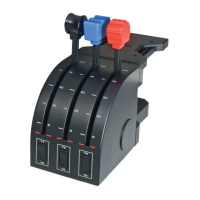
Detachable lever knobs for configuring throttle, flaps, mixture, or prop pitch combinations.
Smooth-travel levers equipped with a 0-position detent button.
Description of the three 2-way rocker switches on the quadrant.
Steps to download and install the latest drivers and software from the Saitek website.
Guide to installing the accompanying software, including options for the Profile Editor.
Information on checking for and downloading the latest driver and programming software updates.
Guidance on ensuring the controller is recognized and configured correctly within flight simulation games.
Explanation of what a Profile is and where pre-written Profiles can be found.
Steps on how to create personal Profiles using the Saitek Smart Technology programming software.
Initial steps for using the Saitek Smart Technology programming software, including assigning commands.
Accessing the initial tips screen for the ST software for guidance.
Link to download the latest drivers and software for the product from the Saitek website.
Link to download pre-made profiles for various games compatible with the controller.
Specific instructions for obtaining warranty service in North America and Europe.
Provides the URL for online technical support and troubleshooting resources.
 General
| Device type | Flight Sim |
|---|---|
| Buttons quantity | 6 |
| Connectivity technology | Wired |
| Minimum system requirements | USB 2.0 |
| Compatible operating systems | Windows Vista/XP |

 To Next Page