- 17 -
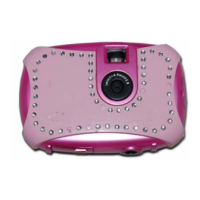
6. The “Get photos from camera” window will appear.
7. Click the “Browse” button to select a folder to place your photos and videos.
8. Click the “OK” button to proceed.
9. On the next screen, choose where you want to place your photos and video clips and click the
“Finish” button
to copy the photos to your computer.


 To Next Page