Installation Manual
MEMO
III-4
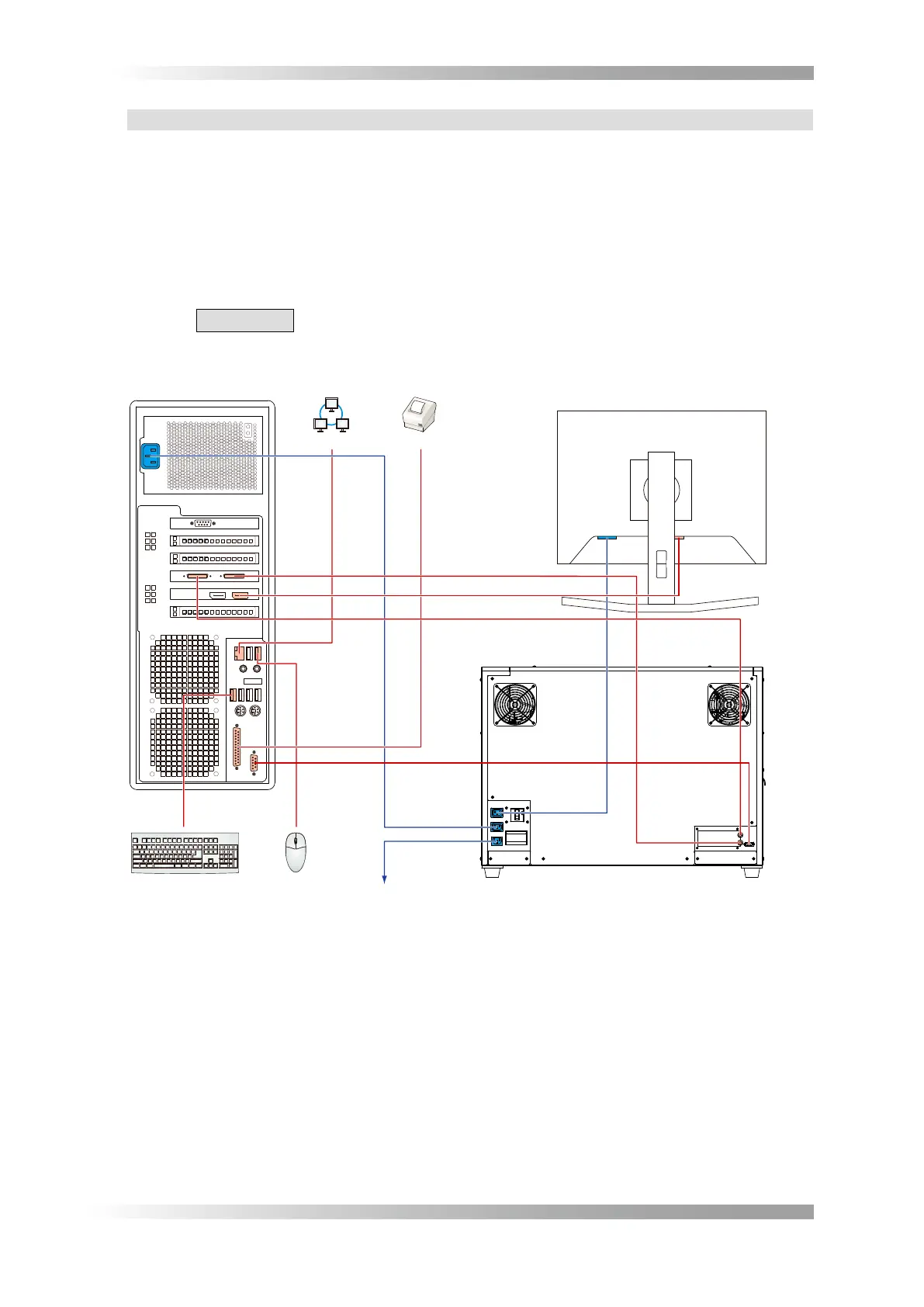
1.2.4 Devices Connection
ConnectthemouseandthekeyboardtothePC.
ConnecttheLCDmonitortothePCwithDisplayPort-DVIconversioncableandDVIcable.
ConnectthemainmachinetothePCwithpowersupplycordforthesystem,RS-232Ccable,and
cameralinkcable.
ConnectthemainmachinetothePCandtheLCDmonitorwithpowersupplycordforthesystem.
Connectthepowersupplycordtothemainmachine.
Insertconnectorsandconsentsrmlyandxthem.
Whenthemainmachineismovetootherplace,makesuretoheftbothsideofthe
mainmachine.
1
2
~
Mouse
Keyboard
Network
Optional Printer
CL3
CL4
CL1
CL2
Power Supply Cord
Power Supply Cord
LAN Cable
Printer Cable
RS-232C Cable
Camera Link Cable(CL4-CL2)
DVI Terminal
LCD Monitor Rear View
PC Rear View
Main Machine Rear View
Camera Link Cable(CL3-CL1)
DisplayPort
DisplayPort-DVI Conversion
Cable and DVI Cable
for the System
Power Supply Cord
for the System
DevicesConnectionFigure 1-3


 To Next Page