35
Selecting the signal source
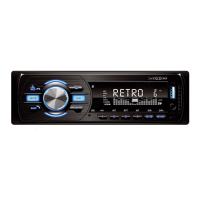
You can select the signal source you want to listen to besides the remote control with a short press of the front panel’s MOD (1.) button. Only active,
currently connected devices and features are available.
RADIO: FM radio, with 18 program area, RDS function
USB: MP3/WMA playback from USB
SD: MP3/WMA playback from SD memory card
AUX: Stereo audio input on the front panel, for 3.5 mm plug
BT (A2DP): Wireless music playback from mobile phone and giving call
• Do not hold the MOD button pressed for a longer period of time because the unit switches off.
• The source cannot be activated if it is not available. For example, if there is no storage device connected to the corresponding les (songs, photos,
movies). Or if no mobile phone is paired, the BT features will not work.
• When the power is turned on, the last played track will resume if during the device has not been removed.
• If you have an external device connected simultaneously with the USB and SD sockets, use the MOD button to select the desired source. Basically,
the use of the SD card is recommended because of its safer and more secure location.
• After the connection, the last inserted external unit’s program is played.
USE OF THE RADIO
After the unit is switched on the radio will turn on if it was being previously listened to – or the last played USB/SD/BT signal source has been removed.
Select radio function with the remote control’s MODE button or with the front panel’s MOD button.
Manual tuning and storing of the radio stations
Select with the front panel’s BND (10.) button one of the F1-F2-F3 bands. (recommended: F1) Tap shortly one of the (4.) or (11.) step buttons for tuning
up or down on the band. The SEARCH message is displayed and the tuning stops at the next, stronger station. If you have not searching for this, press
one of the stepper buttons again. Tune the weaker stations manually, with ne tuning. To do so, hold pressed one of the stepper buttons (4.) or (11.)
for 2 seconds, until the MANUAL message is displayed on the display. Then briey press the stepper buttons until the exact frequency of the station
you are searching for is displayed. The frequency goes up or down by 0.05 MHz at all presses. 2 seconds after waiting, it turns back to AUTO mode.
The station can be stored in the desired program area by pressing one of the number buttons 1…6 for 3 seconds. After recording, the selected storage
number appears at the far right of the display. Later the desired radio station can be choosen by shortly pressing the remote control’s or the front panel’s
1…6 buttons.
• Total of 18 FM and 12 AM radio stations can be stored at FM1-FM2-FM3 bands.
• In every case, 6-6 stations are storable. When storing e.g. you have choosen FM2 band 4. place for one station, then later you have to choose FM2
(BAND) and a button
Automatic tuning and storing
Hold pressed the BND (10.) button for 2 seconds to automatically locate and store radio stations that can be received in the place of use. On the display
SEARCH message is readable, while the device scans all the available frequencies. The better the reception conditions are, the more programs you
will nd. At the far right of the display the already stored stations are trackable.
• After the tuning has nished, a few seconds broadcasting will be audible from each stored radio station. The device steps alongside even the possibly
empty storages and stops at the rst xed radio station. Introduction function can be switch off by tapping any of the storage buttons.
• Take into consideration that unit will skip stations with weaker reception, and the stations may be stored in a different sequence what you have dened.
• Select manual tuning and storing in order to perform custom settings.
• If a memory location is already occupied, its contents will be deleted and the new station frequency will be stored.
• In case of receivers of suitable quality, STEREO (double circle) symbol lights up at the storage above the serial number. If reception is poor due to poor
reception conditions, select the MONO setting in the menu available with the rotary knob. In case of MONO setting, the STEREO symbol goes off.
If reception is poor due to low reception conditions, select MONO in the available menu. When it is set to MONO, the STEREO symbol goes out.
• In case of low reception conditions, turn off the LOC (local, strong reception) function and select DX mode in DX/LOC (distance/local reception) menu,
with the rotary knob. Reception may be weaker nearby high buildings or electrical equipment.
• If you use the device at a distance further from the location of the tuning - e.g. when traveling - you may have to search for the same radio station again
at another frequency. In different geographic areas the same programs are transmitted at different frequencies! This inconvenience can be avoided if
the listened station has RDS function and you turn on the RDS AF (alternative frequency) feature on your device. For details, refer to the RDS functions
below.
Selection of stored radio stations
On the remote control or the front panel select the desired band (e.g. F1) with BAND button, then with 1-6 storage number buttons, select the desired
show. Totally 18 FM radio station can be memorized.
FM RDS functions
The Radio Data System is used to transmit digital information during FM radio broadcasts. These textual information will be displayed on radio displays
if the broadcasting station and the receiver unit have this RDS function and it has been activated. Such information includes for example the name of the
radio station, the program type, etc., which varies depending on the station and the device. Apart from the display of textual information, extra services
are also generally available. They include the followings in case of this radio:
• PS – program service: displays the radio station’s brief name. Operates continuously as basic RDS function.
• AF – alternate frequency: if the current station can be received on another frequency in better quality, the unit automatically switches over to that
frequency; this is useful when travelling because the unit searches for a station broadcasting the same program with a stronger signal
• TP – Radio stations displaying TP marking, regularly broadcast trafc information. Operates continuously as basic RDS function.
• TA – the active TA function allows trafc and road information announcements to be heard. When an announcement is received the text TRAFFIC will
appear on the display. If music or a movie is being played back from a USB/microSD or Bluetooth source, it will pause during the announcement then
playback will continue.


 To Next Page
 Loading...