4
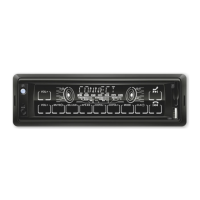
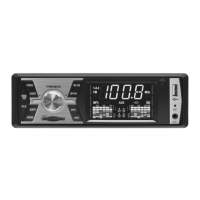
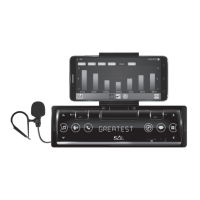
SMART CAR RADIO
VB 8000
WARNINGS
• Before using the product for the first time, please read the instructions for use below and retain them
for later reference. The original instructions were written in the Hungarian language. This appliance may
only be used by persons with impaired physical, sensory or mental capabilities, or lacking in experience
or knowledge, as well as children from the age of 8, if they are under supervision or have been given
instruction concerning use of the appliance and they have understood the hazards associated with
use. Children should not be allowed to play with the unit. Children may only clean or perform user
maintenance on the appliance under supervision. After unpacking the unit, confirm that it has not
been damaged during transit. Keep the packaging away from children if it contains plastic bags or other
potentially hazardous components.
• Read the instruction manual carefully before use and retain it for later reference.
• If necessary, consult a specialist to avoid damaging the device or the vehicle.
• Depending on the compressed files, the MP3 compression program used, and the quality of the USB/SD
memory, anomalies may occur during playback, which are not due to the unit malfunctioning.
• The playback of copy righted DRM files is not guaranteed!
• It is also possible to connect MP3/MP4 players using a USB cable but avoid connecting external hard
drives this way!
• Do not store any additional files on the USB/microSD device other than playable files, because they can
slow down or interfere playback.
• Do not store data storage in the vehicle if it is exposed to freezing or extremely high temperatures!
• While underway, do not do anything that distracts your attention from driving. Handling the player
while driving can result in accidents.
• Do not listen to the player too loud. Set a volume that allows you to hear external sounds while driving.
Extreme volumes can also cause permanent damage to your ears!
• Do not disassemble or remake the player, as that can cause fire, accidents, or electric shock. Incorrect
use or installation renders the warranty void.
• Only for use in cars with a 12 V battery and a negative ground. Using the player for any other purpose
can result in electric shock, damage, or fire. The player was designed exclusively for use in vehicles!
• Always use melting fuses with the proper values (10 A). When replacing a fuse, make sure that the
new fuse has the same nominal value as the one you are replacing. Using a different fuse can cause
fire or damage.
• Do not block the player’s cooling vents, as that can cause its circuits to overheat, resulting in fire. Install
the player properly to ensure adequate ventilation. The air vents around the edge must be left free.
• Make sure to connect the player correctly. Incorrect connections can result fire or other defaults.
• Prior to wiring/installation, be sure to remove the car battery’s negative terminal connection! This will
prevent any electric shock, short circuit or malfunction.
• While installing the player never cut through cables or damage their insulation. Doing so can result
in short circuit and fire!
• Before drilling holes or inserting screws into your vehicle’s body make sure you do not damage tubes or
electric wires on the other side of the cover.
• Do not connect to any electric systems of your vehicle that operate steering, brakes, or any other safety
function. Doing so can result in loss of control over the vehicle, and can cause fire.
• Do not install the player or its accessories in a location where they can prevent you from controlling the
vehicle safely, e.g., nearby the steering-wheel and the gear shift.
• Make sure that wires do not coil around neighboring objects. Arrange cables and wires in a way that
does not hinder you in driving. Wires that interfere with your movement or hang over the gear shift, the
brake etc. can be extremely dangerous.
• In case of any malfunction, turn of the player immediately, and consult your distributor. Many
malfunctions are very easy to detect (e.g., no sound, bad smell, smoke, an external object inside the
product etc.).
• Make sure that no external objects get into the USB socket or the memory card slot, as these can cause
fatal damage.
• Protect it from dust, damp, liquids, heat, moisture, frost and impact, as well as direct heat or sunlight!
• When leading the connection cables make sure that their insulation does not get damaged by any sharp
metal objects nearby!
• Do not connect any cables when the device is working.
• The warranty is not applicable to damage caused by irresponsible or improper installation or use! This
product must be installed by a specialist!
• A Somogyi Elektronic Kft. certifies that this radio equipment conforms to directive No. 2014/53/EU. Full
text of EU Declaration of Conformity is available on the following address: somogyi@somogyi.hu
• Due to continuous improvements, the technical data and design may change without any prior notice.
• The actual instruction manual can be downloaded from www.somogyi.hu website.
• We don’t take the responsibility for printing errors which may occur, and apologize for them.
INSTALLATION
This product is able to work with smart phones. Therefore, when preparing this description we assumed
that the user is in possession of general knowledge related to the management of smartphones. Setting
up and using this radio is very close to the use of phones and tablets. Some phone settings may require
deeper knowledge and English language skills. The first part of the description shows how to use the
device independently without connecting a telephone. The radio can be used as a full-value device
without the use of a telephone.
USING THE MOBILE HOLDER
Loosen the screw nut provided with the phone holder, so that the nut is still in place. Then place the
holder firmly on the ball and tighten the nut by hand. The holder can be tilted and rotated so that
you can use the phone horizontally or vertically. If the instrument panel above the radio contains
protruding switches or other devices, it is possible to extend the holder (max. 35 mm) to provide
space for the vehicle equipment. To do this, loosen the two knurled metal screws on the top of the
radio, then pull out the holder and reattach it. If you need, you can move your phone away from the
radio to another holder - the wireless connection will still work between them.
• When using the phone in a horizontal position, it is recommended that the sliding, spring-loaded side
of the phone holder be positioned downwards for a more comfortable, one-handed phone insertion.
• Not recommended, but you can remove the entire phone holder from the radio if necessary by
unscrewing the two metal screws completely. Then two small metal nuts may fall out of the holder, take
care of it! A flat compartment will be visible on the front of the radio at the console location.
FACTORY RESET
After any event that the power supply is interrupted or the device (including its display) malfunctions,
it is necessary to clear the microprocessor data. To do this, press the RST (RESET) button on the bottom
right of the front panel with a thin, pointed object (such as a paper clip) for 3 seconds. The device
switches off and returns to the factory default. The previous settings must be repeated. This operation
must be performed after installation, before the first switch-on, and if the battery is replaced in the
vehicle or if a telephone connection problem requires it.
ATTENTION! DO NOT REACH INTO THE OPENINGS NEXT TO THE RST BUTTON BECAUSE IT CAN CAUSE
FAILURE!
ON/OFF SWITCH
If the cable is connected properly, the current time will be shown in blue when it is switched off. To
turn on, briefly touch the
button, or any touch button on the front panel. After the WELCOME
greeting, it switches to the last listened source - provided the external storage device has not been
removed or the mobile connection has not been disconnected in the meantime. In BT mode, you may
need to reconnect your phone. The volume will be adjusted when you turn it off. To turn off, touch the
same
button for 3 seconds, and turn off after the GOOD-BYE message.
• Experience the required duration of touches and the correct position of your fingertips. The
effectiveness of the touches may be affected by the extreme temperatures of your fingers or the
device, as well as condensation on the buttons or sweat on your hands. Touch the buttons on the
largest possible area with a full, dry fingertip. If you are disturbed by the beep, you can turn it off in
the SETTINGS / SYSTEM menu.
• As voltage surges may occur when starting and stopping the engine of some vehicles, do not switch
on the appliance until the engine is running. Switch off before stopping the engine.
SETTING THE VOLUME, THE TONE AND THE CLOCK
Use it briefly by tapping the
buttons repeatedly to adjust the volume. You can follow the
current level between VOL00…VOL63 on the display. Touch and hold these two buttons (3 sec) to
access other functions. : MUTE and : CLOCK (short time display)
Setting the exact time: after the clock is displayed, briefly tap the button again and the number
of hours will start flashing. To scroll, use the buttons repeatedly, touching briefly, then tap to
button to switch to the minutes, which you can also scroll with the buttons. At the end,
wait a few seconds and the set time will be recorded automatically.
• The speakers can be unmuted by touching briefly any button.
• If you wait for more than a few seconds during setup, the unit exits the menu.
• You usually do not need to set the clock, because after connecting your phone to BT, the current time
will be synchronize with SMARTLINK.
• The clock displayed when it is off is always blue, regardless of the custom display color set after it is
turned on.
• Tone control is possible in three ways (EQ, high/deep, loudness), see the SETUP section for more details.
• If you use more than one tone setting mode at the same time, they may affect each other's operation
and result in poor sounding. When listening at a higher volume, do not emphasize the bass and treble
significantly, as this may lead to distortion.
FEATURES
• Swivel, tiltable and pull-out phone holder • Holder size: 95 mm • More functions available with phone app • The phone will be an extended display of the radio • Quick buttons (voice as-
sistant, phone, navigation, message) • Full-value radio without telephone • FM radio / BT / USB / microSD • Acrylic glass front panel with touch buttons • 7-color, textual dot-matrix display
• 7-color button-backlight • Wireless BT connection • Adjustable sensitivity external microphone (~3 m) • Ringtone and conversation through car speakers • Displaying the caller’s phone
number • ID3 Tag - textual track information • Clock on the display, even in switched-off state • Double USB socket with fast charging (3.1 A max.) • High, low, loudness and EQ sounding
settings • 4x45 W Hi-Fi speaker output • 4 x RCA socket amplifier, to connect subwoofer * For iPhone iOS10.3 and Android 5.0 or newer mobile phones, connected wirelessly; after installing
an English language application (the available services may depend on the mobile phone, the settings and the region)


 To Next Page
 Loading...