18
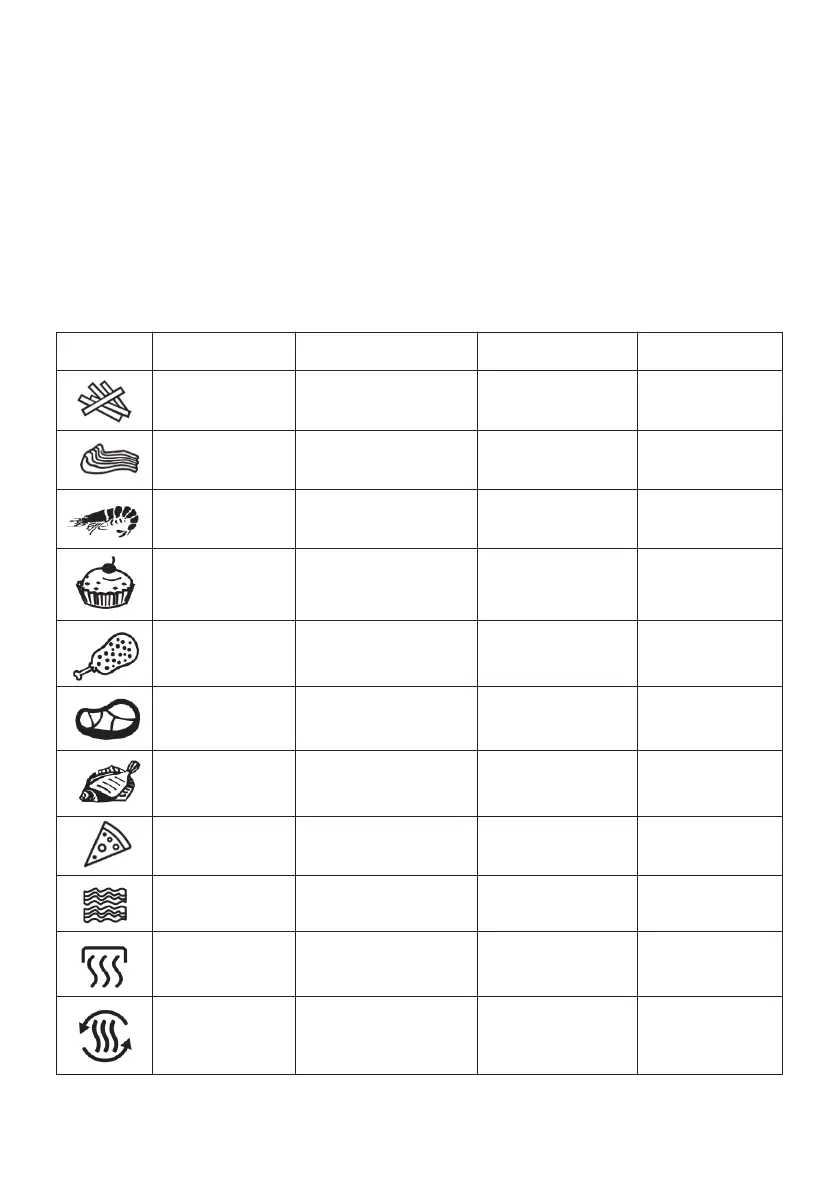
Icons Preset Max Amount (g) Time Temperature
Chips
Chops
Prawns
Baking
Drumsticks
Steaks
Fish
Pizza
Bacon
Heating
Defrost
1000g
800g
600g
1200g
900g
800g
800g
600g
200g
30 minutes
15 minutes
20 minutes
25 minutes
20 minutes
20 minutes
25 minutes
15 minutes
12 minutes
20 minutes
15 minutes
200°C
200°C
200°C
180°C
200°C
200°C
170°C
180°C
200°C
150°C
50°C
2. Basket Buttons
• Touch basket 1 or 2 to light up the control basketel for setting.
3. Preset Functions
• The preset functions will help you to start cooking efficiently.
• Select any of the icons, this will automatically set the Time and Temperature to a default
setting for the selected food type. You can over-ride the default presets with time and tem-
perature buttons. The choose icon will keep blinking until the cooking process has started.
• The preset settings are as follows:
Note: use the below table for reference only. Actual cooking time and temperature may
have to be adjusted depending on the food quantity or size.


 To Next Page