19
Note: Turn or shake the ingredients once during frying if needed.
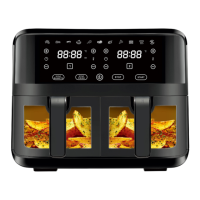
4. Time Setting Buttons
• Use the time control button for the cooking time of the corresponding basket setting.
• Time control buttons enable you to select exact cooking time by minute. You can increase
or decrease time by 1 minute from 1-60 minutes.
• You can touch the time setting buttons to set the time before or during cooking.
• Press and hold the time setting buttons for faster increments of the time.
5. Temperature Setting Buttons
• Use the temperature control button for the cooking temperature of the corresponding
basket setting.
• Temperature control buttons enable you to raise or lower cooking temperature by 5°C star-
ting from 80°C to 200°C under normal operating conditions, and 40°C to 70°C under preset
function on defrost.
• You can touch the temperature setting buttons to set the temperature before or during
cooking.
• Press and hold the temperature setting buttons for faster increments of the temperature.
6. Digital Display
• The Digital Display shows the time and temperature in alternate turns.
• It shows set time and temperature during setting and the remaining time and cooking
temperature during cooking.
• Check the correct time and temperature for the corresponding basket.
7. SYNC BASKEST
• To match settings across both baskets (both baskets fry at the same temperature and for
the same duration) press the sync basket button.
8. SYNC Finish
• To stop matching settings across both baskets, press the SYNC Finish button. The frying
process of both baskets are stopped simultaneously.
COOKING WITH YOUR AIR FRYER
1. Connect the supply cord plug into a mains power outlet socket. The appliance is now in
standby mode.
2. Place the ingredients into the baskets.
Do not fill more than 2kg food in each basket.
3. Slide the baskets back into the appliance.
CAUTION! Do not touch the baskets during use or immediately after use, as the baskets
gets very hot during and after cooking. Only hold by the handle.
4. Touch the power button. Select the basket to set the cooking process.
5. Select a preset function or set the time and temperature manually for the baskets one by
one. Then touch the start buttons to start cooking.
6. For cooking some ingredients, it may require turning the contents in the basket or
adding a small quantity of oil during the cooking process to ensure even cooking and
avoid charring of ingredients positioned at the top of the basket. When this is needed,


 To Next Page
 Loading...