OPERATION
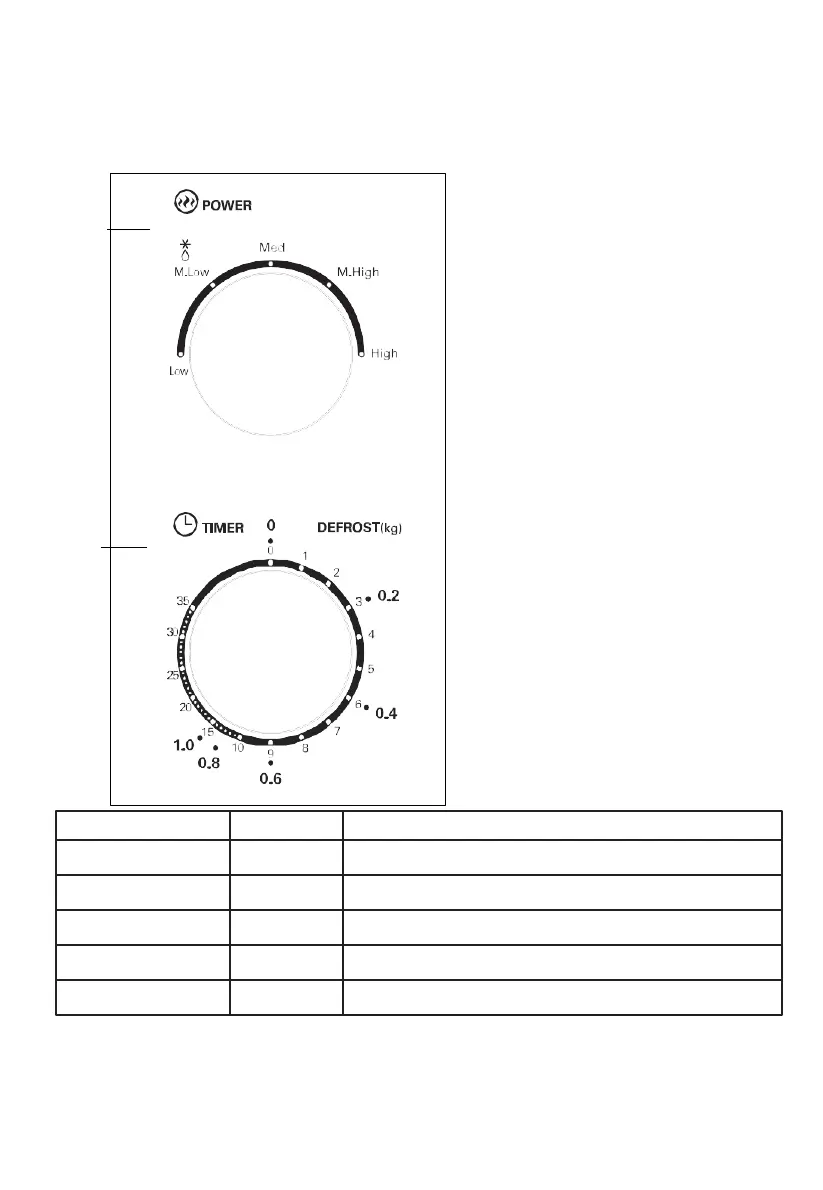
Control Panel and Features
Operation Instructions
Power
Timer
1.
To set cooking power by turning the
power knob to desired level.
2.
To set the time of cooking by turning
the timer knob to desired time per
your food cooking guide.
3.
The microwave oven will
automatically start cooking after
power level and time are set.
4.
After the cooking time is up, the unit
will "Dong" to stop.
5.
If the unit is not in use, always set
time to "0".
Function/Power
Low
Output
17% micro.
Soften ice cream
Application
Med. Low (Defrost)
Med.
Med. High
High
33% micro.
55% micro.
77% micro.
100% micro.
Soup stew, soften butter or defrost
Stew, fish
Rice, fish, chicken, ground meat
Reheat, milk, boil water, vegetables, beverage
Notice: When removing food from the oven, please ensure that the oven
power is switched off by turning the timer switch to 0 (zero).
Failure to do so, and operating the microwave oven without food in
it, can result in overheating and damage to the magnetron.


 To Next Page