English - 27 -
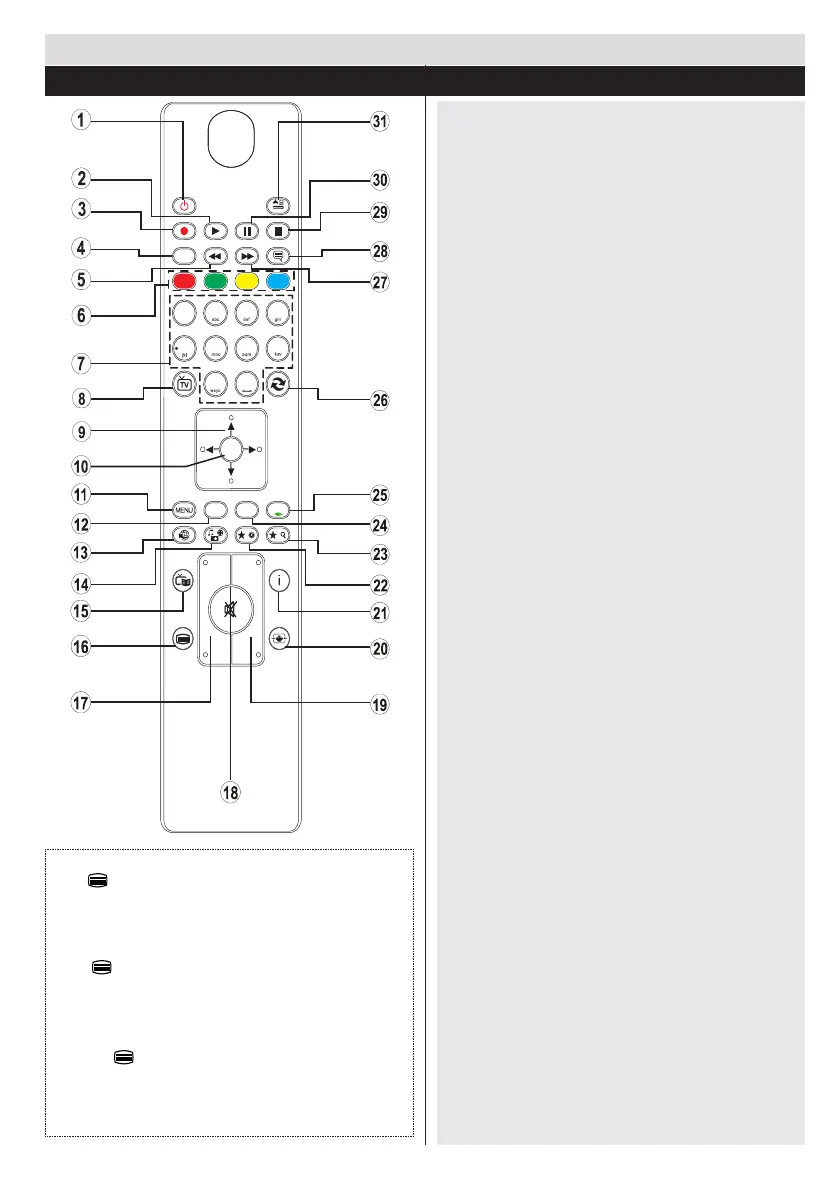
1. Standby / On
2. Play (in media browser mode)
3. No function
4. Mono-Stereo Dual I-II / Current language
5. Fast rewind (in media browser mode)
6. Colored buttons
7. Numeric buttons
8. Channel list
9. Navigational buttons
10. Ok / Conrm
11. Menu on / off
12. Return / back
13. No function
14. Media browser
15. Electronic programme guide
16. Teletext - Mix
17. Volume up / down
18. Mute
19. Programme up / down
20. Image size
21. Info / Reveal (in TXT mode)
22. My button 1
23. My button 2
24. Exit
25. Quick menu
26. Previous programme / Now ( in EPG mode)
27. Fast forward (in media browser mode)
28. Subtitle on-off / Subtitle (in media browser
mode)
29. Stop (in media browser mode)
30. Pause (in media browser mode)
31. AV / Source
Using My button 1
Press MY BUTTON 1 for ve seconds when
on a desired source, channel or link, until the
“MY BUTTON IS SET” message is displayed on
the screen. This conrms that the selected MY
BUTTON is now associated with the selected
function. Using My button 2
Press MY BUTTON 2 for ve seconds when
on a desired source, channel or link, until the
“MY BUTTON IS SET” message is displayed on
the screen. This conrms that the selected MY
BUTTON is now associated with the selected
function.
Teletext
Press button to enter. Press again to activate mix
mode. Press once more to exit. Follow the instructions
displayed on digital teletext screen.
Digital Teletext (for UK only)
Press button to view digital teletext information.
Operate it with the coloured buttons, cursor buttons
and the OK button. The operation method may differ
depending on the contents of the digital teletext. Follow
the instructions displayed on the digital teletext screen.
When the button is pressed again, the TV returns to
television broadcast.
Getting Started
Remote Control
4
7
8
9
P+
P-
V+
V-
1
.,/@
2
3
5
6
0
OK
Q.MENU
EXIT
BACK
LANG.
SOURCE
2
/
1
/


 To Next Page