2 3
SAFETY AND CAUTION
To ensure that the device provides you with long-term satisfaction and enjoyment, please observe the
following instructions.
This device is connected to the mains with the AC cord. To completely disconnect the power input,
pull out the mains plug of the device from the mains.
The device and the mains plug should not be obstructed or should be easily accessed during
intended use.
It is recommended to avoid using or storing the device at extremes of temperature. Only use the
device in moderate climates.
The device and the mains plug should not be exposed to water (dripping or splashing), steam, heat
(heater or direct sunlight) and sand.
No objects filled with liquids such as vases, and no naked flame sources such as lighted candles
shall be placed on the device.
It is recommended minimum 10cm distances around the device for sufficient ventilations.
The ventilation should not be impeded by covering the ventilation openings with items such as
newspaper, tablecloths, curtains etc.
In case of malfunctions occur due to electrostatic discharge; reset the unit by reconnecting the
power source to resume normal functions.
OVERVIEW
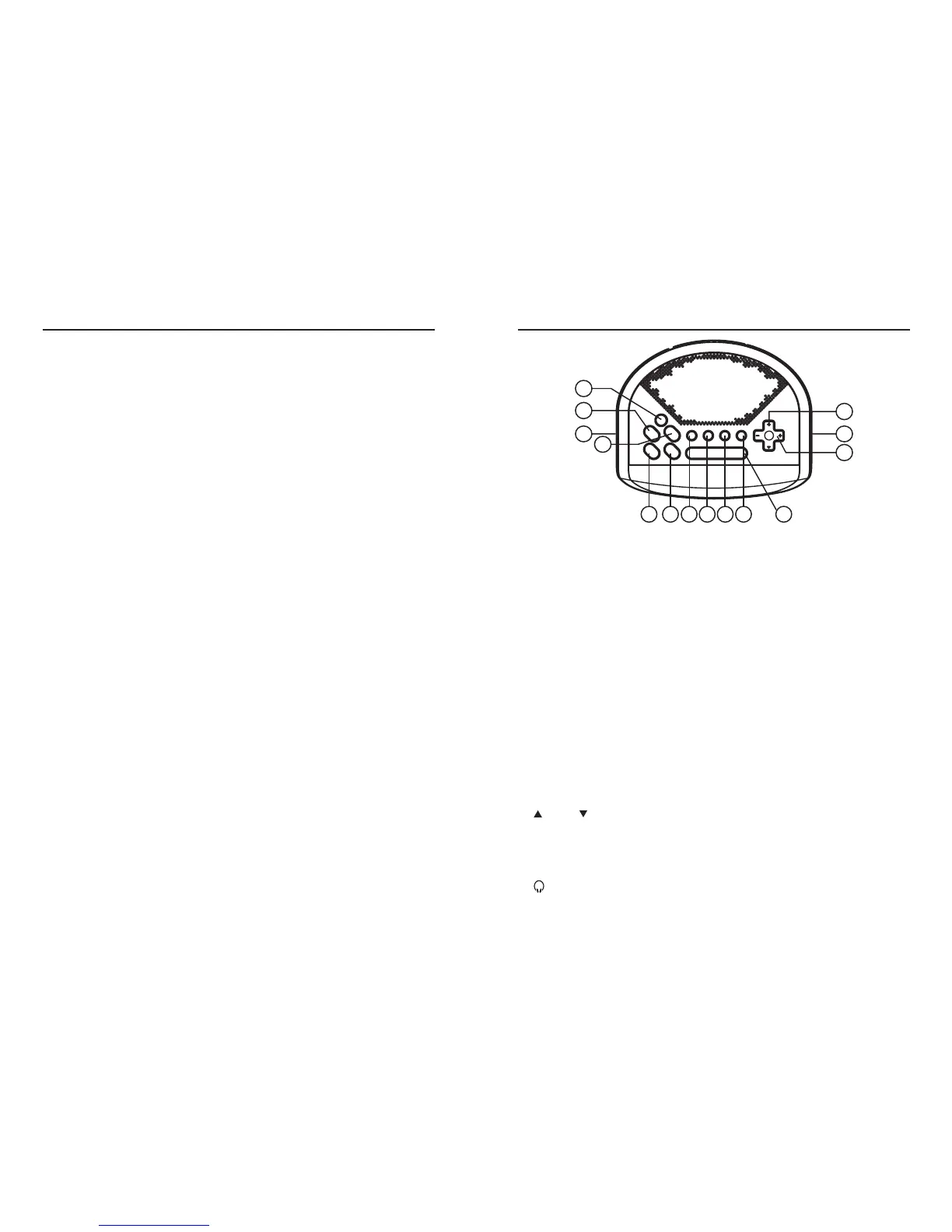
Keys and Controls
1. ON/OFF Switches the device on and off.
2. SLEEP/NAP Activates the setting for the sleep timer.
Activates the setting for the reminder timer.
3. MEM/TIME Saves radio stations to presets.
Activates the time setting.
4. ALARM 1 Activates the setting for alarm 1.
5. ALARM 2 Activates the setting for alarm 2.
6. DISPLAY Switches the display between the radio frequency/station name and
the time with week day.
In standby mode, views the alarm times.
7. COLOUR Switches between eight different colours for the display backlight.
8. DIMMER Adjusts the brightness of the display to one of three levels or OFF.
9. RDS/WEC Switches between different RDS station information bulletins in radio
mode.
Switches the alarm standby off for the weekend.
10. SNOOZE Interrupts the alarm function.
11. TUNING For tuning the radio stations manually.
Press and hold to start the automatic station search.
12.
-
PROG + Selects the next or previous preset.
13. VOLUME Control dial for volume control.
14.
Headphone jack for connecting a headphone or earphone with a jack
plug (Ø3.5mm) on the side of the device.
10
74 5 6 98
12
11
1
2
14 13
3



 To Next Page