- 5 -
Remote control (batteries installation)
Battery Replacement for the Remote Control
BA+ BA-
VOL+
VOL-
INPUT
TR+
MUSIC MOVIE
DEFAULT
TV
TR- PAIR
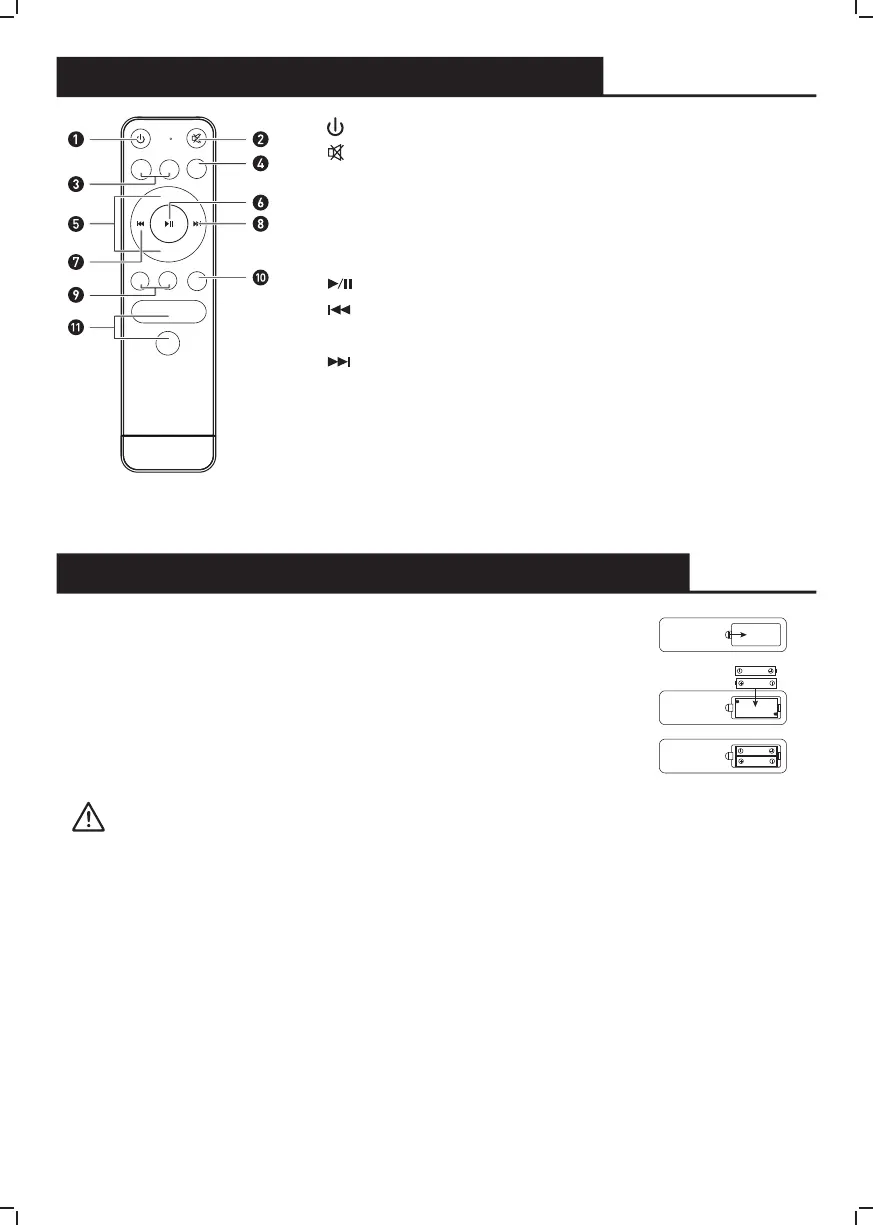
1. button ---- Press the unit between On and Standby mode.
2. button ---- Press to mute the sound. Press again resume.
3. BASS+/BASS- buttons ---- (It can adjust the Bass volume in
mode of DEFAULT.)
4. INPUT button ---- Select the modes.
5. VOL +/- buttons ---- Adjust the volume.
6. button ---- Play/pause/resume playback in Bluetooth mode.
7. button ---- Skip backwards to the beginning of the track or to
the previous track in Bluetooth mode.
8. button ---- Skip forwards to the next track in Bluetooth mode.
9. Treble+/Treble- buttons ---- (It can adjust the Treble volume in
mode of DEFAULT.)
10. BT PAIR button ---- Disconnect the bluetooth device.
11. Music/TV/Movie/VOICE/DEFAULT buttons
---- Press the button to select a desired music mode: MUSIC,
MOVIE,VOICE, DEFAULT.
1. Press and slide the back cover to open the battery compartment.
2. Insert two "AAA" size batteries (supplied). Make sure the (+) and
(-) ends of the batteries match (+) and (-) ends indicated in the
battery compartment.
3. Close the battery compartment cover.
Handling the battery
• Improper of incorrect use of batteries may cause corrosion or battery leakage which can cause fire
personal injury or damage to property.
• We recommend to use the battery type indicated in this manual.
• Don't install or mix new and old batteries OR mix different types of batteries.
• Don't dispose used batteries as a kind of domestic waste. Dispose of them accords to local regulations.
Handling the Remote Control
• Don't drop the remote control.
• Don't spill water or any liquid on the remote control.
• Don't place the remote control on a wet object or near any source of excessive heat.
• Take out the batteries from the remote control if it is not necessary to use for a long period of time.
Otherwise, they may have corrosion and leakage which incurs physical injury, property damage or fire
etc.


 To Next Page