02 03
Installing your Wi-Fi Box Extender
Selecting the location
Installation
Dos
Don’ts
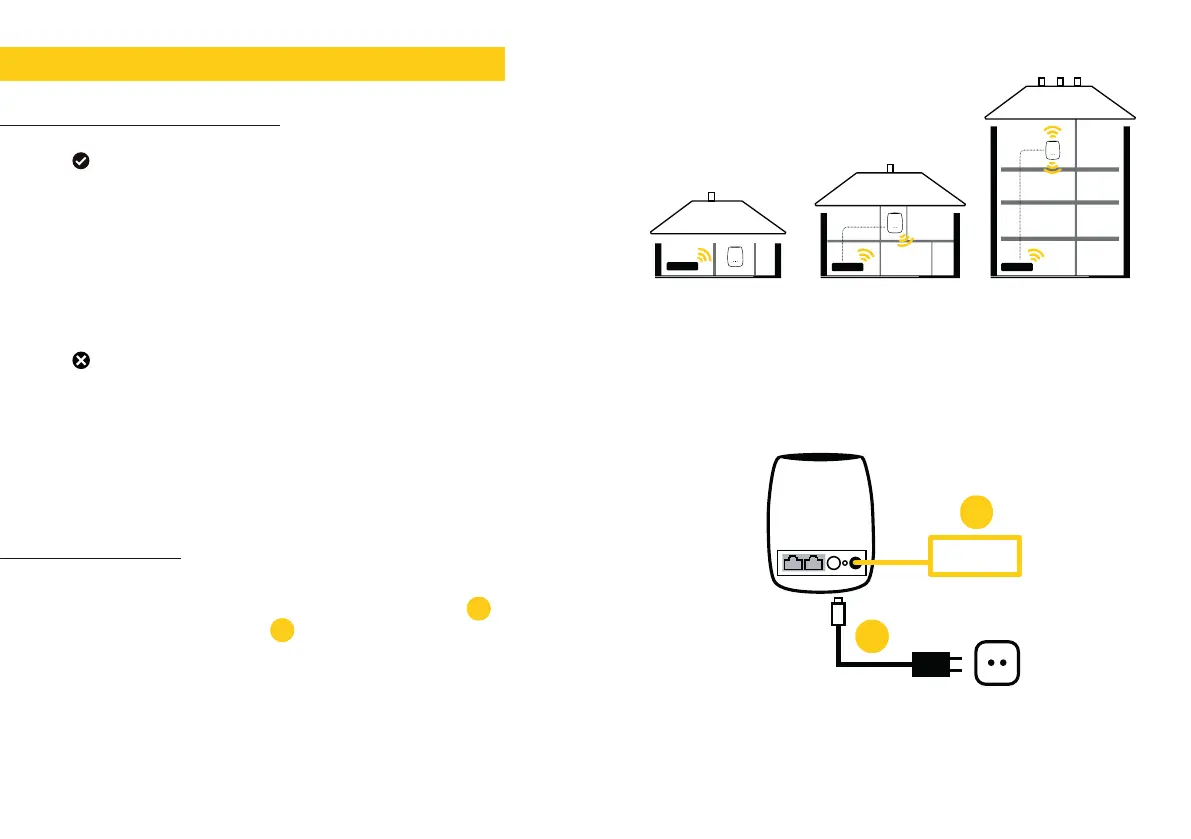
• Position it halfway between a hard-to-reach Wi-Fi area and
the modem.
• Place it in an area where the connection LED is green
(fig.1)
• Place it half way (between 1 m and 1.50 m) on a high piece
of furniture or on a shelf.
• Place it in a confined/covered location.
• Place it on a soft (couch or carpet) or delicate surface.
• Place it outside.
• Place it in an area where the connection LED is red or off.
(see fig.7 page 09)
• Plug the power adaptor into the power socket and plug
the cable in to the power port of the Wi-Fi Box
• Turn the Wi-Fi Box on
If you are setting up more than one Wi-Fi Box simply repeat
these steps for each Box.
fig.1 - location
1.
2.
PRESS
WiFi Box
fig.2 - installation
1
2.
1.


 To Next Page