GB
7
GB
6
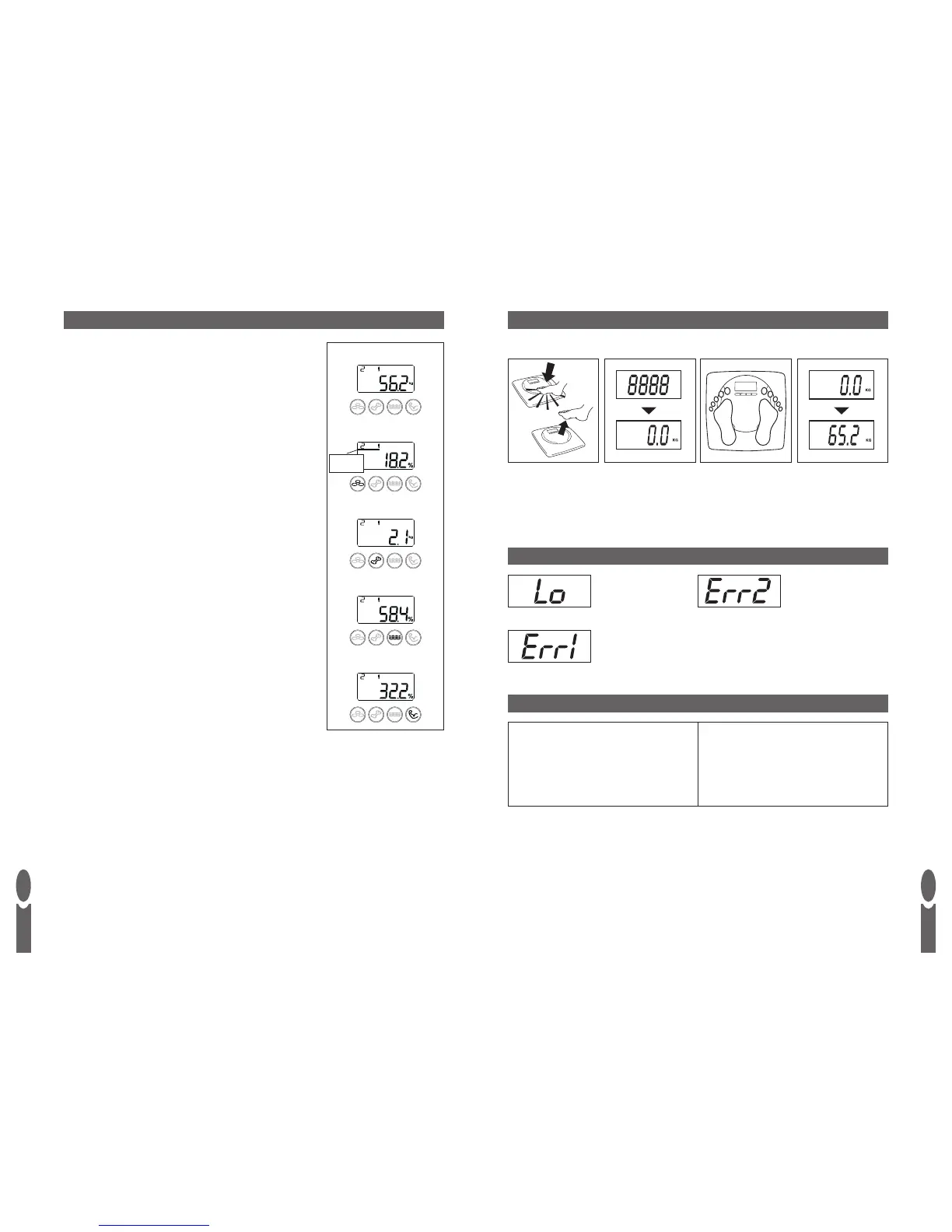
a) Press the centre of
the platform firmly to
activate the scale.
b) When ‘8888’ appears,
remove foot from
platform and WAIT
for display to show
a zero reading.
c) When zero is
displayed, step onto
the platform and
stand still.
d) After 2-3 seconds,
your weight will
be displayed.
Position the scale on a flat level surface.
WEIGHT READING ONLY
‘Lo’ = replace battery.
‘Err2’ = out of body
fat range or poor
feet contact.
WARNING INDICATORS
TECHNICAL SPECIFICATION
100 cm - 220 cm
3’3” - 7’2”
16 - 80 years
Male/Female/Athlete
10 user memory
d = 0.1 % body fat
d = 0.1 % body water
d = 0.1 % muscle mass
d = 0.1kg / 0.2lb bone mass
WEIGHT & BODY FAT READINGS
Position the scale on a flat level surface.
1) Press the
SET button.
2) Select your user number by pressing the ▲ or ▼ buttons.
3) WAIT while the display reconfirms your personal data then
shows a zero reading.
4) When zero is displayed,WITH BARE FEET, step onto the
platform and stand still. Ensure your feet are in good contact
with the 4 metal pads on the platform.
5) After 2-3 seconds, your weight will be displayed followed by
your body fat percentage, bone mass, total body water
percentage and muscle mass percentage.
Note:
When the body fat reading is displayed a horizontal bar will appear
above the body fat reading.This corresponds to the low, normal and
high printed above the display.This gives a general guide to your
body fat category - low, normal or high.Also refer to the normal
body fat tables on page 3.
Tip:
Instead of steps 1 & 2 you can select your user number as follows:
Press and hold the platform with your foot.After 2 seconds the
user number will appear in the centre of the display and begin to
cycle. Release your foot when your user number is displayed.
‘Err1’ = overload.
Weight
Body Fat
B
ODY FAT
C
ATEGORY
I
NDICAT
OR
Bone Mass
Body Water
Muscle Mass


 To Next Page