The Salter PT-1590 Indoor Bike Stone is a fitness equipment designed for home use, offering a comprehensive workout experience. This owner's manual provides essential information for assembly, safe operation, usage, and maintenance of the indoor bike.
Function Description:
The PT-1590 Indoor Bike Stone is an exercise machine that simulates the experience of cycling. It allows users to engage in cardiovascular workouts, helping to improve physical strength, flexibility, and overall fitness. The bike is equipped with a computer monitor that displays various workout metrics, enabling users to track their progress and tailor their exercise routines. The primary functions displayed on the main screen include RPM, Speed, Distance, and Calories burned. The bike features an adjustable resistance system, allowing users to control the intensity of their workout. An emergency stop function is also integrated for immediate cessation of the flywheel's movement.
Important Technical Specifications:
- Maximum User Weight: The equipment is designed for individuals weighing no more than 120 kg.
- Computer Functions:
- SCAN: Automatically cycles through RPM, Speed, Distance, and Calories on the main screen.
- TIME: Displays elapsed workout time from 0:00 to 99:59 in one-second intervals.
- SPEED: Shows workout speed in KM/MILE per hour, ranging from 0.0 to 999.9.
- RPM: Displays pedal cadence.
- DISTANCE: Accumulative distance traveled during each workout, up to 99.99 KM/MILE.
- CALORIES: Estimates cumulative calories burned during the workout.
- Batteries: The computer requires 1.5V UM-3 or AA batteries (not included).
- Assembly Components: The manual details a comprehensive parts list including various bolts, nuts, washers, knobs, and specific components like the carriage bolt (M8x55), spring knob (M16x22), L-knob (M10x20), and screwdriver.
- Dimensions (based on parts drawing): While specific overall dimensions are not provided, the parts drawing illustrates a robust frame structure with components like the front and rear stabilizers, main frame, seat post, handlebar post, flywheel, and pedals.
Usage Features:
- Assembly: The manual provides step-by-step assembly instructions, recommending two people for the process to ensure correct and safe setup. Key steps involve attaching the front and rear stabilizers, securing the seat and handlebar posts, and installing the pedals.
- Adjustability:
- Seat Adjustment: The seat height and horizontal position can be adjusted using the spring knob (No. 11) and L-knob (No. 25) respectively, allowing users to find a comfortable and ergonomically correct riding position.
- Handlebar Adjustment: The handlebar height can be adjusted using an L-knob (No. 25) and washer (No. 46) to suit different user preferences.
- Exercise Intensity Adjustment: The bike features a knob tension control. Turning it clockwise increases the intensity level, while turning it counter-clockwise decreases it.
- Computer Operation:
- Power On: The console powers on by pressing the button.
- Clear Data: Pressing the button for 2 seconds clears all exercise values.
- Stop SCAN Function: Pressing the button during exercise stops the SCAN function, allowing users to view their preferred data display.
- Emergency Stop: A critical safety feature, pressing down the intensity adjustment knob immediately stops the flywheel.
- Footwear: Users are advised to always wear appropriate footwear (running, walking, or cross-training shoes) and never exercise in bare feet or socks.
- Balance: Users should maintain balance carefully when mounting, dismounting, or using the equipment to prevent falls and injuries.
Maintenance Features:
- Cleaning:
- Regularly dry and clean areas exposed to perspiration using towels to prevent sweat from damaging the equipment.
- Keep the equipment casing and its various elements clean to prevent dust and dirt from causing problems in the gears and internal bearings.
- Component Inspection: Inspect the equipment for worn or loose components before each use. Any loose or worn parts must be replaced or repaired before the equipment is used again.
- Hardware Tightness: Check all visible hardware (bolts, screws, washers) every two weeks to ensure they are tight.
- Battery Replacement: Replace the computer batteries (1.5V UM-3 or AA) if the display functions improperly.
- Environmental Disposal: The product is marked with a waste bin symbol, indicating that it should not be disposed of with domestic waste. It must be taken to a proper recycling point to promote reuse, recycling, and environmental conservation.
- Warranty: Users are advised to consult warranty conditions on www.salter.es and to provide the equipment's serial number for any warranty repairs.
- Technical Service: Salter offers an online technical service accessible via WWW.SALTER.ES for customer support.

 Need help?
 General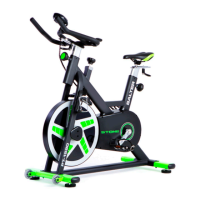

 To Next Page