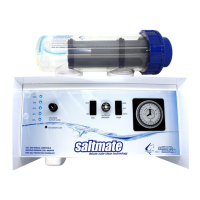
LOOKING AFTER YOUR SALTMATE POWER PACK
Do not carry out any maintenance or repair work other than that shown in this operang manual
or advised by Saltmate, and only use parts recommended by Saltmate. If you do not it could
invalidate your warranty.
• Do not store pool chemicals in a conned space with your Saltmate. The fumes can breach
cooling vents and damage vital components.
• Small insects can also enter cooling vents causing damage to vital components. To avoid this
happening, rounely spray insect repellent to the surfaces around the power pack.
NO WATER FLOW
Saltmate cells contain a sensor that checks for proper water ow and for safety purposes if
adequate water ow is not sensed your Saltmate will cease to produce chlorine unl the
problem is resolved.
If this situaon occurs, the chlorine output indicator will drop to zero, while RP models also have
a no ow indicator light which will light up if proper water ow is not detected and turn o once
the problem has been resolved.
SETTINGS FOR POOL OPERATIONS
The following is a guide to seng your Saltmate to perform various pool operaons.
OPERATION 240V SUPPLY CELL SWITCH PUMP SWITCH
Run pump & chlorinator via mer ON ON AUTO
Run pump & chlorinator manually ON ON MAN
Vacuum or backwash ON OFF* MAN
Clean cell or cartridge lter
OFF & REMOVE PLUG
OFF* OFF
* When turning cell switch to the ‘o’ posion for backwashing, cleaning cartridge or cleaning
cell REMEMBER to turn cell back to the ‘on’ posion when resuming normal ltraon operaon.
Similarly if you have turned any valves to the ‘closed’ posion to clean the cell or the cartridge
lter remember to turn them back to the ‘open’ posion before resuming water ow.
Operang Your Saltmate



 To Next Page