FPCN10A WITH APP Operation manual
7. APP (Mapping software tool in mobile) Setting
After pressing MENU into function menu and choice APP, press OK key then you can select
on/off through by ▲or ▼, then press OK key again press the EXIT key to give up setting
The Smartphone should download Samcom Talk about App, the app shall provide functionally
to control radio, include radio settings change channel
The App shall provide message functionality include send/receive text message
The App shall provide location functionality include display generic map (like google map) with
own/friends coordinates/trail and geofencing ( out of boundary alert)
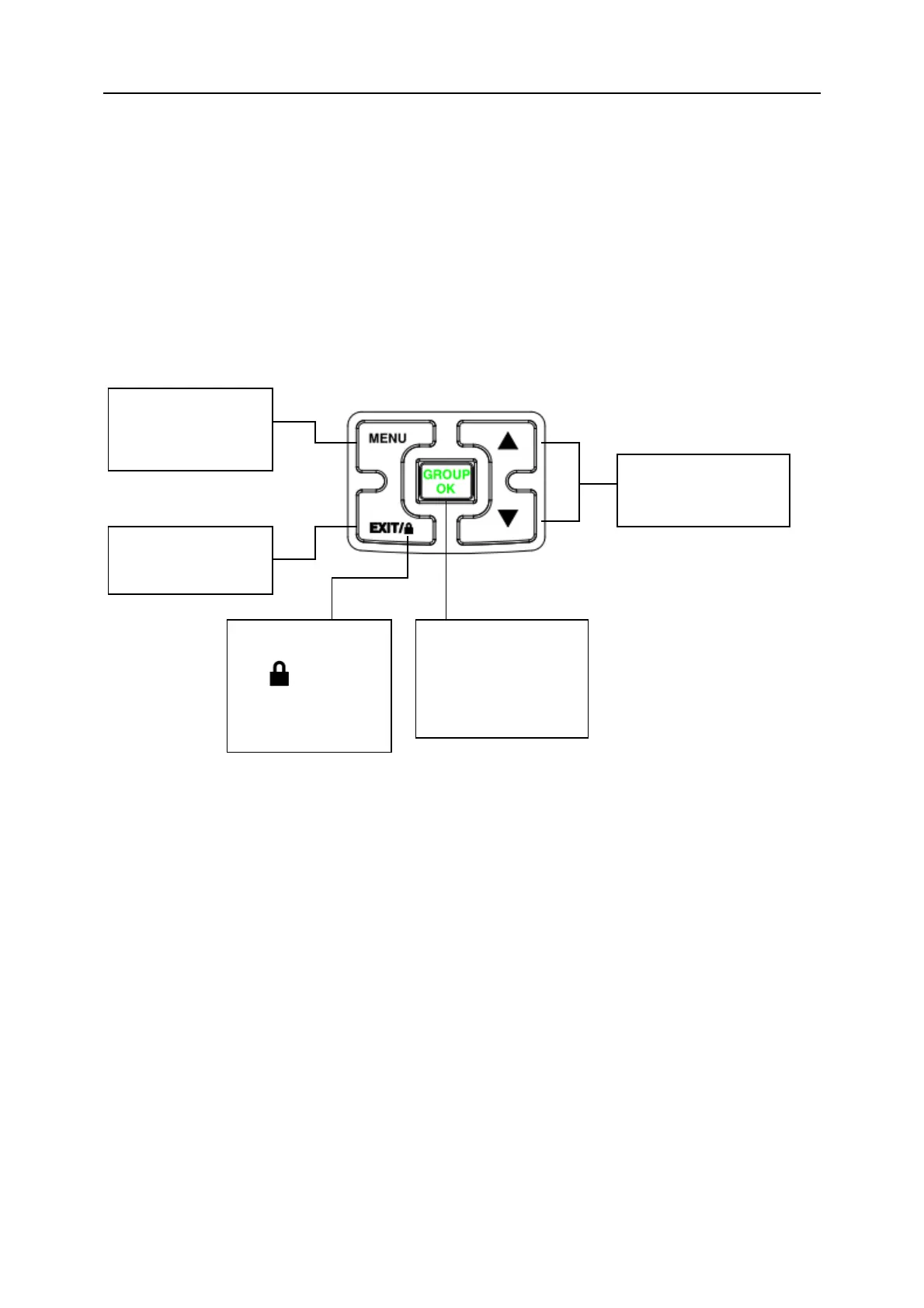
D、Key
E、Get Acquaint
Press the MENU
key , enter into the
menu selecting mode
Press the EXIT key to
exit setting.
Press ▲ or ▼
key choice the function.
Keep press 3 seconds
the
key to lock
/open the key
Press the GROUP key
to speak to all channel ,
press the OK key to
confirm the function


 To Next Page