EasyManua.ls Logo

Samson C01U - C01 U Operational Tips and Techniques; Setting Signal Level and Gain; Preventing P-Popping Sounds; C01 U Stand Mounting Instructions

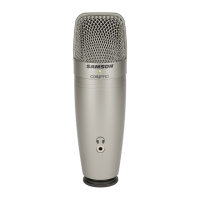
Samson C01U
74 pages
Print Icon
To Next Page IconTo Next Page
To Previous Page IconTo Previous Page
Loading...
SAMSON’
pares
Operating
the
CO1U
Setting
Up
the
Signal
Level
In
your
digital
audio
workstation
(DAW),
create
a
mono
audio
track,
and
set
it
to
the
Left
channel
of
the
CO1U
(the
Right
channel
should
be
ignored).
Arm
the
track
for
recording,
and
adjust
the
input
gain
by
using
the
software
control
in
your
com-
puter's
operating
system
and/or
digital
audio
workstation.
To
set
a
good
level
on
the
mic,
set
the
CO1U
up
in
front
of
the
desired
sound
source
and
slowly
raise
the
input
trim
control
until
you
see
the
CLIP
or
Peak
indicator
in
your
DAW
light
up.
Then,
turn
the
input
trim
control
down
until
the
indicator
does
not
light
any
more.
P-Popping
P-Popping
is
that
annoying
pop
that
you
can
get
when
the
microphone
diaphragm
gets
a
blast
of
air
from
a
vocalist
pronouncing
words
with
the
letter
“P”
included.
There
are
a
few
ways
to
deal
with
the
problem
including
using
an
external
pop
filter.
Some
famous
engineers
have
relied
on
an
old
nylon
stocking
over
a
bent
clothes
hanger,
which
actually
works
very
well.
You
can
also
try
placing
the
micro-
phone
slightly
off
axis
(on
a
slight
angle)
from
the
vocalist.
This
can
often
solve
the
problem
without
using
an
external
pop
filter.
Stand
Mounting
the
CO1U
The
CO1U
can
be
mounted
to
a
standard
microphone
stand
using
the
included
swivel
mount
adapter.
If
you
are
using
a
U.S.
5/8”
mic
stand,
you
will
need
to
remove,
by
unscrewing,
the
Euro
stand
adapter.
Simply
screw
the
swivel
adapter
on
to
your
mic
stand
or
boom
arm.
Now,
loosen
the
thumbscrew
and
adjust
the
microphone
to
the
desired
angle.
Once
set,
tighten
the
thumbscrew
to
secure
the
microphone
in
place.

Related product manuals