EasyManua.ls Logo

Samson Media 6 - User Manual

Samson Media 6
34 pages
Print Icon
To Next Page IconTo Next Page
Loading...
Differential Pressure Meter
Media 6 with LCD
Media 6 with LED
Mounting and
Operating Instructions
EB 9527-1 EN
Firmware A 2.11 (LCD), B 2.11 (LED)
Edition July 2004
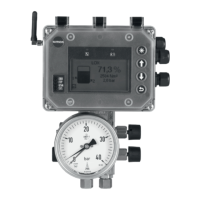
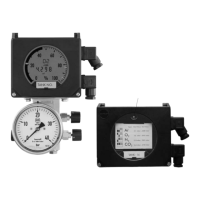
Fig. 1 Media 6 with LCD and attached valve block, Media 6 with LED (right)
LED

Questions and Answers

  • K
    kirsten44Aug 12, 2025
    What to do if '?p not within permissible range' error appears on Samson Measuring Instruments?
    • A
      Ashley HawkinsAug 12, 2025
      If you encounter the '?p not within permissible range' error with your Samson Measuring Instruments, reset the error. Then, load other tank or gas data, or use an appropriate dp cell.
  • T
    Tina GarciaAug 19, 2025
    What to do if my Samson Media 6 show a hardware error?
    • D
      Dr. Caroline Wood MDAug 19, 2025
      If you are experiencing a hardware error with your Samson Measuring Instruments, the suggested solution is to send the device to SAMSON for repair.
  • K
    Kristina SimsAug 27, 2025
    What to do if Samson Measuring Instruments show RAM checksum error?
    • J
      James BuckleyAug 27, 2025
      If your Samson Measuring Instruments display a RAM checksum error indicating a defect, the recommended action is to send the device to SAMSON for repair.
  • B
    brian27Sep 4, 2025
    What to do if Samson Media 6 Measuring Instruments show EEPROM checksum error?
    • J
      Jessica BowmanSep 4, 2025
      If your Samson Measuring Instruments show an EEPROM checksum error, you should send the device to SAMSON for repair.

Samson Media 6 Specifications

General IconGeneral
BrandSamson
ModelMedia 6
CategoryMeasuring Instruments
LanguageEnglish

Related product manuals