EasyManua.ls Logo

Samsung 6400 - Mounting the TV on a Wall Using the Wall Mount Kit (Optional); VESA Wall Mount Kit Notes and Specifications

Samsung 6400
58 pages
Print Icon
To Next Page IconTo Next Page
To Previous Page IconTo Previous Page
Loading...
Mounting
the
TV
on
a
Wall
Using
the
Wall
Mount
Kit
(Optional)
Wall
or
Ceiling
Mounting
If
you
mount this product
on
a
wall,
it
should
be
mounted
only
as
recommended
by
the
manufacturer.
Unless
it
is
correctly mounted, the product
may
slide
or
fall,
causing
serious
injury to a
child
or
adult,
and
serious
damage
to the product.
Installing
the
Wall
Mount
Kit
The
wall
mount kit
(sold
separately)
lets
you
mount the
TV
on
the
wall.
For
detailed
information about installing
the wall mount,
see
the
ins
tructions
provided
with the
wall
mount.
We
recommend
you
contact a
technician
for
assistance
when
installing
the
wall
mount
bracket.
We
do
not
advise
you
to do it
yourself.
Samsung
Electronics
is
not
responsible
for
any
damage
to the product or injury to
yourself
or
others
if
you
select
to
install
the
wall
mount
on
your own.
To
order the
wall
mount
kit,
contact
Samsung
Customer
Care
at
1-800-SAMSUNG
(1-800-726-7864).
VESA
Wall
Mount
Kit
Notes
and
Specifications
Install
your
wall
mount
on
a
solid
wall perpendicular
to the
floor.
Before
attaching the
wall
mount to
surfaces
other than
plaster
board
,
please
contact
your
nearest
dealer
for
additional
information.
If
you
install the
TV
on
a
ceiling
or
slanted
wall,
it
may
fall
and
result
in
severe
personal
in
jury.
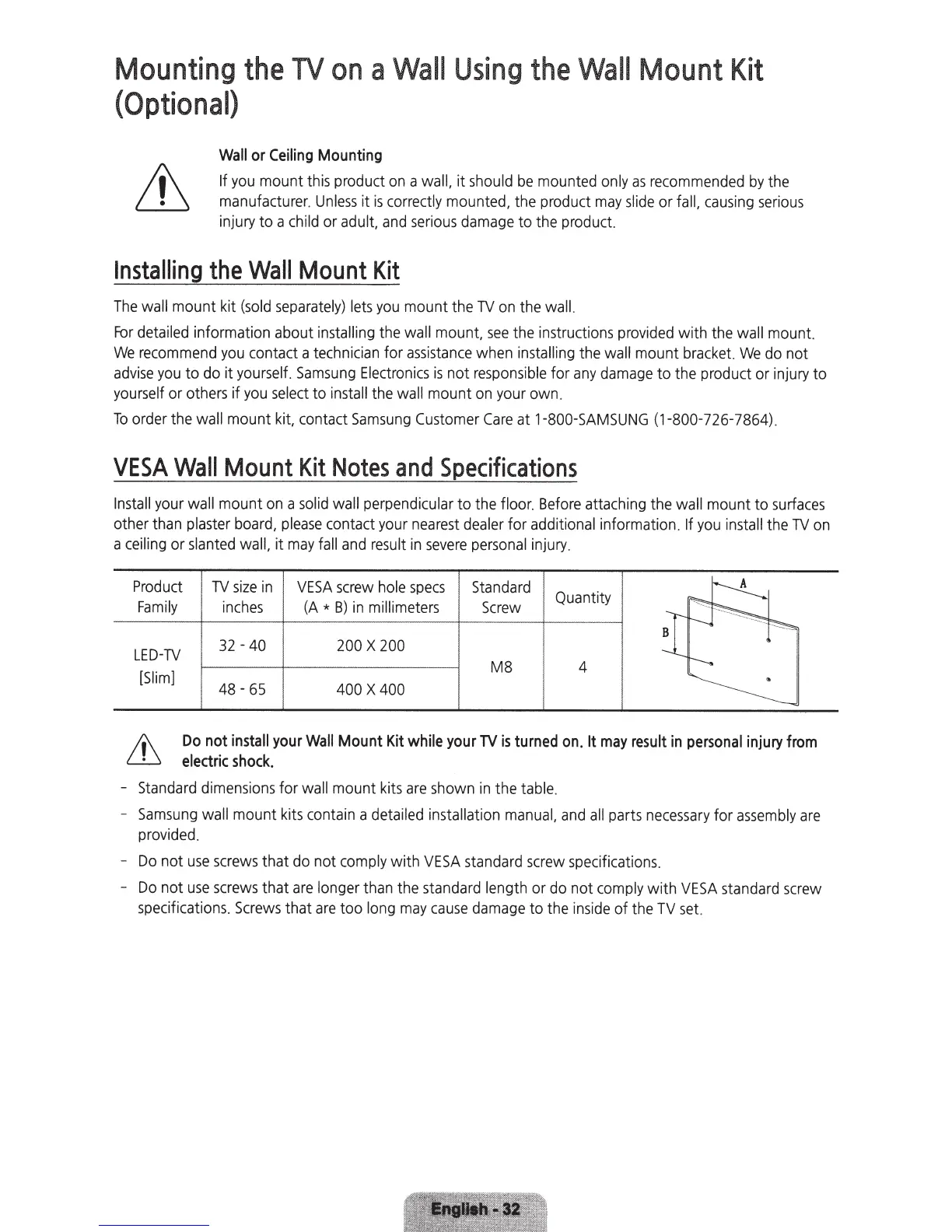
Product
TV
size
in
VESA
screw
hole
specs
Standard
Quantity
~
Family
inches
(A
*
B)
in
millimeters
Screw
~~
LED-TV
32-40
200
X
200
{
~
-
M8 4
---..
[Slim]
48
-
65
400
X
400
~
Do
not
install
your
Wall
Mount
Kit
while
your
TV
is
turned
on.
It
may
result
in
personal
injury
from
electric
shock.
-
Standard
dimensions
for
wall
mount
kits
are
shown
in
the
table.
-
Samsung
wall
mount
kits
contain
a
detailed installation
manual,
and
all
parts
necessary
for
assembly
are
provided.
-
Do
not
use
screws
that do not
comply
with
VESA
standard
screw
specifications.
-
Do
not
use
screws
that
are
longer
than the
standard
length
or
do
not
comply
wit
h
VESA
standard
screw
specifications.
Screws
that
are
too
long
may
cause
damage
to
the
inside
of the
TV
set.

Related product manuals