7
English
PART NAMES & FUNCTIONS
Warning
t Do not touch leaking batteries directly. If liquid from the battery gets on skin or in eyes,
t flush out with water immediately and seek medical attention.
t Do not give batteries to young children, or store batteries where children may access them.
t Do not immerse batteries in water or otherwise get them wet.
t Battery overheating or leakage may cause product damage.
t Do not reverse the battery’s polarity ((+), (-) terminals).
t Do not modify, heat or recharge the batteries.
t Do not dispose of batteries or the product in a fire.
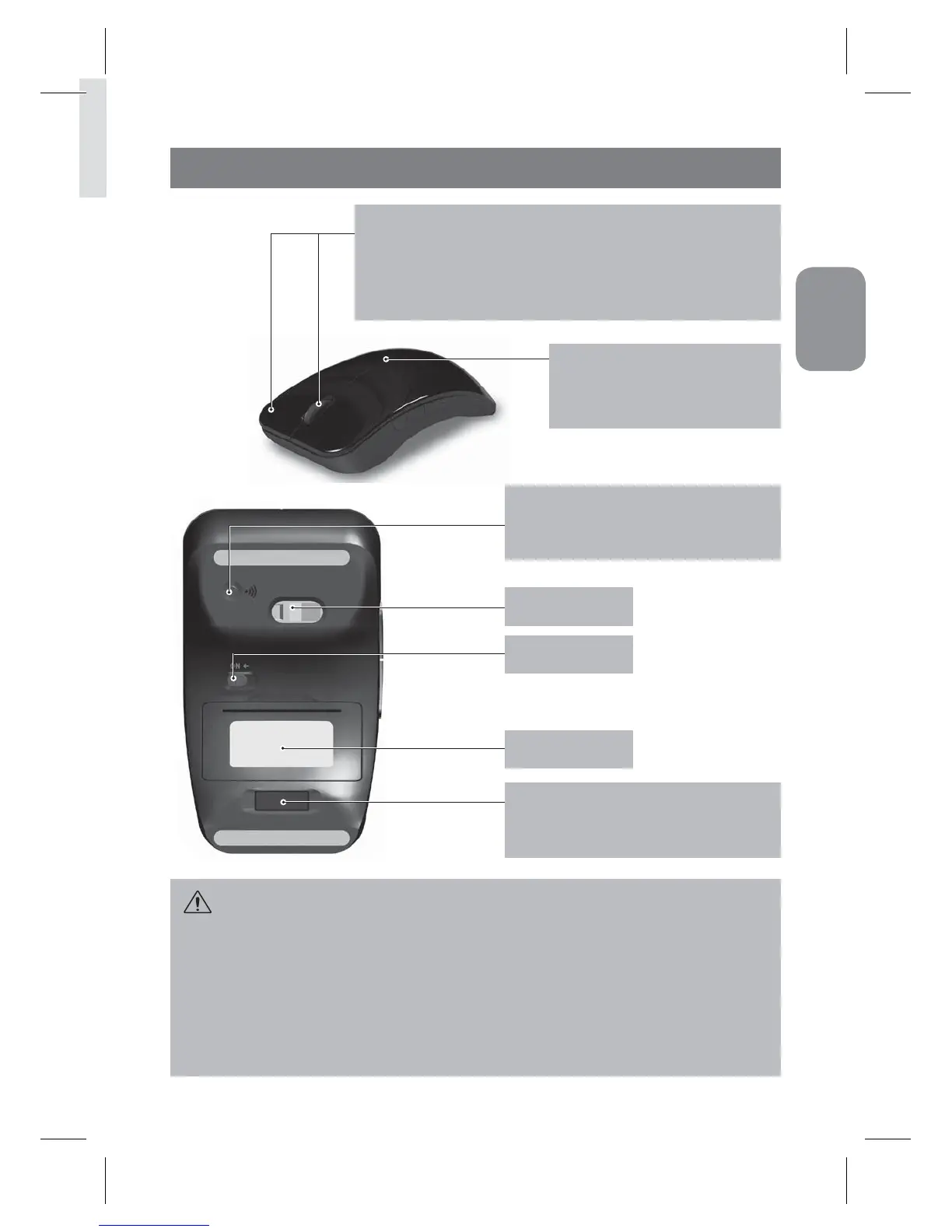
ID Reset Button:
When you want to reset ID, push the ID Reset
button while the power of mouse is on.
USB Receiver:
Slightly push the USB receiver, then it will be
attached by the power of magnet inside.
Sensor
Power On/Off
Battery Cover
To Switch DPI:
Push mouse wheel button and right button simultaneously for 5 seconds then
green LED will be twinkled to switch either to 1000 DPI or 1600 DPI
* Note 1000 DPI is the factory default setting.
- 1000dpi : green LED twinkle one time.
- 1600dpi: green LED twinkle two times.
LED indicator:
Glows amber when the battery is low.
The LED is turned o when the battery
power is good.


 To Next Page