4-24 Samsung Electronics
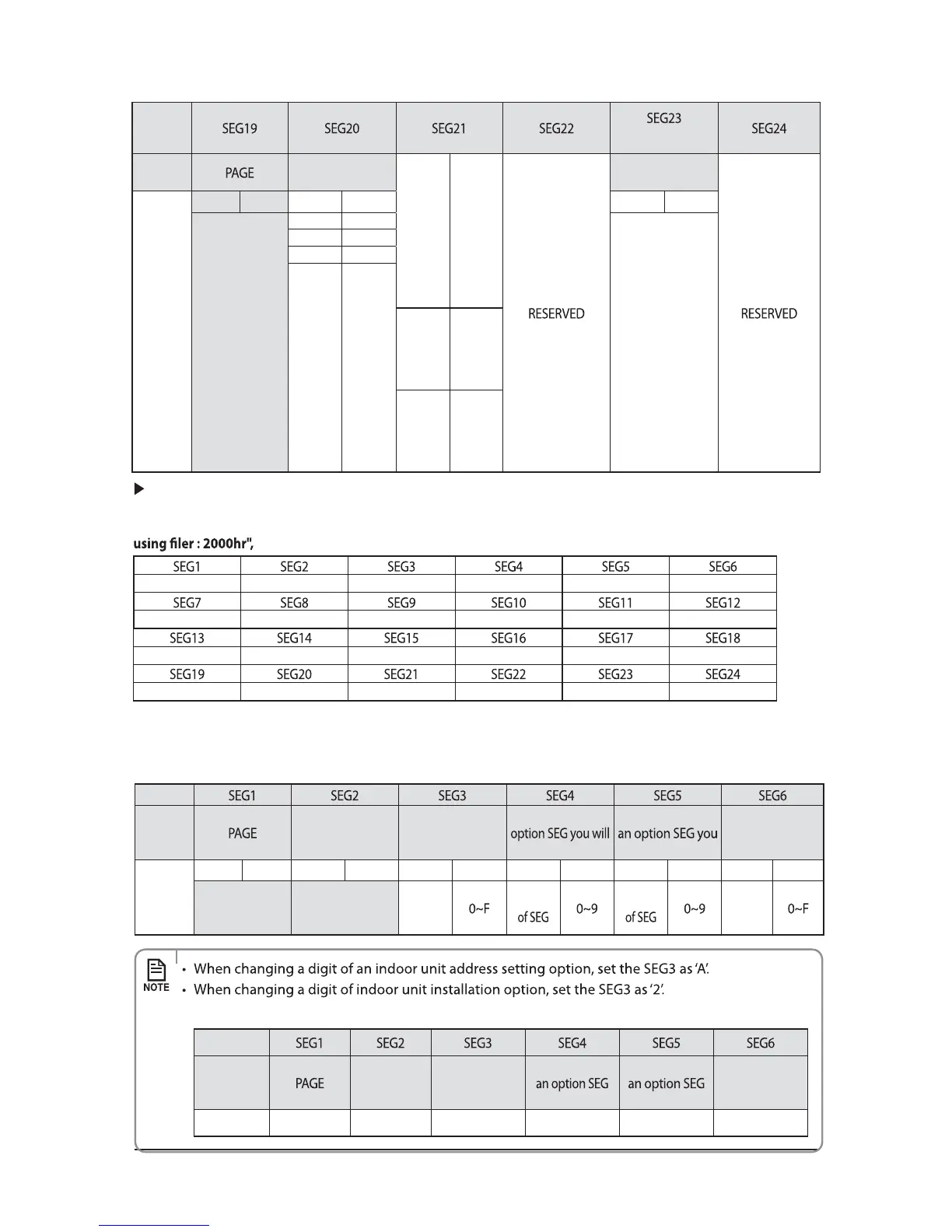
Option
(Mini 4 Way only)
Explanation
Individual control of
a remote controller
0 Disuse
Motion detect
sensor
Indication
and
Details
Indication
Details
Indication
Details
Indication
Details
3
0 or 1 Indoor 1 0.No Use (Factory Setting)
1.Standard Mode/Auto
Set OFF30 Min.
2.Standard Mode/Auto
Set OFF60 Min.
3.Standard Mode/Auto
Set OFF 120 Min.
4.Standard Mode/Auto
Set OFF 180 Min.
5.Premium Mode/
Auto Set OFF30
Min.6.Premium Mode/
Auto Set OFF60 Min.
7.Premium Mode/Auto
Set OFF 120 Min.
8.Premium Mode/Auto
Set OFF 180 Min.
2 Indoor 2
3 Indoor 3
4 Indoor 4
12
˚C
25˚C
If you input a number other than 0~4 on the individual control of the indoor unit(SEG 20), the indoor is
set as "Indoor 1".
Example) If you want to set as "Exterior temperature sensor : USE, External control : USE, Number of hours
02-10-
10---0
210-06
30----
assign option codes except SEG 1, 7, 13, 19 which are page options.
You can change each digit of set option.
Option
Explanation
MODE
The option mode
you want to
change
The tens’ digit of an
change
The unit digit of
will change
The changed value
Indication
and
Details
Indication
Details
Indication
Details
Indication
Details
Indication
Details
Indication
Details
Indication
Details
0D
Option
mode
Tens’ digit Unit digit
The
changed
value
Ex) When setting the 'buzzer control' into disuse status.
Option
Explanation MODE
The option
mode you want
to change
The tens’ digit of
you will change
The unit digit of
you will change
The changed
value
Indication 0 D 2171
4-3-1-5 Changing a particular option



 To Next Page