Anycall English User’s Guide
for KT subscribers
06
Getting started
Display
Standby screen
When you rst turn the phone on or the phone is idle, the Standby screen will appear.
Menu screen
From the Standby screen, tap Menu to access the Menu screen.
Widgets screen
On the Widgets screen, you can access various kinds of widgets. To access the Widgets screen,
tap Widgets from the Standby screen.
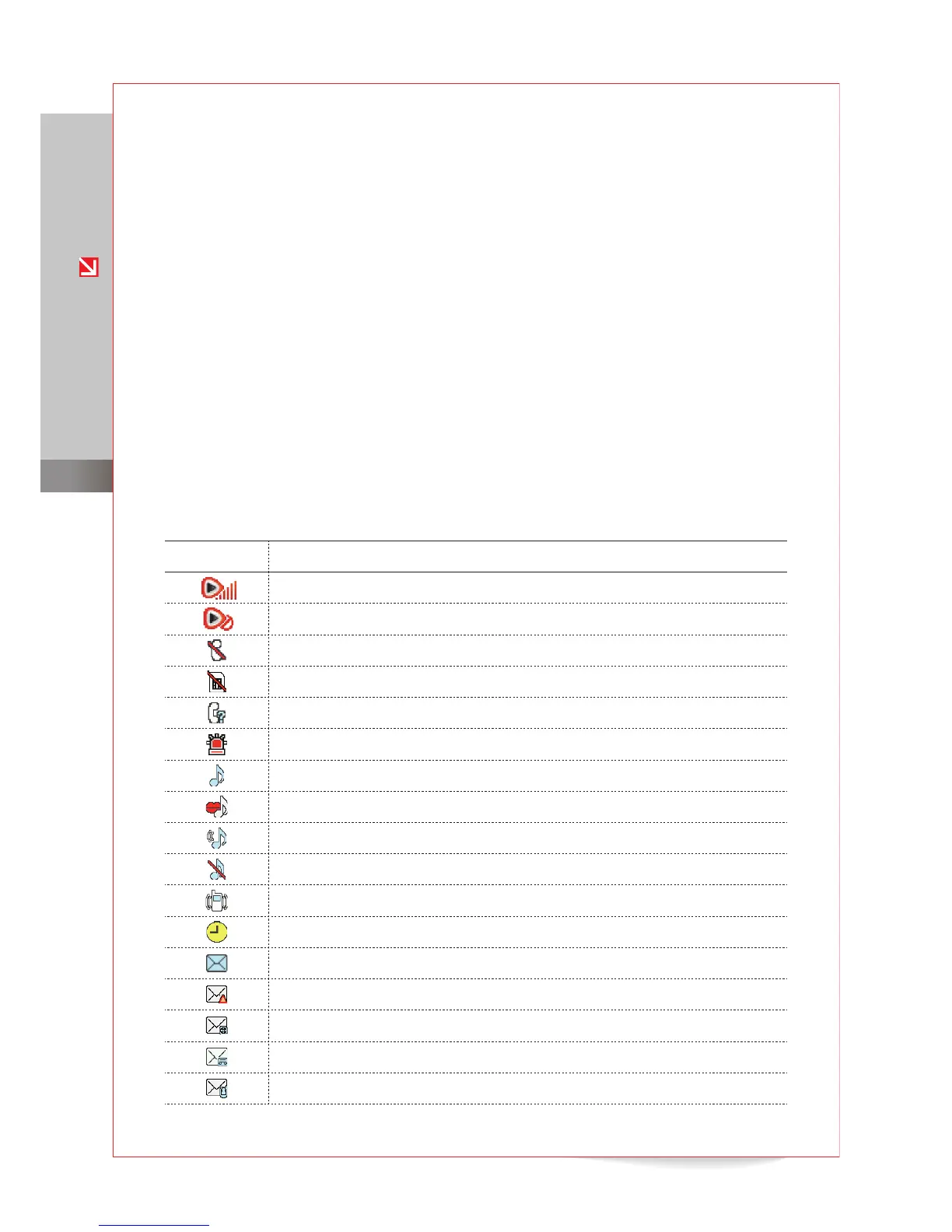
Icons
The following icons may appear at the top of the display to indicate the status of phone
functions or the wireless network.
Icon Description
Signal strength
Flight mode (network connection disabled)
No network service available
USIM card not installed
Missed call
Anycall SOS message feature activated
Audible sound pro les (Ringtone or Louder) activated
Text-to-speech sound pro le (TTS Bell) activated
Dual alert sound pro le (Ring After Vibration) activated
Silent sound pro le (No Ring) activated
Etiquette mode (vibration only) activated
Alarm activated
New text message
New SOS message
New multimedia message
New voice message
New video message



 To Next Page