Anycall English User’s Guide
for KT subscribers
05
Getting started
Getting started
Depending on your model, the descriptions in this guide may dier somewhat from your
phone’s actual operation.
Turn the phone on or o
Press and hold to turn the phone on or o.
Note
When the phone’s buttons are locked, you must rst unlock the keys before you can turn
the phone o.
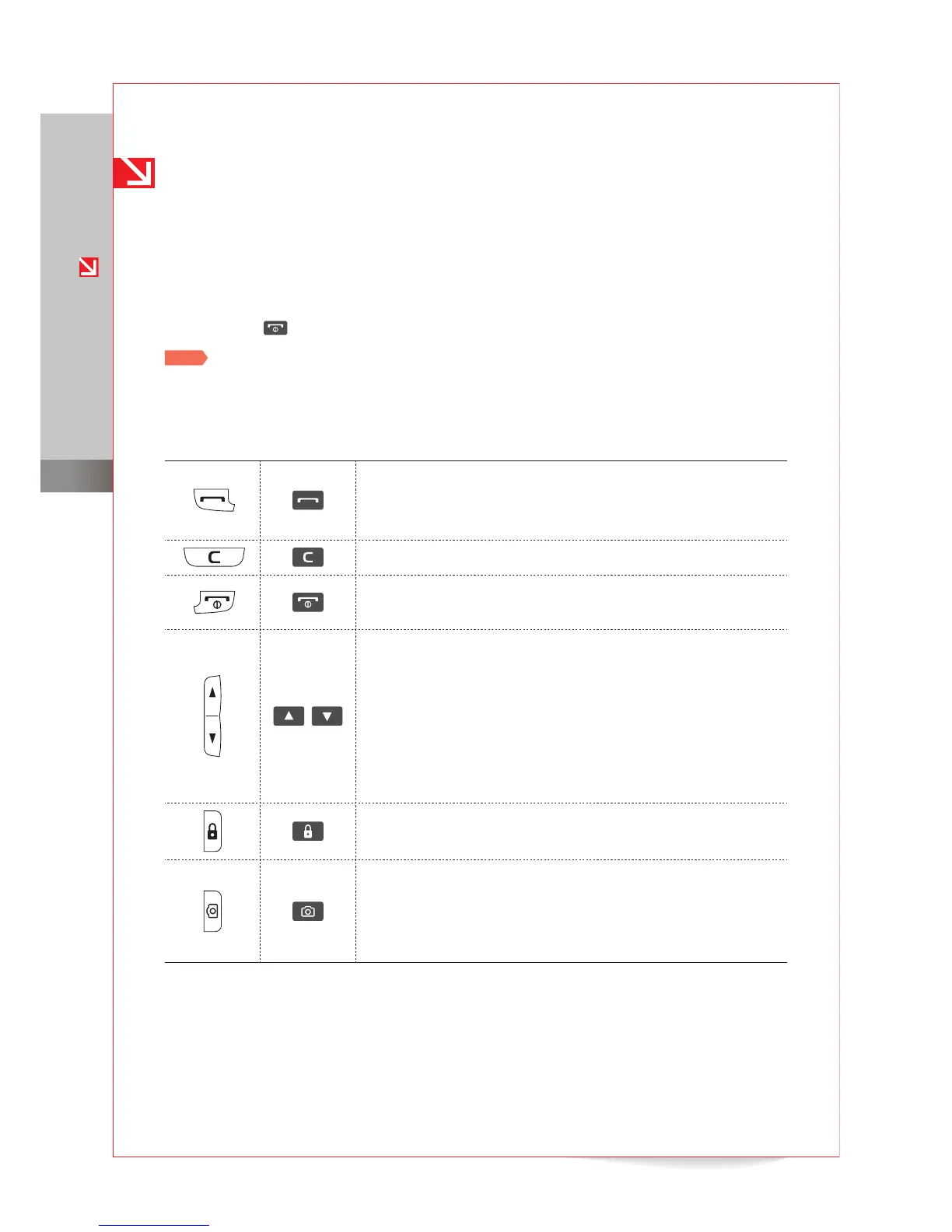
Keys
Answer or receive calls
Access the call log
Redial the last called number (press and hold)
■
■
■
Return to the previous menu
■
Turn the phone on or o (press and hold)
End a call
■
■
/
Adjust the volume of phone sounds
During an incoming call
Adjust the volume of ringtone
Silence the ringtone (press and hold)
During a call, adjust the call volume
When the keys are locked or the phone is closed (slider-type
phones), announce the current time (press and hold)
■
■
-
-
■
■
Lock or unlock keys (press and hold)
When the keys are locked, turn the display on or o
■
■
Activate the camera
In camera mode, press to take a photo
During an incoming call, reject the call (press and hold)
During a call, record the call (press and hold)
■
■
■
■



 To Next Page