E-9
Airing Your Room
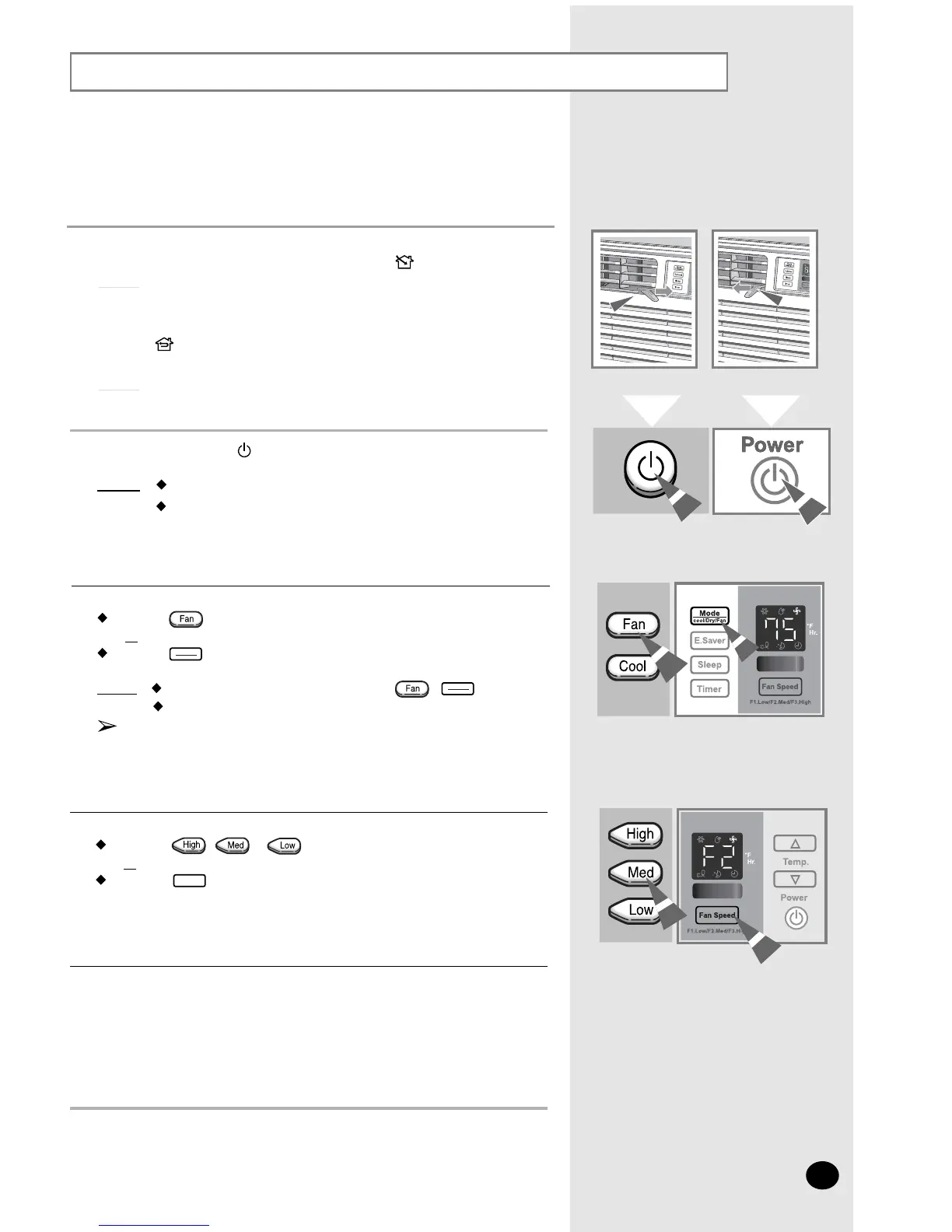
If you want to provide air circulation without cooling, you can use
the
Fan mode.
If necessary, press the (On/Off) button.
Result: The Air Conditioner starts up in Cool mode
.
The unit beeps twice.
2
To set the Fan Speed:
Press the , or button on the Remote control as desired.
or
Press the button on the unit one or more times until the
desired
Fan Speed(F1, F2 or F3) is displayed.
4
To control the direction of the air flow, refer to page 11.
5
If the Fan Speed(F1, F2 or F3) is not displayed on the control panel:
Press the button on the remote control
or
Press the button on the unit one or more times until the Fan Speed
(F1,
F2 or F3) is displayed.
Result
:
The unit beeps each time you press the / button.
The Air Conditioner starts up in Fan mode.
You can change modes at any time.
When
the Air Conditioner is in Fan mode, the temperature
cannot
be set or displayed.
3
Mode
Cool/Dry/Fan
Fan Speed
Mode
Cool/Dry/Fan
Remote Control
Control Panel
1
If you wish to evacuate stale air outside, push the ventilation lever on the
front of the unit to the right and the open position (
).
Result: The air inside the room circulates and stale air is evacuated
outside
.
Otherwise, push the ventilation lever to the left and the closed
position (
).
Result: The air simply circulates inside the room.


 To Next Page