ENG - 24
07 CONNECTING AN EXTERNAL DEVICE
Connect to an external device via a wired connection or Bluetooth connection to play the external
device’s sound through the Soundbar.
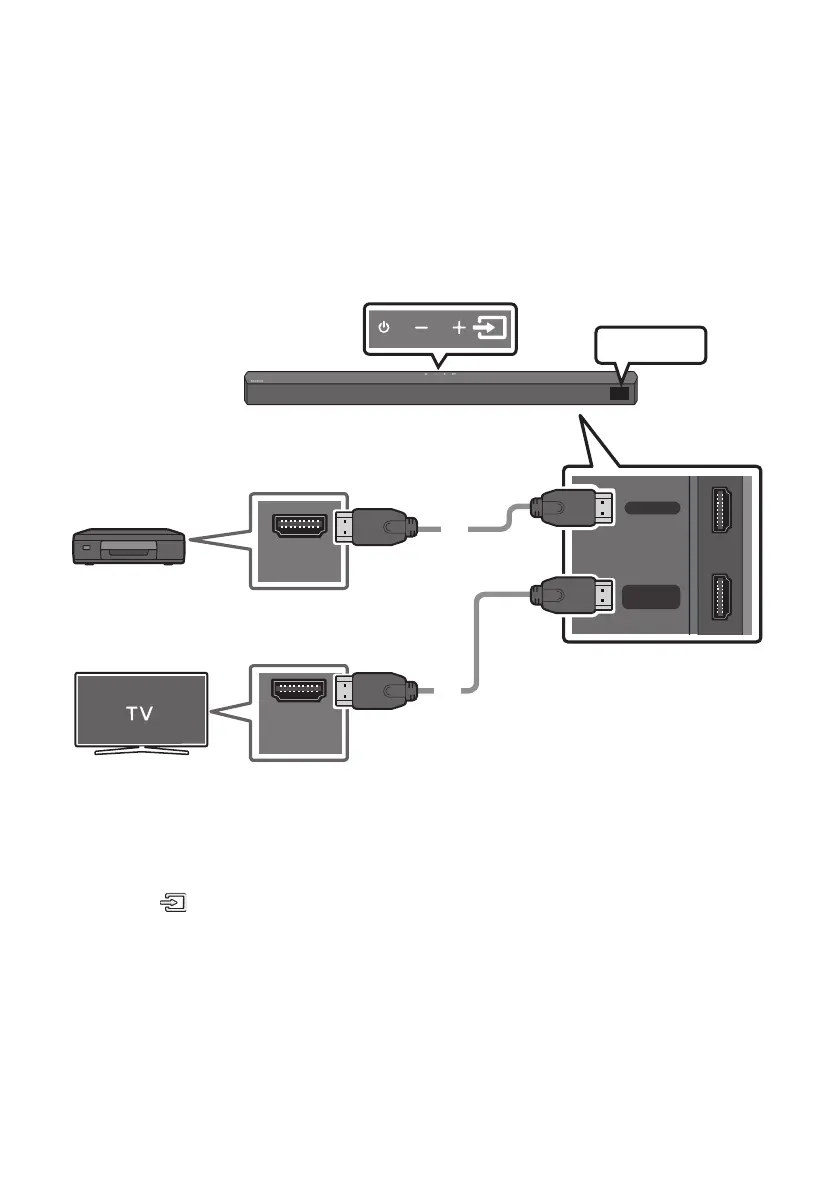
Method 1. Connecting using an HDMI Cable
HDMI IN
HDMI TO TV
(ARC)
HDMI OUT
HDMI IN
(ARC)
HDMI Cable
(not supplied)
HDMI Cable
(not supplied)
Bottom of the Soundbar
External Device
HDMI
Top of the Soundbar
1. Connect an HDMI cable (not supplied) from the HDMI IN port on the bottom of the Soundbar to the
HDMI OUT port on your digital device.
2. Connect an HDMI cable (not supplied) from the HDMI TO TV (ARC) port on the bottom of the
Soundbar to the HDMI IN port on your TV.
3. Press the (Source) button on the top panel or on the remote control, and then select “HDMI”.
4. “HDMI” mode is displayed on the Soundbar display panel and sound plays.




 To Next Page