7
Your New ProGourmet
TM
oven
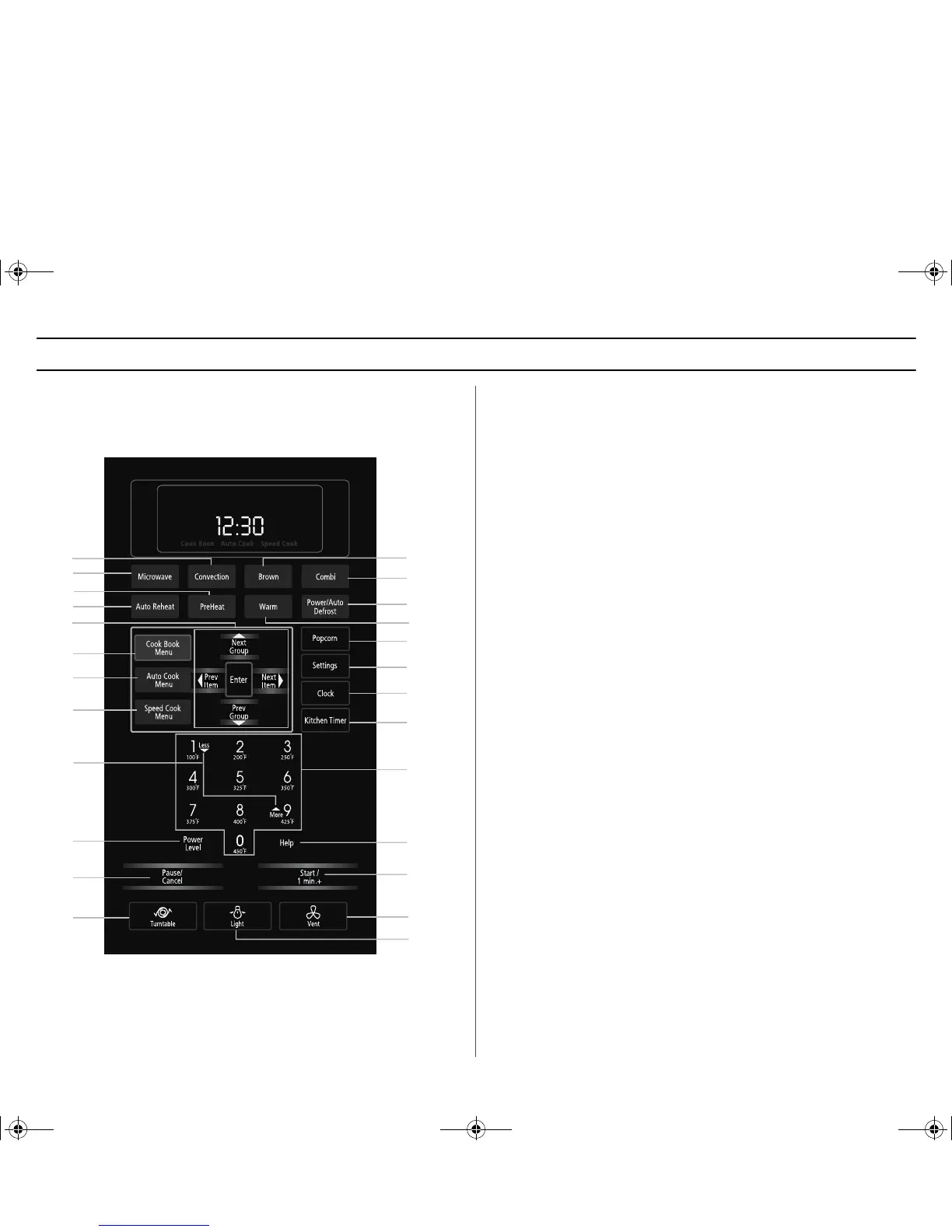
Control Panel Buttons Control Panel Buttons
1. Convection p.25
2. Microwave p.23
3. PreHeat p.24
For better results, preheat to desired temperature
before cooking.
4. Auto Reheat p.11
Selects type of dish to be reheated
5. Prev Group, Next Group, Prev Item, Next Item
6. Cook Book Menu p.12~p.14
7. Auto Cook Menu p.15~p.19
8. Speed Cook Menu p.19~p.22
This time-saving function cooks by combining both
microwaving and heating.
9. More/Less p.23
Increase or decrease cooking time.
10. Power Level p.23
Press this button to set a power level other than high.
11. Pause/Cancel p.10
Press to pause oven or correct a mistake.
12. Turntable p.27
13. Brown p.24
Browns meat and fish up to 60 minutes.
14. Combi p.25~p.27
15. Power/Auto Defrost p.11~p.12
Quickly thaws frozen food automatically by weight.
16. Warm p.24
Keeps food warm at 175 °F for up to one (1) hour
17. Popcorn p.10
18. Settings p.8~p.9
Press to set non-cooking features.
19. Clock p.9
Sets current time.
20. Kitchen Timer p.10
Sets kitchen or convenience timer.
21. Number/Cooking Temperature Buttons
Sets Baking temperature, cooking time, amount,
and power level.
22. Help p.10
Press to see help information about the feature you are using.
23. Start / 1 min. + p.10
Press to start cooking. Adds one (1) minute while
oven is operating.
24. Vent p.27
25. Light p.27
1
2
3
4
5
6
7
8
9
11
10
12
13
14
15
16
17
18
19
20
21
22
23
24
25
SMV9165SC_GB.fm Page 7 Tuesday, November 18, 2003 4:40 PM





 To Next Page