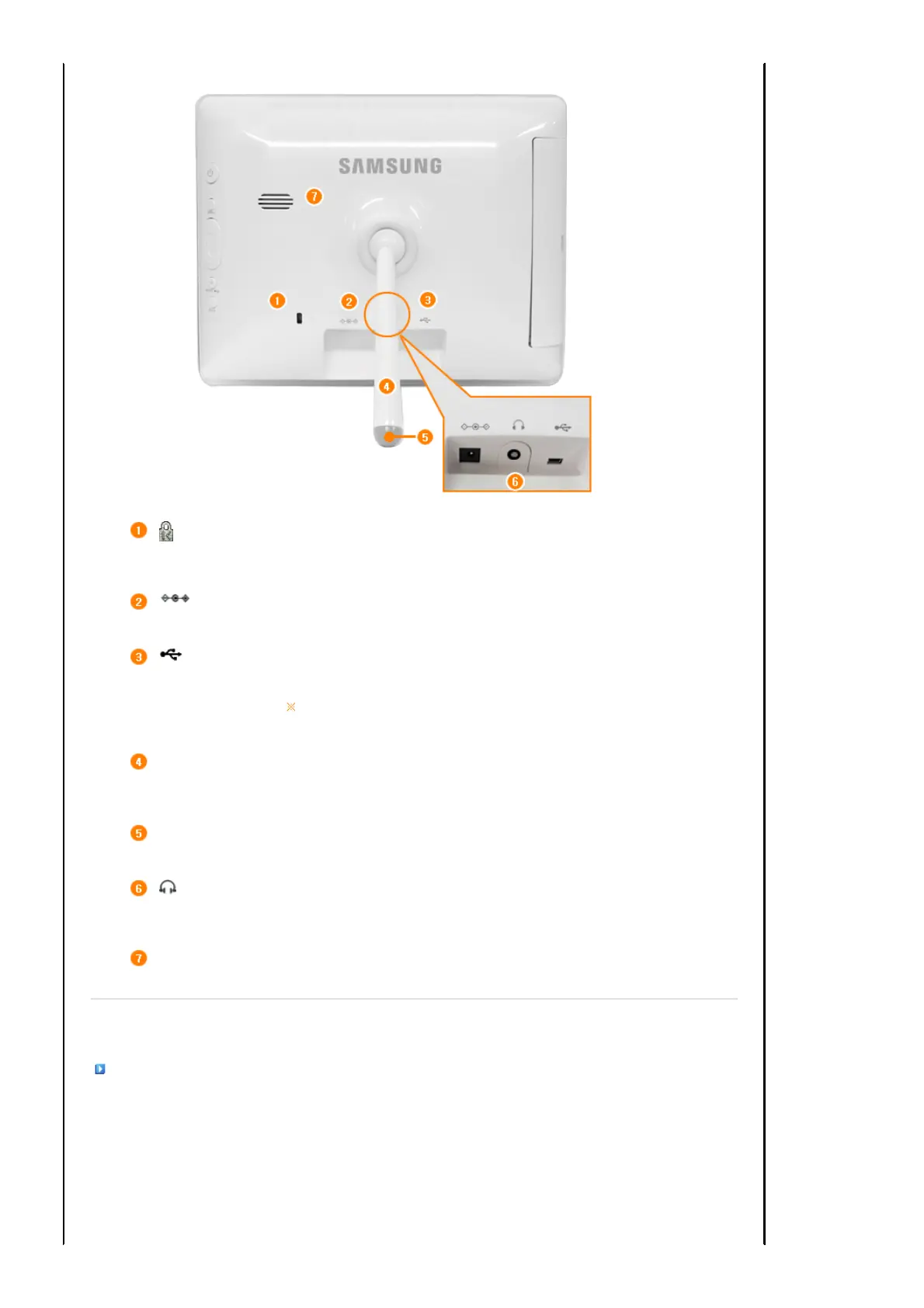
Kensington lock
he Kensin
ton lock is a device used to physically fix the system when usin
it in a
public place. (The locking device has to be purchased separately.)
For using a locking device, contact where you purchase it.
Power terminal
Connect the power adapter to this jack.
Connect the power cord to the power terminal of the power adapter.
USB connection
terminal
Connect a PC or an external device using a USB cable.
Up stream
terminal
Connect your digital photo frame to a PC's USB terminal with a USB
cable. (Compatible to USB 1.1(host))
Make sure to use the USB cable (A-mini B type) provided with the product when
connecting your digital photo frame to a PC through the up stream terminal.
Stand
stand allows both horizontal and vertical installations.
If your digital photo frame is installed vertically, you can rotate your photos using the
rotation function to fit to the vertical installation.
Sliding Prevention
Holder
Supports the product so that it stays firmly in place on slippery surfaces.
Headphone
connection jack
Connect your headphones to the Headphone connection jack.
Speaker
ou can listen to music files and movies.
|
Features
|
Components
|
Front
|
Back
|
Side
|
Side


 To Next Page