EasyManua.ls Logo

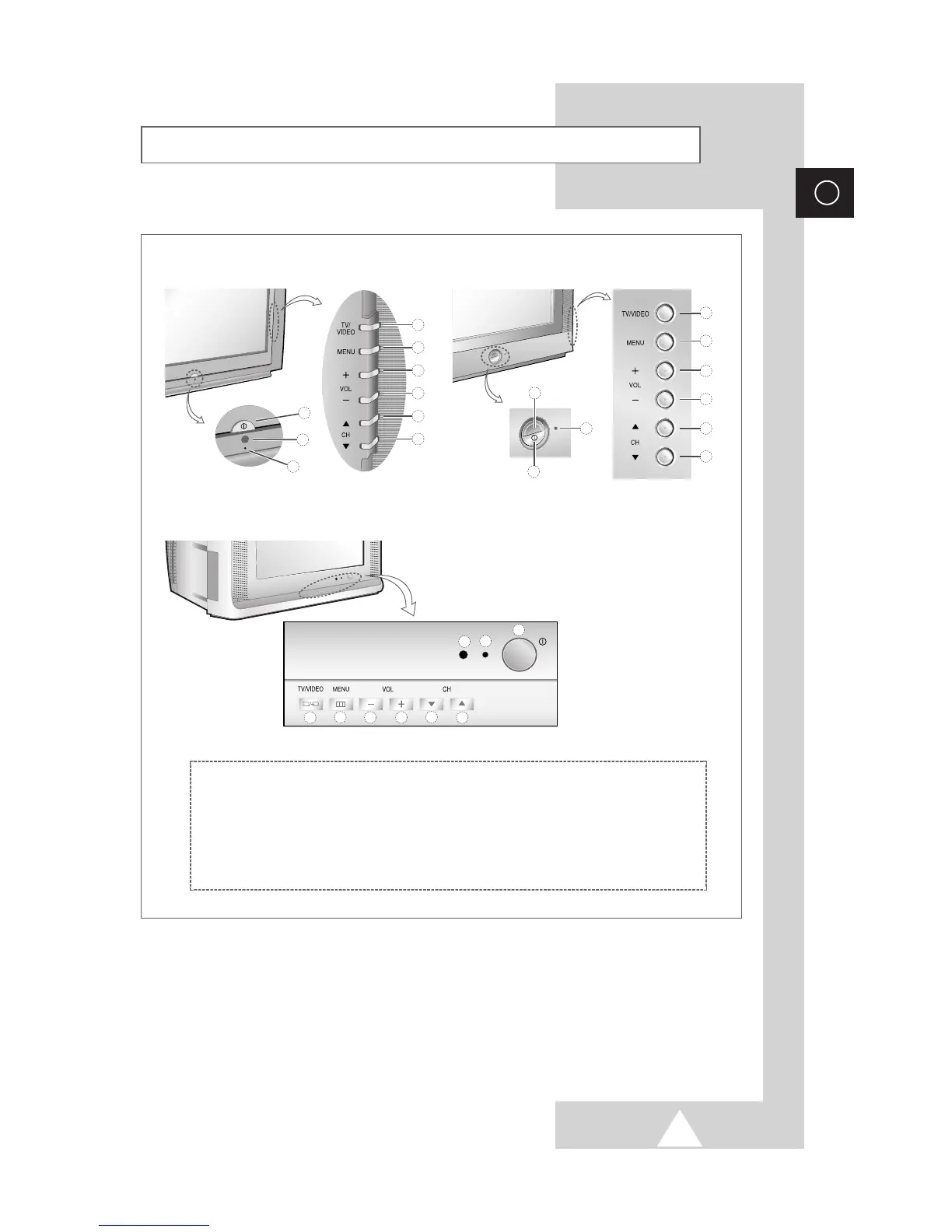
Samsung CS-29A10HW - Control Panels (Depending on the Model)

Samsung CS-29A10HW
44 pages
Print Icon
To Next Page IconTo Next Page
To Previous Page IconTo Previous Page
Loading...
5
ENG
➢
The actual configuration on your TV may be different, depending on
your model.
Control Panels (depending on the model)
➢
Using the Buttons on the Panel
If the remote control no longer works or you have lost it, you can use controls on the
panel of the TV to:
◆
Switch on the TV when it is in Standby mode and select channels ( ▼ CH ▲ ).
◆
Access the menu ( MENU ).
◆
Adjust the volume ( - VOL
+
).
◆
Switch among Video input modes ( TV/VIDEO ).

9
8
7
2
1
3
4
5
6
2
1
3
4
5
6
9
8
7
2
1
3
4
5
6
9
8
7
➀
Input Source Selection
➁
Menu Display
➂
Volume Decrease
➃
Volume Increase
➄
Previous Channel
➅
Next Channel
➆
Standby Indicator
➇
Remote Control Sensor
➈
Power On/Off
CS29Z4/WS32Z4/CS34Z4
CS29A10/WS32A10/CS34A10
CS29Z6/WS32Z6/CS34Z6

Table of Contents