EasyManua.ls Logo

Samsung DA-E751 - Connecting an Audio Device Using AUX in

Samsung DA-E751
35 pages
Print Icon
To Next Page IconTo Next Page
To Previous Page IconTo Previous Page
Loading...
14
PUSH
AUX IN
WPS / RESET
ONLY FOR
SERVICE
LAN
USB 5V 500mA
POWER
PUSH
AUX IN
WPS / RESET
ONLY FOR
SERVICE
LAN
USB 5V 500mA
POWER
DOCK
PUSH
AUX IN
WPS / RESET
ONLY FOR
SERVICE
LAN
USB 5V 500mA
POWER
PUSH
AUX IN
WPS / RESET
ONLY FOR
SERVICE
LAN
USB 5V 500mA
POWER
DOCK
PUSH
AUX IN
WPS / RESET
ONLY FOR
SERVICE
LAN
USB 5V 500mA
POWER
PUSH
AUX IN
WPS / RESET
ONLY FOR
SERVICE
LAN
USB 5V 500mA
POWER
DOCK
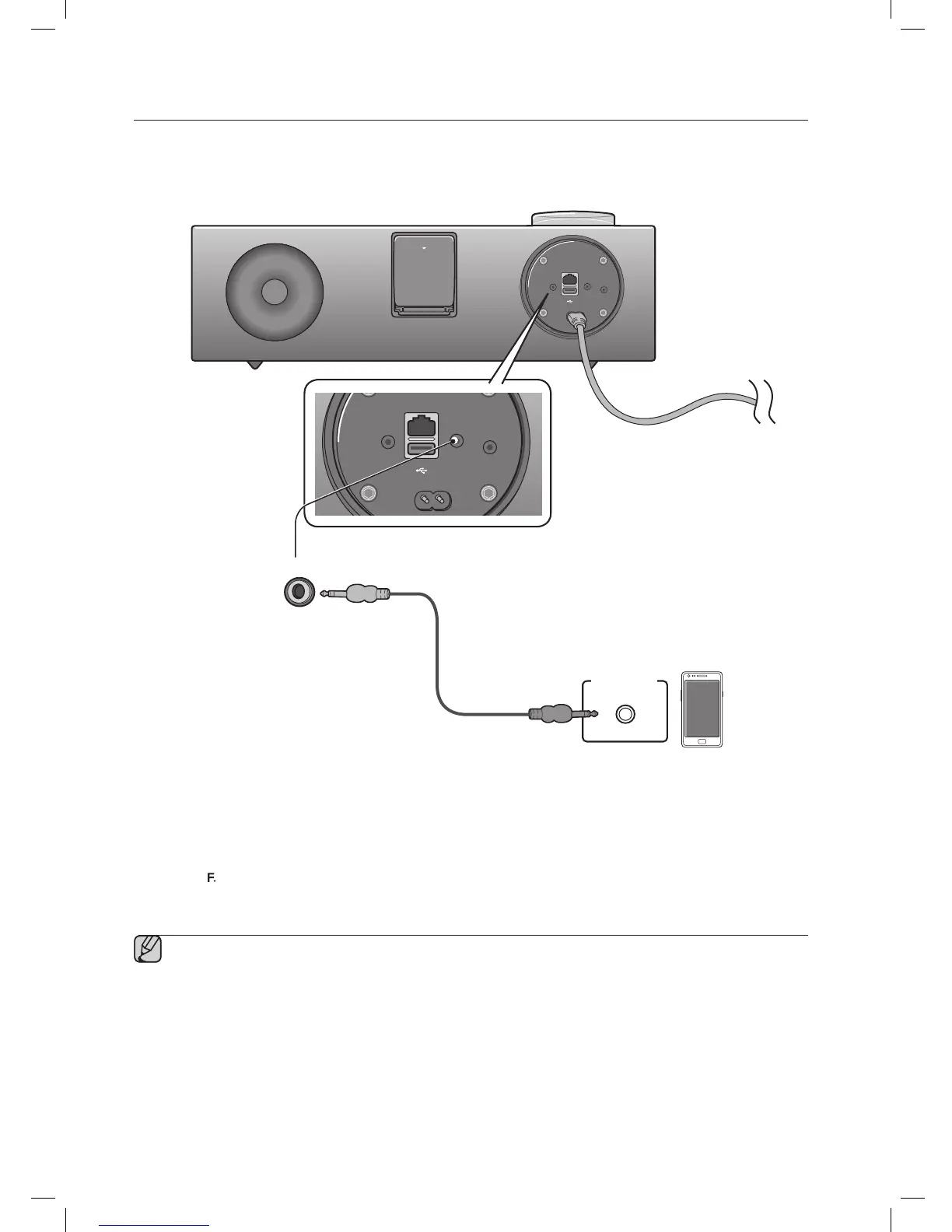
CONNECTING AN AUDIO DEVICE USING AUX IN
This section explains how to connect the unit to an audio device.
This unit is equipped with one audio analog jack for connecting an audio device.
AUX IN
1. Connect AUX IN (Audio) on the back of the unit to the earphone jack of the external device or audio device.
2. Press the
buttonrepeatedlyuntilthefunctionLEDsareoff.
~ TheAUXmodeisactivewhennofunctionLEDislit.
Before moving or installing this product, be sure to turn off the power and disconnect the power cord.

AUX IN
Earphones
jack
Audio Cable
External device

Related product manuals