89
Before contacting a service center
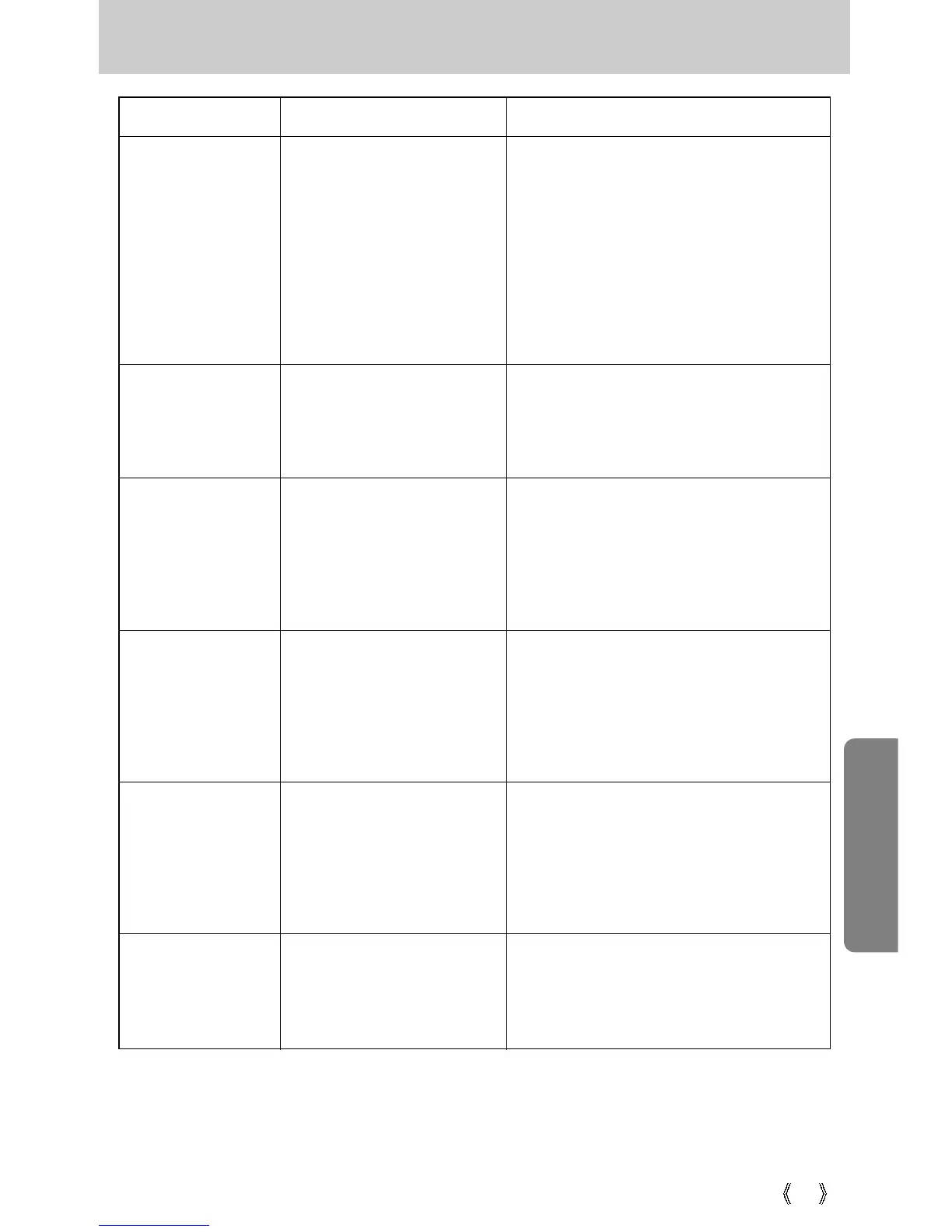
Symptom Causes Remedy
-
A picture was taken within 0.8 m
from the subject without setting
an appropriate macro mode.
- Taking a picture beyond
the flash range
- The lens is smudged or
dirty.
- Flash off mode has been
selected
The images are
unclear
The flash does not
fire
- If the subject is closer than 0.8m, select
macro shot mode.
- Take a picture within the flash range
- Clean the lens
- Dis-engage flash off mode
- Reset the date and time correctly- The date and time have
been set incorrectly or the
camera has adopted the
default settings
- Camera malfunction
- Incorrect memory card
format
Incorrect date and
time is displayed
The camera
buttons do not
operate
A card error has
occurred while the
memory card is in
the camera.
- Remove /re-insert batteries and switch
the camera on
- Re-format the memory card (p.66)
- Incorrect file name.
(Violation of DCF format)
The images don't
play back
- Do not change the image file name.



 To Next Page
 Loading...