English
English 47
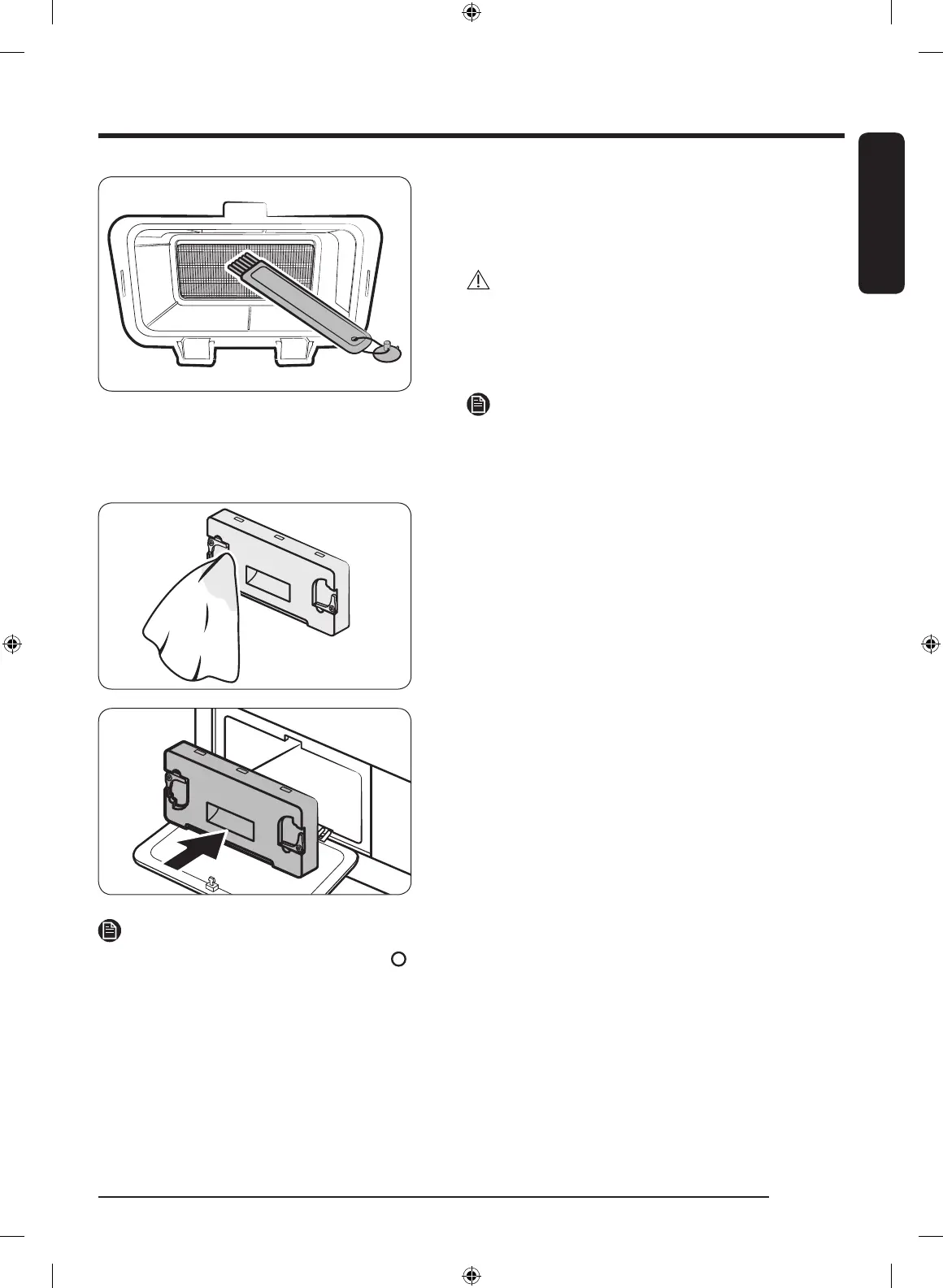
3. Clean the dust on the heat exchanger using the
provided brush.
- After cleaning with the brush, wipe off the
remaining dust using a smooth, damp cloth.
CAUTION
• To avoid physical injury and burns, do not touch or
clean the heat exchanger with bare hands.
• When cleaning the heat exchanger, be careful not
to damage the fins.
NOTE
If the heat exchanger is completely dry and therefore
hard to clean, spray some water on the heat
exchanger and clean using a brush.
4. Clean the inner cover with a smooth, damp cloth.
- There may be moisture and/or foreign
substances around the inner cover.
5. Reinsert the inner cover to its original position, and
then lock the fixers.
6. Close the heat exchanger’s outer cover.
NOTE
• After cleaning the heat exchanger, tap to dismiss the notification message. The message remains on
until you dismiss it.
• If the alarm continues after you have dismissed it, unplug and then plug in the power cord or remove
and reinsert the heat exchanger's inner cover.
Untitled-2 47 8/11/2020 3:36:07 PM



 To Next Page