Washing a Load of Laundry
SAMSUNG
Washing Machine Owner’s Instructions 7
6. Delay Start selection button
Press the button repeatedly to cycle through the available delayed start options (from 3
hour to 24 hours in one hour increments).
Displayed hours means the time of finished washing-cycle.
7.
Half load selection button
Press the button in case of Half load(about 1~4kg) washing. This function saves washing
time and energy.
8. Child Lock selection button
Press the Child Lock button for 2~3 seconds to prevent mis-operation by a child. When
the “Child Lock” is on, other buttons can not be selected. To cancel the “Child Lock”,
press the “Child Lock” button simultaneously for 2~3 seconds.
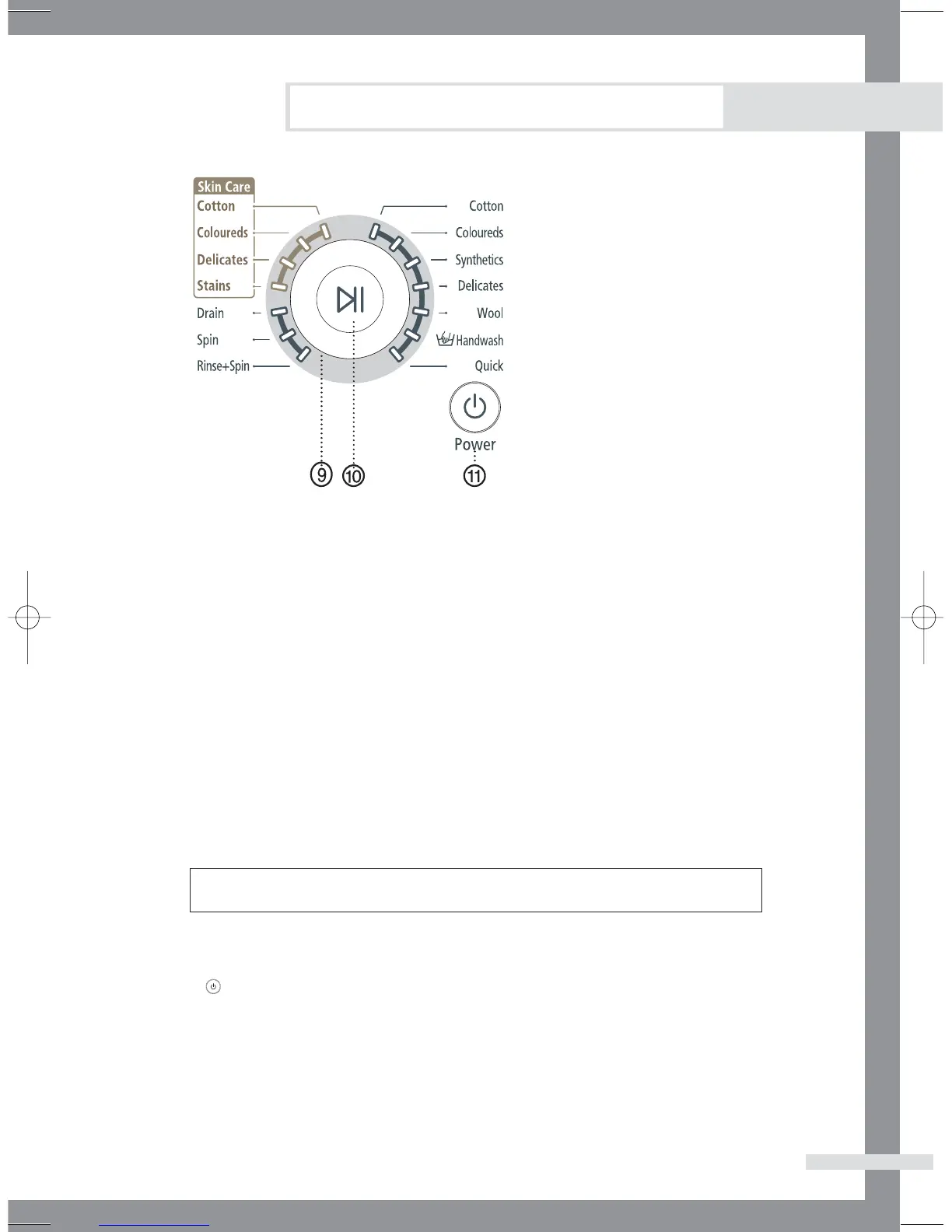
9.
Fuzzy Control dial
Turn the dial to select one of the 14 available wash programs.
10. Start/Pause selection button
Press to pause and restart programs.
11. (On/Off) selection button
Press once to turn the washing machine on, press again to turn the washing machine off.
If the washing machine power is left on for longer than 10 minutes without any buttons
being touched, the power automatically turns off.
Cotton, Coloureds, Synthetics, Delicates, Wool, Hand wash, Quick, Rinse+Spin,
Spin, Drain, Skin Care(Stains, Delicates, Coloreds, Cotton)



 To Next Page