EasyManua.ls Logo

Samsung Galaxy S7 Edge - User Manual

Samsung Galaxy S7 Edge
333 pages
Print Icon
To Next Page IconTo Next Page
Loading...
User Guide
[UG template version 16a]
[Sprint-Samsung-G935P-ug-en-051616-FINAL]

Table of Contents

Other manuals for Samsung Galaxy S7 Edge

Questions and Answers

  • M
    Mary McfarlandAug 19, 2025
    What to do if my Samsung Cell Phone screen is frozen and I cannot turn off the power?
    • O
      owestAug 20, 2025
      If your Samsung Cell Phone screen is frozen and you cannot turn it off, restart the device by pressing and holding the Power/Screen lock key and the volume DOWN key for 7-8 seconds. Note that this operation may erase data and settings.
  • A
    andersonangelaAug 22, 2025
    What to do if my Samsung Galaxy S7 Edge ringtone does not sound?
    • E
      Elizabeth RobinsonAug 22, 2025
      If the ringtone on your Samsung Cell Phone does not sound, check the following: * Ensure the terminal is not set to Silent mode (Vibrate, Mute). * Verify that 'Ringtone' is not set to 'Silent'. * Check that the volume in 'Ringtone' is not set to 0. * Make sure the terminal is not set to 'Blocking mode'. * Confirm the terminal is not set to Airplane mode. * Check if the ring time of Voice mail service or Call forwarding service is set to '0 sec.'. * Ensure the Play after of Answering message is not set to '0 sec.'
  • J
    josephmeltonAug 23, 2025
    What to do if my Samsung Galaxy S7 Edge Cell Phone cannot charge?
    • J
      jacksoncaitlinAug 25, 2025
      If your Samsung Cell Phone is not charging, check the following: * Ensure the adapter or cigarette lighter connector is correctly inserted into the outlet or socket. * Verify that the adapter and terminal are inserted correctly. * If using a Micro USB cable, ensure the PC is turned on. * If the terminal becomes hot due to prolonged calls, communications, or other operations while charging, wait until the temperature drops before retrying.
  • W
    Wesley GutierrezAug 26, 2025
    What to do if my Samsung Galaxy S7 Edge terminal becomes unstable?
    • J
      Justin BrownAug 26, 2025
      If your Samsung Cell Phone becomes unstable, it may be due to applications installed after purchase. Try starting the terminal in Safe mode (a mode similar to default). If the problems improve, uninstalling the application may resolve the issue.
  • J
    James MillerAug 28, 2025
    What to do if my Samsung Galaxy S7 Edge does not receive mail automatically?
    • T
      Tiffany MoodyAug 28, 2025
      If your Samsung Cell Phone is not receiving mail automatically: * Ensure that 'Sync account' is set to ON. * Make sure that 'Set sync schedule' on 'Sync schedule' is not set to 'Manual'. If it is, set Sync schedule.
  • C
    Clarence MarshAug 30, 2025
    Why my Samsung Galaxy S7 Edge cannot connect to network?
    • A
      andrew13Aug 30, 2025
      If your Samsung Cell Phone cannot connect to the network, it might be because you are in a place where the signal is weak. Also, turning the terminal power OFF and then turning ON again may restore the connection.
  • R
    Rachael FieldsAug 31, 2025
    What to do if my Samsung Cell Phone terminal reacts slowly or becomes unstable?
    • C
      cbarajasSep 1, 2025
      If your Samsung Cell Phone terminal reacts slowly, behaves unstably, or some programs cannot activate, confirm the internal memory usage of the terminal and free up memory by ending some activated programs.
  • S
    sshermanSep 2, 2025
    Why is my Samsung Galaxy S7 Edge display dimmed?
    • D
      David BrooksSep 2, 2025
      Your Samsung Cell Phone display may be dimmed because the time set on 'Screen timeout' is over, you have adjusted the brightness of the display, Power saving mode is set, or the battery level is low.
  • J
    johnsonjenniferSep 4, 2025
    How to fix blurred images on Samsung Galaxy S7 Edge camera?
    • R
      Ronald SmithSep 4, 2025
      If still images and videos shot with your Samsung Cell Phone camera are blurred, check if there are clouds or dirt attached to the lens of the camera.
  • R
    rbeanSep 7, 2025
    What to do if my Samsung Galaxy S7 Edge time is incorrect?
    • B
      Bryan SellersSep 7, 2025
      If the time on your Samsung Cell Phone is incorrect, especially if the terminal has been on for a long time, check if 'Automatic date and time' is set to ON and turn on the terminal at places where signal is strong.

Samsung Galaxy S7 Edge Specifications

General IconGeneral
Screen shapeCurved edge screen
Pixel density534 ppi
Second displayNo
Display diagonal5.5 \
Touch technologyMulti-touch
Touchscreen typeCapacitive
Native aspect ratio16:9
Display number of colors16.78 million colors
Processor cores4
Processor familySamsung Exynos
Processor frequency2.3 GHz
Coprocessor frequency1.6 GHz
RAM typeLPDDR4
User memory24.5 GB
RAM capacity4 GB
Compatible memory cardsMicroSD (TransFlash)
Maximum memory card size200 GB
Internal storage capacity32 GB
Flash typeLED
Sensor typeCMOS
Rear camera typeSingle camera
Maximum frame rate120 fps
Optical sensor size1/2.6 \
Video recording modes1080p, 2160p, 720p
Rear camera aperture number1.7
Resolution at capture speed1280x720@120fps, 1920x1080@60fps, 3840x2160@30fps
Video capture resolution (max)3840 x 2160 pixels
Rear camera resolution (numeric)12 MP
Front camera resolution (numeric)5 MP
4G standardLTE
2G standardsGSM
3G standardsTD-SCDMA, UMTS, WCDMA
SIM card typeNanoSIM
Wi-Fi standards802.11a, Wi-Fi 5 (802.11ac), 802.11b, 802.11g, Wi-Fi 4 (802.11n)
Bluetooth version4.2
3G bands supported850, 900, 1900, 2100 MHz
4G bands supported700, 800, 850, 900, 1800, 1900, 2100, 2300, 2500, 2600 MHz
Bluetooth profilesA2DP, AVRCP, HFP, HID, HOGP, HSP, MAP, OPP, PAN, PBAP
SIM card capabilitySingle SIM
2G bands (primary SIM)850, 900, 1800, 1900 MHz
Mobile network generation4G
Subscription typeNo subscription
USB version2.0
USB connector typeMicro-USB
HDMI ports quantity0
Headphone connectivity3.5 mm
PlatformAndroid
Google applicationsGoogle Maps, Google Play, YouTube
App distribution platformGoogle Play
Operating system installedAndroid 6.0
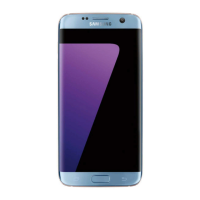
Color nameBlue Coral
Form factorBar
Product colorSilver
Protection featuresDust resistant, Water resistant
International Protection (IP) codeIP68
ThemesWallpapers
PersonalizationIcons, Menu, Themes
Personal info management (PIM)Alarm clock, Calculator, Calendar, Notes
Supported video modes2160p
Audio formats supported3GA, AAC, AMR, AWB, FLAC, IMY, M4A, MID, MIDI, MP3, MXMF, OGA, OGG, OTA, RTTTL, RTX, WAV, WMA, XMF
Video formats supported3G2, 3GP, ASF, AVI, FLV, M4V, MKV, MP4, WEBM, WMV
Multimedia Messaging Service (MMS)Multimedia Messaging Service (MMS) is a standard way to send messages that include multimedia content to and from a mobile phone over a cellular network
Talk time (3G)27 h
Battery capacity3600 mAh
Standby time (3G)- h
Browsing time (3G)12 h
Browsing time (4G)15 h
Browsing time (Wi-Fi)16 h
Continuous audio playback time55 h
Continuous video playback time18 h
Continuous audio playback time (display off)74 h
Cables includedUSB
Body SAR (EU)1.43 W/kg
Head SAR (EU)0.264 W/kg
Weight and Dimensions IconWeight and Dimensions
Depth7.7 mm
Width72.6 mm
Height150.9 mm
Weight157 g

Videos

How To Reset Samsung Galaxy S7 Edge - Hard Reset and Soft Reset

How to get Samsung Galaxy S7 Edge IN & OUT of safe mode

How to Reset Network Settings in SAMSUNG Galaxy S7 Edge

How to find recycle bin on Samsung Galaxy S7 Edge?

How to Activate Hey Google in Samsung Galaxy S7 Edge - Google Assistant

How to Reset Settings in Samsung Galaxy S7 Edge - Restore Settings

Related product manuals