EasyManua.ls Logo

Samsung HT-FS6200/XU - User Manual

Samsung HT-FS6200/XU
57 pages
Print Icon
To Next Page IconTo Next Page
Loading...
imagine the possibilities
Thank you for purchasing this Samsung product.
To receive more complete service,
please register your product at
www.samsung.com/register
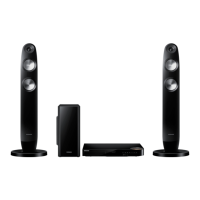
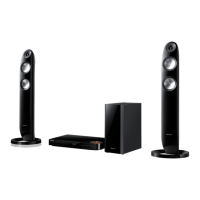
2.1CH Blu-ray™
Home Entertainment System
user manual
HT-FS6200
HT-FS6200-XU_0529.indd 1HT-FS6200-XU_0529.indd 1 2013-05-30 10:55:412013-05-30 오전 10:55:41

Questions and Answers

  • M
    Matthew ParkerSep 18, 2025
    Why can't my Samsung Blu-ray home theater system receive radio broadcasts?
    • W
      whumphreySep 22, 2025
      If you can't receive radio broadcasts on your Samsung Blu-ray home theater system, first ensure the antenna is properly connected. If the antenna's input signal is weak, try installing an external FM antenna in an area with good reception.
  • M
    Mrs. Janet RichardsonAug 25, 2025
    Why is there no sound from my Samsung Home Theater System?
    • V
      Valerie SmithAug 25, 2025
      There might be several reasons why your Samsung Home Theater System isn't producing sound. First, remember that the home cinema system doesn't play sound during fast playback, slow playback, and step motion playback. Check if the speakers are connected properly and the speaker setup is correctly customized. Finally, check if the disc is severely damaged.
  • H
    Holly LeeAug 25, 2025
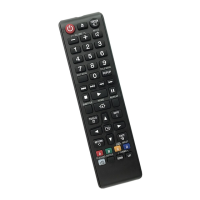
    Why is my Samsung Blu-ray home theater system remote control not working?
    • J
      Jonathan SweeneyAug 26, 2025
      If your Samsung Blu-ray home theater system remote control isn't working, make sure you're within the operational range and at the correct angle to the sensor. Also, check if the batteries are drained and ensure you've selected the correct mode (TV/BD) for the function you're trying to use.
  • B
    buckleykyleAug 26, 2025
    What to do if my Samsung Home Theater System won't eject the disc?
    • Z
      Zachary TaylorAug 27, 2025
      If your Samsung Home Theater System won't eject the disc, ensure the power cord is securely plugged into the outlet. If it is, try turning the power off and then back on again.
  • J
    Jamie McintyreSep 23, 2025
    Why can't I change the aspect ratio on my Samsung Blu-ray home theater system?
    • C
      cjonesSep 23, 2025
      If the aspect ratio cannot be changed on your Samsung Blu-ray home theater system, note that 16:9 Blu-ray/DVD discs can be played in 16:9 Full mode, 4:3 Letter Box mode, or 4:3 Pan-Scan mode. However, 4:3 Blu-ray/DVD discs are played in 4:3 ratio only. Refer to the Blu-ray Disc jacket and then select the appropriate function.
  • A
    Anthony MartinSep 23, 2025
    What does 'Not Available' mean on my Samsung Blu-ray home theater system?
    • E
      Emily HoganSep 23, 2025
      The 'Not Available' message appears on your Samsung Blu-ray home theater system screen when a feature or action cannot be completed because: the Blu-ray/DVD disc's software restricts it; the disc's software doesn’t support the feature (e.g., angles); the feature is not available at the moment; or you’ve requested a title or chapter number or search time that is out of range.
  • A
    Ana RodriguezSep 10, 2025
    Why is there no sound coming from my Samsung Blu-ray home theater system?
    • J
      Jeffrey ConwaySep 10, 2025
      If your Samsung Blu-ray home theater system isn't producing sound, it could be due to several reasons. Note that the system does not play sound during fast, slow, or step motion playback. Check if the speakers are properly connected and the speaker setup is correctly customized. Also, determine if the disc is severely damaged.
  • R
    Robert Greene Jr.Sep 12, 2025
    Why is my Samsung Blu-ray home theater system disc rotating but there is no picture?
    • T
      Tracy ThompsonSep 12, 2025
      If the disc is rotating in your Samsung Blu-ray home theater system but no picture is showing, ensure the TV is powered on and the video cables are properly connected. Check if the disc is dirty or damaged, and remember that a poorly manufactured disc may not be playable.
  • F
    Frank PaulSep 3, 2025
    Why can't I change the aspect ratio on my Samsung Home Theater System?
    • M
      Michael JonesSep 3, 2025
      You can play 16:9 Blu-ray/DVD discs in 16:9 Full mode, 4:3 Letter Box mode, or 4:3 Pan-Scan mode on your Samsung Home Theater System. However, 4:3 Blu-ray/DVD discs are played in 4:3 ratio only. Refer to the Blu-ray Disc jacket and then select the appropriate function.
  • C
    Christian MaciasSep 1, 2025
    Why does playback on my Samsung Home Theater System have a delay?
    • D
      Derek PachecoSep 1, 2025
      If playback on your Samsung Home Theater System doesn't start immediately when you press the Play/Pause button, it could be due to using a deformed or scratched disc. Try wiping the disc clean.

Samsung HT-FS6200/XU Specifications

General IconGeneral
BrandSamsung
ModelHT-FS6200/XU
CategoryBlu-ray home theater system
LanguageEnglish

Related product manuals