EasyManua.ls Logo

Samsung HT-H4500R - User Manual

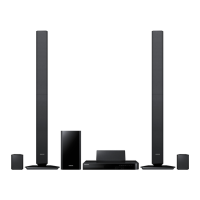
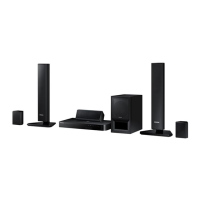
Samsung HT-H4500R
38 pages
Print Icon
To Next Page IconTo Next Page
Loading...
imagine the possibilities
Thank you for purchasing this Samsung product.
To receive more complete service,
please register your product at
www.samsung.com/register
5.1CH Blu-ray™
Home Entertainment System
user manual
HT-H4500R
HT-H4550R

Questions and Answers

  • R
    Rachel MunozSep 23, 2025
    Why is the HDMI output screen abnormal on my Samsung Home Theater System?
    • A
      April PhillipsSep 23, 2025
      If random noise appears on the screen when using HDMI output with your Samsung Home Theater System, it means that your TV does not support HDCP (High-bandwidth Digital Content Protection).
  • J
    Jeffrey HolmesAug 23, 2025
    Why is my Samsung HT-H4500R Home Theater System remote control not working?
    • M
      margaret68Aug 25, 2025
      The remote control might not be working because you are operating it outside of its operational range or at an improper angle relative to the sensor. Also, check if the batteries are drained and replace them if needed.
  • L
    Lauren SweeneyAug 25, 2025
    Why is there no sound coming from my Samsung HT-H4500R Home Theater System?
    • J
      Jose HernandezAug 26, 2025
      If no sound is coming from your Samsung Home Theater System, first ensure that the speakers are connected properly. Confirm that the speaker setup is correctly customized. Also, check the disc for severe damage. Note that the home cinema does not play sound during fast playback, slow playback, and step motion playback.
  • P
    Paul MunozAug 27, 2025
    Why is there no HDMI output from my Samsung HT-H4500R Home Theater System?
    • Y
      yandersonAug 27, 2025
      If you're not getting any HDMI output from your Samsung Home Theater System, first check the connection between the TV and the HDMI jack on the product. Also, confirm that your TV supports the HDMI input resolution (576p/480p/720p/1080i/1080p).
  • X
    xjamesAug 27, 2025
    Why is Dolby Digital 5.1 CH Surround Sound not working on my Samsung HT-H4500R?
    • L
      Lauren LopezAug 27, 2025
      If Dolby Digital 5.1 CH Surround Sound isn't being produced by your Samsung Home Theater System, check if the disc has the "Dolby Digital 5.1 CH" mark. Also, confirm that the audio language is correctly set to Dolby Digital 5.1-CH in the information display.
  • E
    Erin LeSep 17, 2025
    Why can't the aspect ratio be changed on my Samsung HT-H4500R?
    • J
      Joshua CooperSep 18, 2025
      You can play 16:9 Blu-ray/DVD discs in 16:9 Full mode, 4:3 Letter Box mode, or 4:3 Pan-Scan mode on your Samsung Home Theater System, but 4:3 Blu-ray/DVD discs are played in 4:3 ratio only. Refer to the Blu-ray Disc jacket and then select the appropriate function.
  • S
    Stacey MolinaSep 14, 2025
    Why is there no sound when listening to TV audio through my Samsung Home Theater System?
    • N
      Nicholas AllenSep 14, 2025
      If you're not hearing sound while listening to TV audio through your Samsung Home Theater System, pressing the OPEN/CLOSE ^ button while using the D. IN or AUX functions will turn on the Blu-ray/DVD disc functions and mute the TV audio.
  • P
    Paul CookSep 15, 2025
    How do I reset the rating level password on my Samsung HT-H4500R Home Theater System?
    • D
      daniel25Sep 15, 2025
      To reset the rating level password on your Samsung Home Theater System, remove any disc from the product, then press and hold the 5 button on the product for longer than 5 seconds. INIT will appear on the display, and all settings will return to the default values. Note: This will erase all stored settings, so only use this if necessary.
  • K
    Kent HernandezSep 6, 2025
    Why does playback not start immediately on my Samsung HT-H4500R Home Theater System?
    • R
      Rhonda MaciasSep 6, 2025
      If playback doesn't start immediately when you press the Play/Pause button on your Samsung Home Theater System, it might be due to a deformed disc or a disc with scratches. Try wiping the disc clean.
  • M
    mezagrantSep 3, 2025
    Why is sound only coming from a few speakers on my Samsung Home Theater System?
    • D
      Destiny GravesSep 3, 2025
      If sound is only coming from a few speakers on your Samsung Home Theater System, verify that the speakers are connected properly and adjust the volume. On certain Blu-ray/DVD discs, sound is output from the front speakers only. Also, when playing audio from a CD, the radio, or a TV, the unit outputs sound to the front speakers only.

Summary

Safety Information

Safety Precautions and Warnings

Covers general warnings, electrical shock risks, and laser safety.

Laser Product Classification

Details the Class 1 Laser Product designation and associated cautions.

Getting Started

Connections

Connecting the Speakers

Provides guidance on speaker placement, listening position, and connection.

Connecting to TV and External Devices

Details methods for connecting the home cinema to a TV and other audio/video components.

Settings

Initial Settings Procedure

Guides users through the first-time setup process for language, TV aspect, and network.

Media Play

Playing Files from USB Devices

Instructions for playing video, photo, and music files from a connected USB drive.

Video Playback Control

Details playback functions like play, pause, stop, fast motion, slow motion, and step motion.

Appendix

Troubleshooting Common Issues

Guides on resolving common problems like disc eject, playback start, sound production, and speaker output.

Troubleshooting Connectivity and Features

Addresses issues with remote control, menus, aspect ratio, network, and BD-LIVE.

Troubleshooting Network and DLNA

Resolves problems with HDMI output, DLNA function, video intermittency, and BD-LIVE server connection.

Samsung HT-H4500R Specifications

General IconGeneral
Disc types supportedCD-R, CD-RW, DVD+R, DVD+RW, DVD-R, DVD-RW
Playback disc formatsBlu-Ray video, VCD
Optical disc player typeBlu-Ray player
Built-in HDDNo
Image formats supportedJPG
Apple docking compatibilityNot supported
3DYes
Video formats supportedAVCHD, DIVX, DIVX HD, MKV, WMV, WMV7, WMV9
Analog signal format systemPAL
Audio decodersDolby Digital, Dolby TrueHD, DTS, DTS 96/24, DTS-HD
RMS rated power500 W
Audio output channels5.1 channels
Audio formats supportedAAC, FLAC, LPCM, MP3, WMA
Surround modes quantity8
Subwoofer typePassive subwoofer
Wireless subwoofer-
Product colorBlack
Consumer Electronics Control (CEC)Anynet+
HDMI in0
Number of HDMI outputs1
Power consumption (standby)0.5 W
Power consumption (typical)59 W
Package weight9000 g
Weight and Dimensions IconWeight and Dimensions
Main unit weight2300 g
Subwoofer weight2900 g
Center speaker weight500 g
Main unit dimensions (WxDxH)430 x 250 x 55 mm
Subwoofer dimensions (WxDxH)155 x 285 x 300 mm
Front speaker dimensions (WxDxH)77 x 68 x 107 mm
Center speaker dimensions (WxDxH)228 x 70 x 77 mm

Related product manuals