ENG - 16
Connecting a TV or Bluetooth Device via Bluetooth
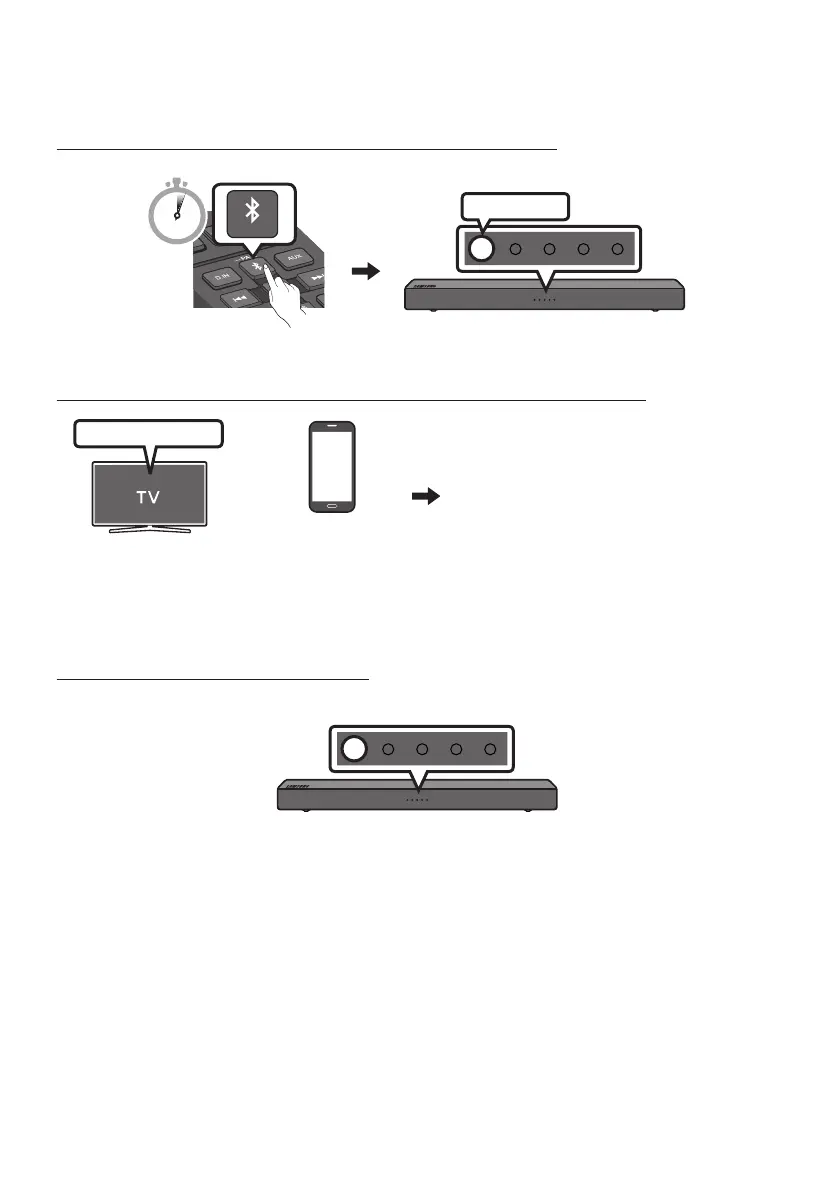
Step 1. Change the Soundbar mode to “Bluetooth Pairing”
B
Fast-Blinking
5 Sec
Step 2. Select the Soundbar in your TV’s or Bluetooth device’s Menu
Select
“[AV] Samsung Soundbar Nxxx N-Series”
Bluetooth device
(OR)
Bluetooth menu
NOTE
– You cannot connect more than one TV or Bluetooth device at a time.
Step 3. Check the Soundbar’s status
The blue LED should not be blinking once the Bluetooth connection is complete.
B
If the TV or device fails to connect
• If a previously connected Soundbar listing appears in the device list of your TV or Bluetooth device,
delete it. (e.g. “[AV] Samsung Soundbar Nxxx N-Series”)
• Then repeat steps 1 through 3.






 To Next Page