Using the device
17
Rewinding or fast forwarding the multimedia file
Press and hold the REW button or FF button to rewind or fast forward the file during
playback.
Adjusting the volume
Press the Volume button to adjust the volume.
•
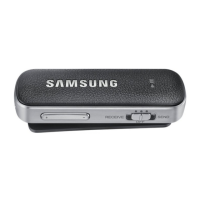
When the Level Link is connected to two devices, you can play multimedia files
from either device. To play a multimedia file from a different device, pause playback
from the other device first.
•
When you play a multimedia file from one device, you can still answer calls from
the other device.
•
If there are differences in the output power of the audio cable and the connected
audio device in sending mode, the sound volume on the Level Link may vary.
Performing a data reset
When your Level Link is connected to a device via Bluetooth, the Level Link’s information,
such as Bluetooth address and device type, is stored on the connected device. To delete
the Level Link’s connection information, press and hold the Multifunction button for
about 3 seconds to enter Bluetooth pairing mode. Then, press and hold the REW, FF, and
Multifunction buttons simultaneously for 3 seconds.


 To Next Page
 Loading...