Getting started
6
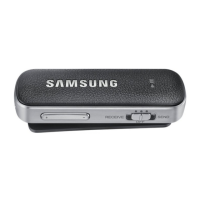
Buttons and functions
Name Function
Mode/Power
switch
•
Slide left to activate receiving mode and slide right to activate
sending mode.
•
Slide to
OFF
to turn off the device.
Call/Multifunction
button
•
In receiving mode, press and hold for 1 second to launch
S Voice
.
•
In receiving mode, press to answer or end a call.
•
In receiving mode, press and hold to reject a call.
•
In receiving mode, press and hold to transfer calls from the Level
Link to your other device, or vice versa.
•
In receiving mode, press to play or stop multimedia files.
•
In receiving mode or sending mode, press and hold for 3 seconds
to enter Bluetooth pairing mode.
Volume button
•
In receiving mode, press to adjust the volume during a call.
•
In receiving mode, press to adjust the volume while playing
multimedia files.
REW button / FF
buttons
•
In receiving mode, press to play the previous or next multimedia
file during playback.
•
In receiving mode, press and hold to rewind or fast forward a
multimedia file during playback.
Status indicator
Status Colour
Bluetooth pairing
mode
•
Flashing red, green, and blue
Power on or
activate modes
•
Flashing blue 3 times
Power off
•
Flashing red 3 times
Incoming call
•
Flashing blue


 To Next Page