8
3
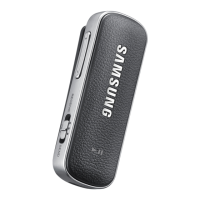
Place your Level Link within 30 cm of the paired audio device.
The Level Link and the audio device are now connected via Bluetooth.
4
Plug the audio cable into the audio input jack of the Level Link.
5
Plug the other end of the audio cable into the audio input jack of the multimedia
player.
•
When using the Level Link with a TV, turn down the TV’s volume before
unplugging the audio cable to prevent sudden, loud sounds.
•
When the Level Link is connected to a TV in sending mode, lipsync
problems may occur. It is recommended to connect the Level Link to a TV
that supports the aptX Low Latency codec.
Connecting additional devices
You can activate multi-pairing mode to connect your Level Link to additional
Bluetooth devices. For more information, refer to the user manual.


 To Next Page