EasyManua.ls Logo

Samsung MAX-485 - Disassembly Instruction

Samsung MAX-485
69 pages
Print Icon
To Next Page IconTo Next Page
To Previous Page IconTo Previous Page
Loading...
5.
Disassembly
instruction
Before
you
start
the
disassembly,
disconnect
power
cord.
5-1.
Amp
&
Tuner
section
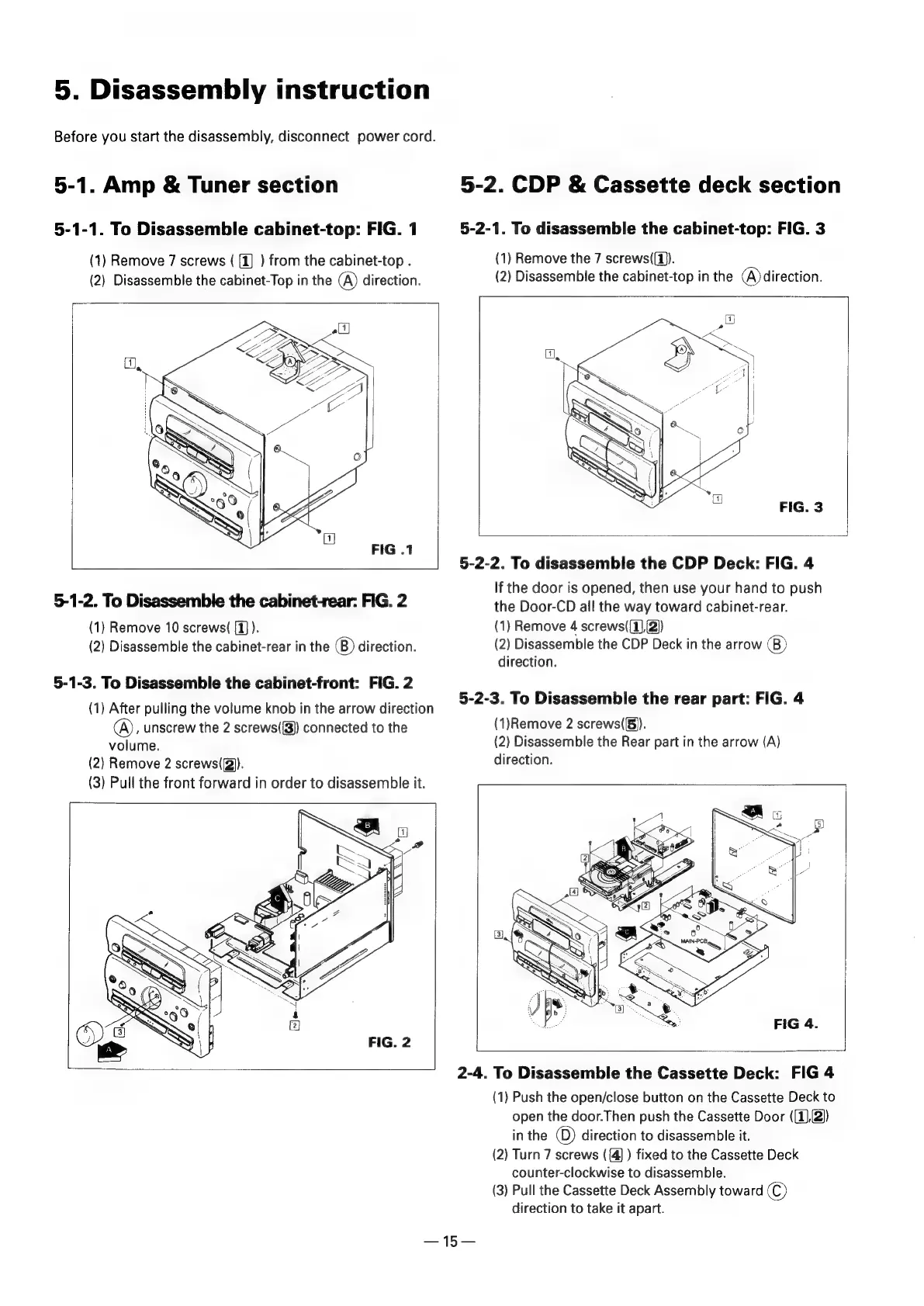
5-1-1.
To
Disassemble
cabinet-top:
FIG.
1
(1)
Remove
7
screws
(
[1]
)
from
the
cabinet-top
.
(2}
Disassemble
the
cabinet-Top
in
the
A)
direction.
5-1-2.
To
Disassemble
the
cabinet-rear:
FIG.
2
{1}
Remove
10
screws(
(1)
).
(2)
Disassemble
the
cabinet-rear
in
the
(B)
direction.
5-1-3.
To
Disassemble
the
cabinet-front:
FIG.
2
(1)
After
pulling
the
volume
knob
in
the
arrow
direction
(A),
unscrew
the
2
screws({8))
connected
to
the
volume.
(2)
Remove
2
screws((2)).
(3)
Pull
the
front
forward
in
order
to
disassemble
it.
5-2.
CDP
&
Cassette
deck
section
5-2-1.
To
disassemble
the
cabinet-top:
FIG.
3
(1)
Remove
the
7
screws((1)).
(2)
Disassemble
the
cabinet-top
in
the
(A)
direction.
FIG.
3
5-2-2.
To
disassemble
the
CDP
Deck:
FIG.
4
If
the
door
is
opened,
then
use
your
hand
to
push
the
Door-CD
all
the
way
toward
cabinet-rear.
(1)
Remove
4
screws((1),(2))
(2)
Disassemble
the
CDP
Deck
in
the
arrow
(B)
direction.
5-2-3.
To
Disassemble
the
rear
part:
FIG.
4
(1)Remove
2
screws(5)).
(2)
Disassemble
the
Rear
part
in
the
arrow
(A)
direction.
2-4.
To
Disassemble
the
Cassette
Deck:
FIG
4
(1)
Push
the
open/close
button
on
the
Cassette
Deck
to
open
the
door.Then
push
the
Cassette
Door
((1),2))
inthe
()
direction
to
disassemble
it.
(2)
Turn
7
screws
({4]
)
fixed
to
the
Cassette
Deck
counter-clockwise
to
disassemble.
(3)
Pull
the
Cassette
Deck
Assembly
toward
©)
direction
to
take
it
apart.

Related product manuals