EasyManua.ls Logo

Samsung MAX-555 - Disassembly Instruction

Samsung MAX-555
55 pages
Print Icon
To Next Page IconTo Next Page
To Previous Page IconTo Previous Page
Loading...
2.
Disassembly
instruction
Remove
the
plug
from
the
wall
outlet
before
disassem-
bling
the
unit.
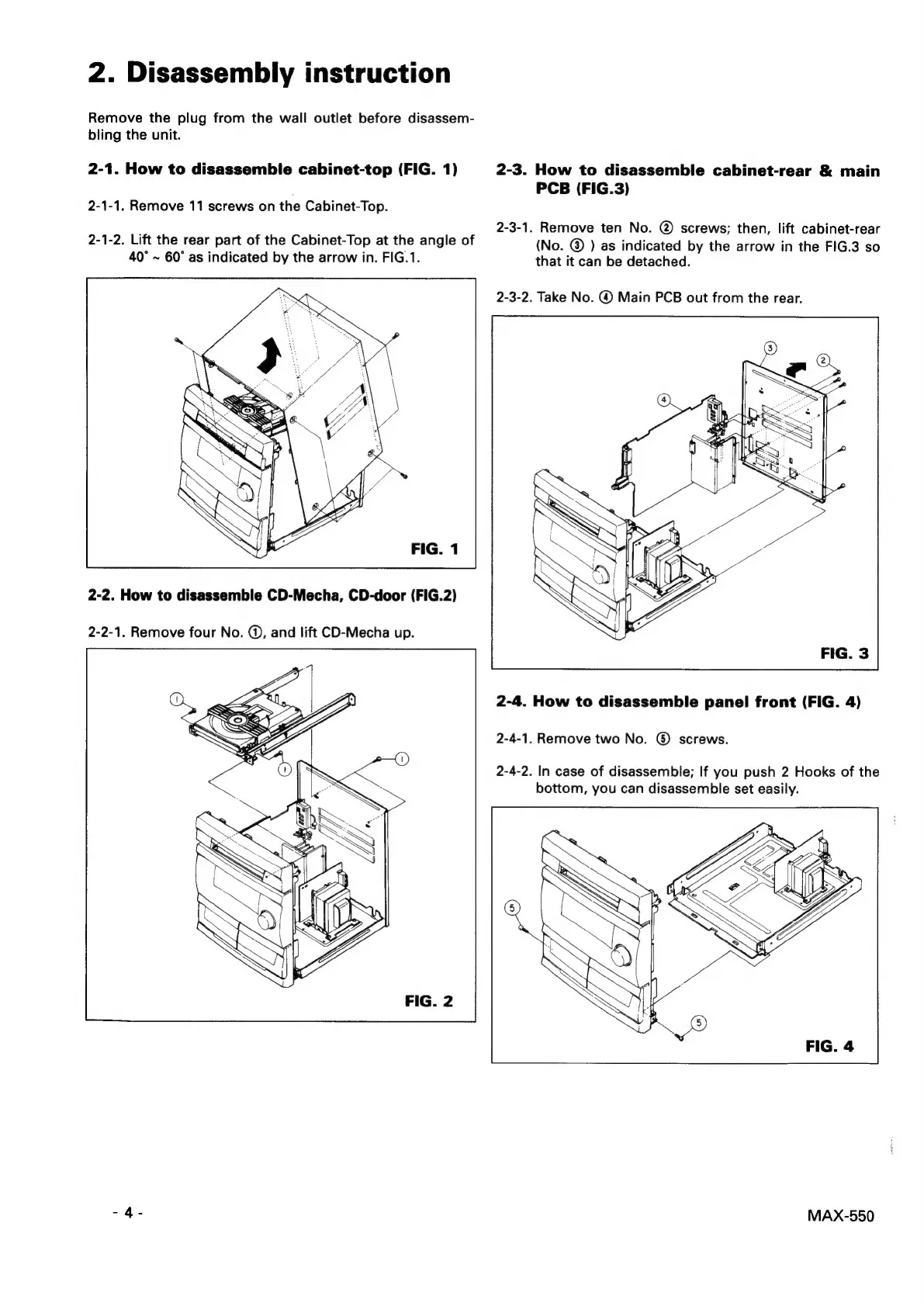
2-1.
How
to
disassemble
cabinet-top
(FIG.
1)
2-1-1.
Remove
11
screws
on
the
Cabinet-Top.
2-1-2.
Lift
the
rear
part
of
the
Cabinet-Top
at
the
angle
of
40°
~
60°
as
indicated
by
the
arrow
in.
FIG.1.
2-2.
How
to
disassemble
CD-Mecha,
CD-door
(FIG.2)
2-2-1.
Remove
four
No.
@,
and
lift
CD-Mecha
up.
2-3.
How
to
disassemble
cabinet-rear
&
main
PCB
(FIG.3)
2-3-1.
Remove
ten
No.
@
screws;
then,
lift
cabinet-rear
(No.
©
)
as
indicated
by
the
arrow
in
the
FIG.3
so
that
it
can
be
detached.
2-3-2.
Take
No.
©
Main
PCB
out
from
the
rear.
2-4.
How
to
disassemble
panel
front
(FIG.
4)
2-4-1.
Remove
two
No.
®
screws.
2-4-2.
In
case
of
disassemble;
If
you
push
2
Hooks
of
the
bottom,
you
can
disassemble
set
easily.
MAX-550

Related product manuals