EasyManua.ls Logo

Samsung MAX-DS750 - User Manual

Samsung MAX-DS750
34 pages
Print Icon
To Next Page IconTo Next Page
Loading...
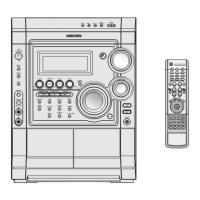
Instruction Manual
THREE-CD CHANGER
DVD MINI-COMPACT
SYSTEM
MAX-DS750
MAX-Ds750 GB-1~24 5/22/03 10:44 Page 1

Table of Contents

Question and Answer IconNeed help?

Do you have a question about the Samsung MAX-DS750 and is the answer not in the manual?

Summary

Safety Warnings

System Overview

Front Panel View

Diagram and labels of the unit's front panel controls.

Display Window Indicators

Explanation of symbols and indicators shown in the unit's display.

Remote Control Operation

Overview of the remote control buttons and their functions.

Insert Remote Batteries

Instructions for inserting batteries into the remote control.

Rear Panel Connections

Diagram and labels for rear panel connection terminals and ports.

Installation and Connections

System Installation and Power

Where to install the system and how to connect it to power.

Speaker and Audio Connectivity

Connecting main speakers, subwoofer, and other audio sources.

Antenna Setup

Instructions for connecting AM, FM, and optional SW aerials.

System Setup and Clock

Set System Clock

Guide to setting the system's internal clock for automatic operation.

Set Video Output Standard

Method for selecting the video output standard (NTSC/PAL/SECAM).

Disc Playback Operations

Basic Disc Playback

Steps for loading and playing discs, including DVD playback.

Advanced Playback Controls

Using search, skip, and frame-by-frame playback features.

Repeat and Time Management

Features for repeat playback and checking remaining time.

Menu Navigation and Program Playback

Using disc menus, titles, and programming track playback.

Audio and MP3 Playback

Language Selection

Choosing preferred audio and subtitle languages for DVDs.

MP3 Playback Functions

How to play MP3 files, including compatibility and operations.

System Configuration and Radio

System Setup Options

Configuring TV screen ratio, rating levels, and digital output.

Radio Tuning and Storage

Searching for, storing, and selecting radio stations.

Cassette and Recording Functions

Listen to Cassettes

Steps for playing audio cassettes in deck 1 or 2.

Recording from CD;Radio

Recording CD tracks or radio programs onto cassettes.

Cassette Dubbing

Transferring audio from one cassette to another.

Timer and Sound Features

Timer Function

Programming the system to turn on or off automatically.

Sound Enhancement Options

Using 3D Sound, Equalizer presets, and Power Surround.

System Operation and Maintenance

Sleep Timer and Headphones

Setting the sleep timer and connecting headphones.

Microphone and Subwoofer Levels

Using the microphone and adjusting subwoofer volume.

External Sources and Safety

Connecting external devices and general safety precautions.

Cleaning and Troubleshooting

Maintaining the system and resolving common problems.

Technical Specifications

Glossary of Terms

Summary

Safety Warnings

System Overview

Front Panel View

Diagram and labels of the unit's front panel controls.

Display Window Indicators

Explanation of symbols and indicators shown in the unit's display.

Remote Control Operation

Overview of the remote control buttons and their functions.

Insert Remote Batteries

Instructions for inserting batteries into the remote control.

Rear Panel Connections

Diagram and labels for rear panel connection terminals and ports.

Installation and Connections

System Installation and Power

Where to install the system and how to connect it to power.

Speaker and Audio Connectivity

Connecting main speakers, subwoofer, and other audio sources.

Antenna Setup

Instructions for connecting AM, FM, and optional SW aerials.

System Setup and Clock

Set System Clock

Guide to setting the system's internal clock for automatic operation.

Set Video Output Standard

Method for selecting the video output standard (NTSC/PAL/SECAM).

Disc Playback Operations

Basic Disc Playback

Steps for loading and playing discs, including DVD playback.

Advanced Playback Controls

Using search, skip, and frame-by-frame playback features.

Repeat and Time Management

Features for repeat playback and checking remaining time.

Menu Navigation and Program Playback

Using disc menus, titles, and programming track playback.

Audio and MP3 Playback

Language Selection

Choosing preferred audio and subtitle languages for DVDs.

MP3 Playback Functions

How to play MP3 files, including compatibility and operations.

System Configuration and Radio

System Setup Options

Configuring TV screen ratio, rating levels, and digital output.

Radio Tuning and Storage

Searching for, storing, and selecting radio stations.

Cassette and Recording Functions

Listen to Cassettes

Steps for playing audio cassettes in deck 1 or 2.

Recording from CD;Radio

Recording CD tracks or radio programs onto cassettes.

Cassette Dubbing

Transferring audio from one cassette to another.

Timer and Sound Features

Timer Function

Programming the system to turn on or off automatically.

Sound Enhancement Options

Using 3D Sound, Equalizer presets, and Power Surround.

System Operation and Maintenance

Sleep Timer and Headphones

Setting the sleep timer and connecting headphones.

Microphone and Subwoofer Levels

Using the microphone and adjusting subwoofer volume.

External Sources and Safety

Connecting external devices and general safety precautions.

Cleaning and Troubleshooting

Maintaining the system and resolving common problems.

Technical Specifications

Glossary of Terms

Samsung MAX-DS750 Specifications

General IconGeneral
BrandSamsung
ModelMAX-DS750
CategoryStereo System
Audio Output ModeStereo
CD PlayerYes
RadioYes
TypeMini Hi-Fi System
Playable MediaCD-R, CD-RW
Tuner BandsAM/FM
Cassette DeckYes
Speakers2

Related product manuals