English - 7
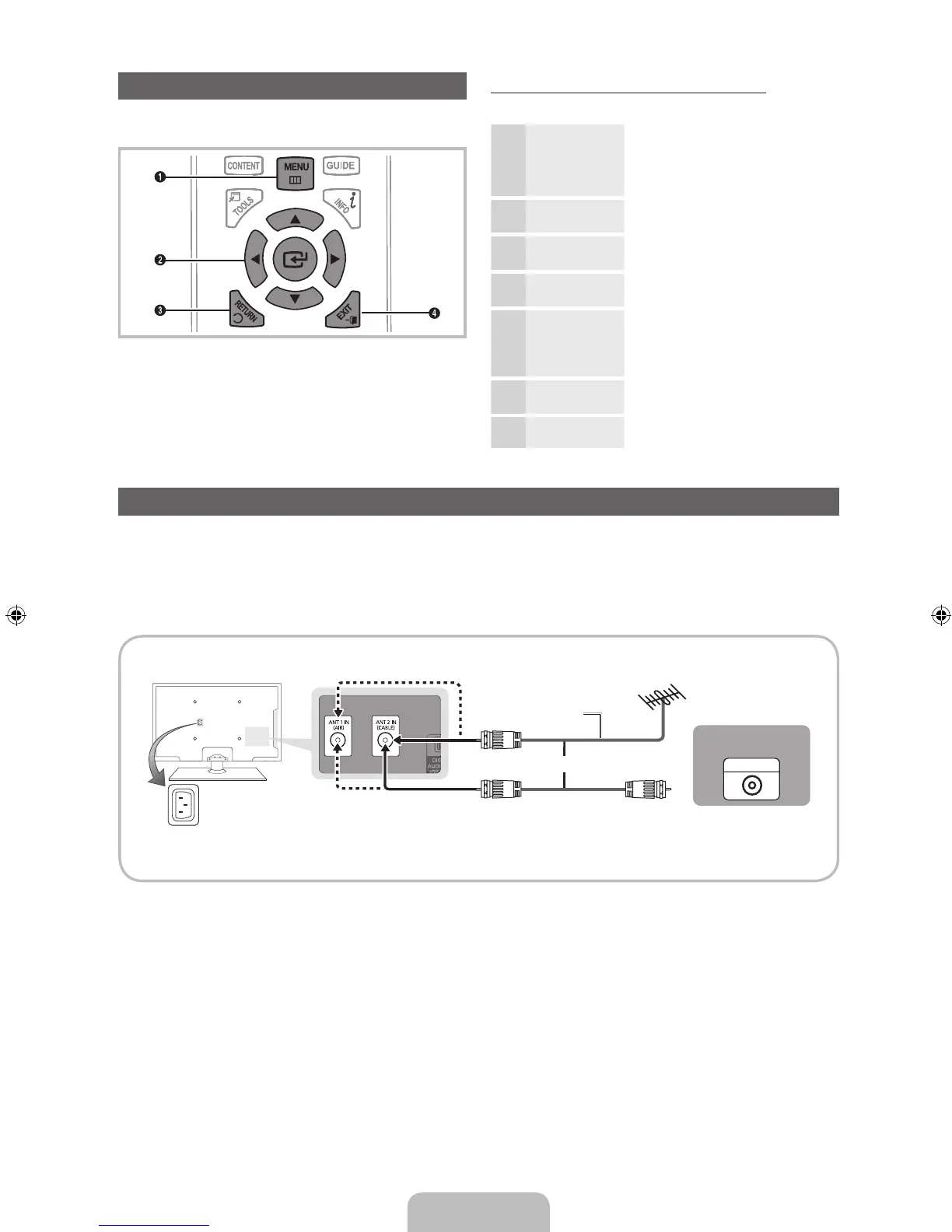
How to Navigate Menus
Before using the TV, follow the steps below to learn how to
navigate the menu and select and adjust different functions.
1 MENU button: Displays the main on-screen menu.
2 ENTER
E
/ Direction button: Move the cursor and
select an item. Confirm the setting.
3 RETURN button: Returns to the previous menu.
4 EXIT button: Exits the on-screen menu.
How to Operate the OSD (On Screen Display)
The access step may differ depending on the selected menu.
1
MENU The main menu options appear on
the screen:
Picture, Sound, Channel,
System, Support.
2
▲ / ▼ Select an icon with the ▲ or ▼
button.
3
ENTER
E
Press ENTER
E
to access the
sub-menu.
4
▲ / ▼
Select the desired submenu with
the ▲ or ▼ button.
5
◄ / ►
Adjust the value of an item with the
◄ or ► button. The adjustment in
the OSD may differ depending on
the selected menu.
6
ENTER
E
Press ENTER
E
to confirm the
selection.
7
EXIT
e
Press EXIT.
Connecting to an Antenna
When the TV is initially powered on, basic settings proceed automatically.
✎
Connecting the power cord and antenna.
✎
The PDP device may interfere with an amateur radio or AM radio.
✎
When using two-way radio mobile and portable units or amateur radio or AM radio near by your TV, this may cause the
TV to malfunction.
ANT OUT
VHF/UHF Antenna
Power Input
or
Cable
Antenna Cable (Not Supplied)
[PD490-ZD]BN68-03500A-00L02.indb 7 2011-02-25 오후 5:12:31



 To Next Page