English 67
Maintenance
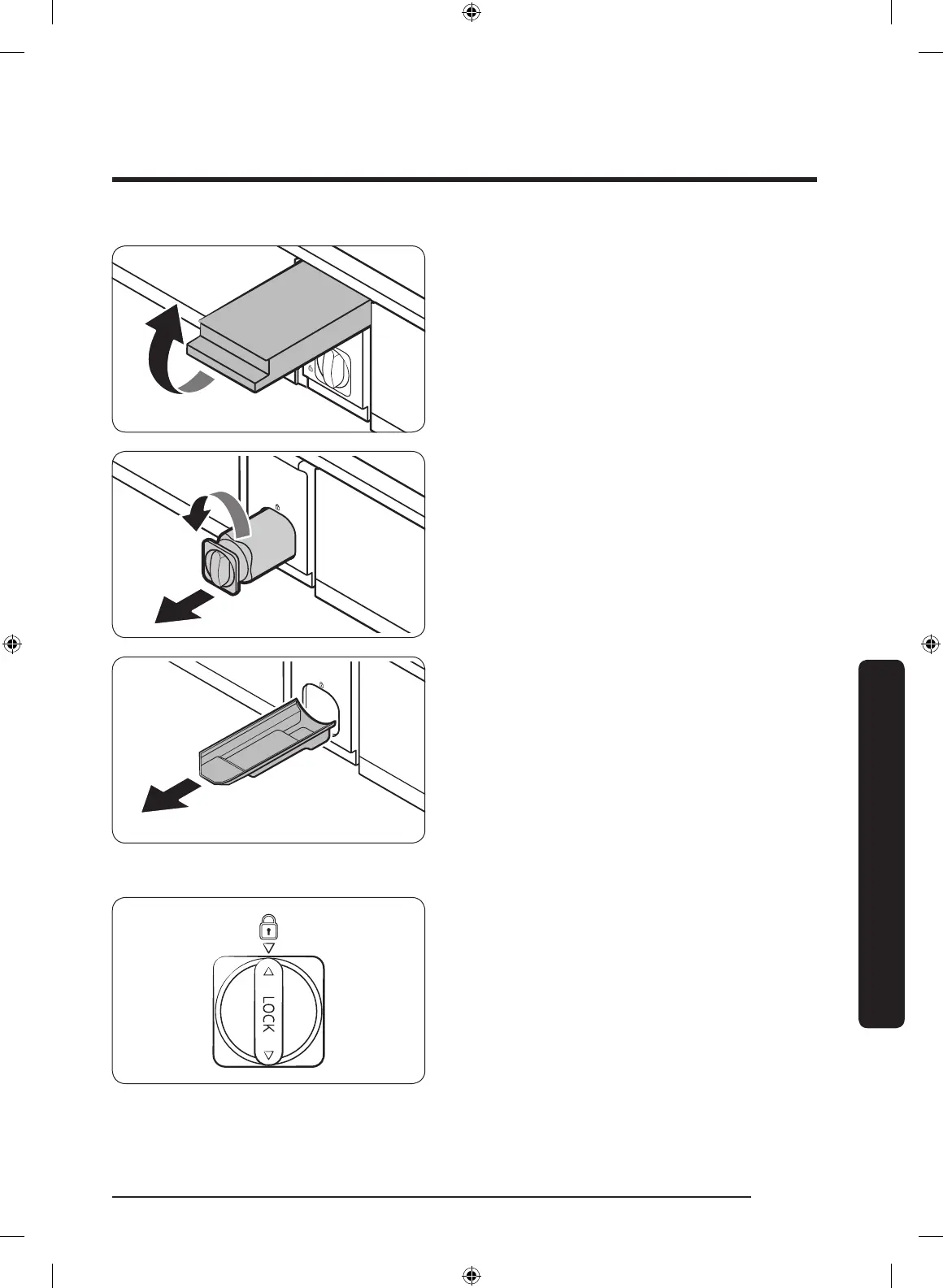
1. Shut off the water supply line.
2. Open the lter cartridge cover.
3. Turn the knob of the lter cartridge
counter clockwise 90 degrees (
1
/4 turn).
The lter cartridge unlocks.
4. Pull out to remove the cartridge.
- If the water lter is severely
contaminated, the cartridge may not
be easy to remove. If that is the case,
use force to remove the cartridge.
- To prevent water leaks from the
lter opening, pull the cartridge
straight out while removing it.
5. Insert a new lter cartridge. Use only
Samsung-provided or approved lters.
6. Turn the cartridge knob clockwise to
lock into place.
7. Close the lter cartridge cover.
8. On the control panel, go to More
Options, and then run Filter Reset.
Untitled-6 67 2021-04-14 8:23:15



 To Next Page