Operations
English70
Operations
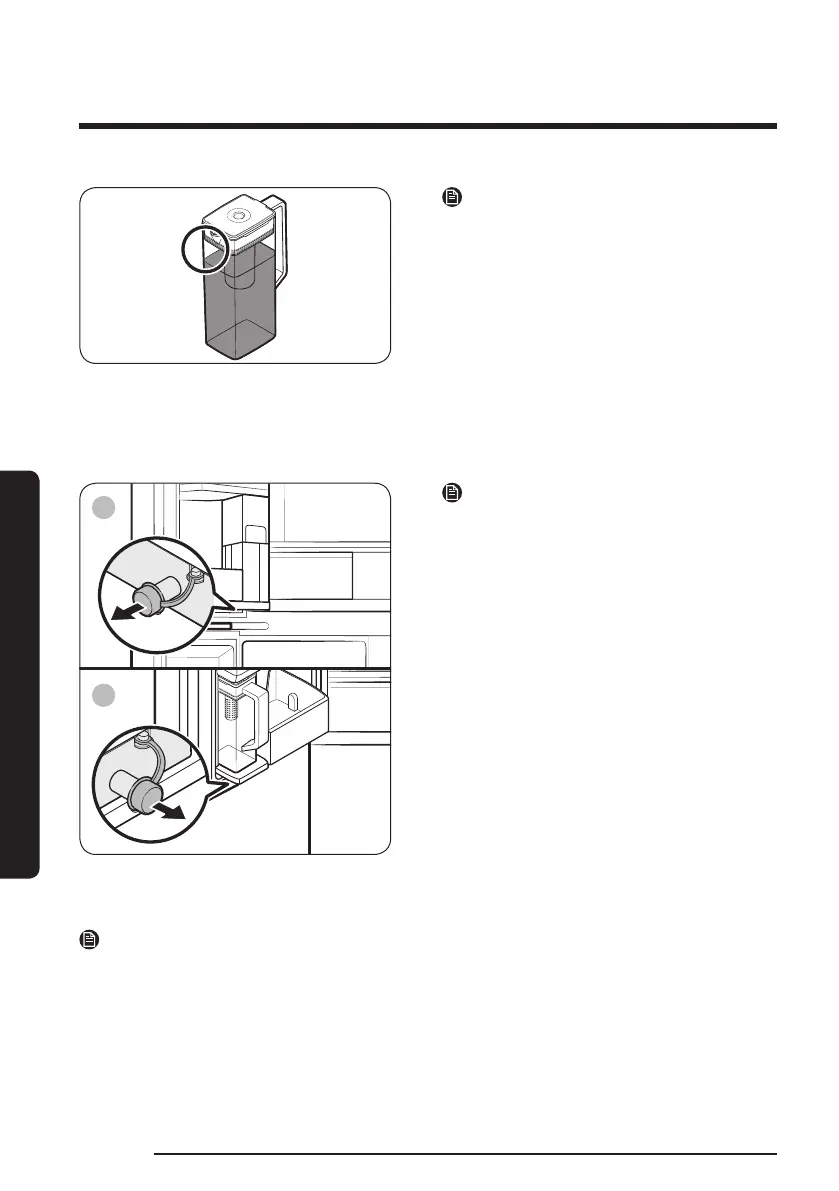
NOTE
• If the front side (specically marked
area) of the water pitcher has too much
moisture, the water pitcher may not
fully ll. Remove the moisture, and then
try again.
• Autoll Pitcher function will stop
supplying water to the water pitcher if
the water pitcher does not ll after a
certain amount of time. If this happens,
check if the water line is properly
connected. Remove and reinsert the
water pitcher, and then try again.
A. Type A models
B. Type B models
NOTE
• Wipe around the water pitcher holder if
the water pitcher overows or leaks.
• Water drops off if the rubber cap is
opened.
• An alert appears on the main panel if
there is a leak. In case of a leak, open
the rubber cap so that the leaked water
drains. If the alert does not disappear
after draining, there might be a system
failure. Contact your local Samsung
service center.
NOTE
• You must clean the water pitcher after you have consumed the infused water. You must
also clean the water pitcher if you have not used it for a long time or left the pitcher
full for more than three days.
• If the infuser is not properly cleaned, the scent of the tea or fruits you previously used
in the infuser may remain. If you are not going to use the infuser, separate it from the
pitcher and store it safely.
• If you have not used the water lter for a long time, dump out the rst two pitchers of
water. Then, clean the water pitcher thoroughly and use it.



 To Next Page