28
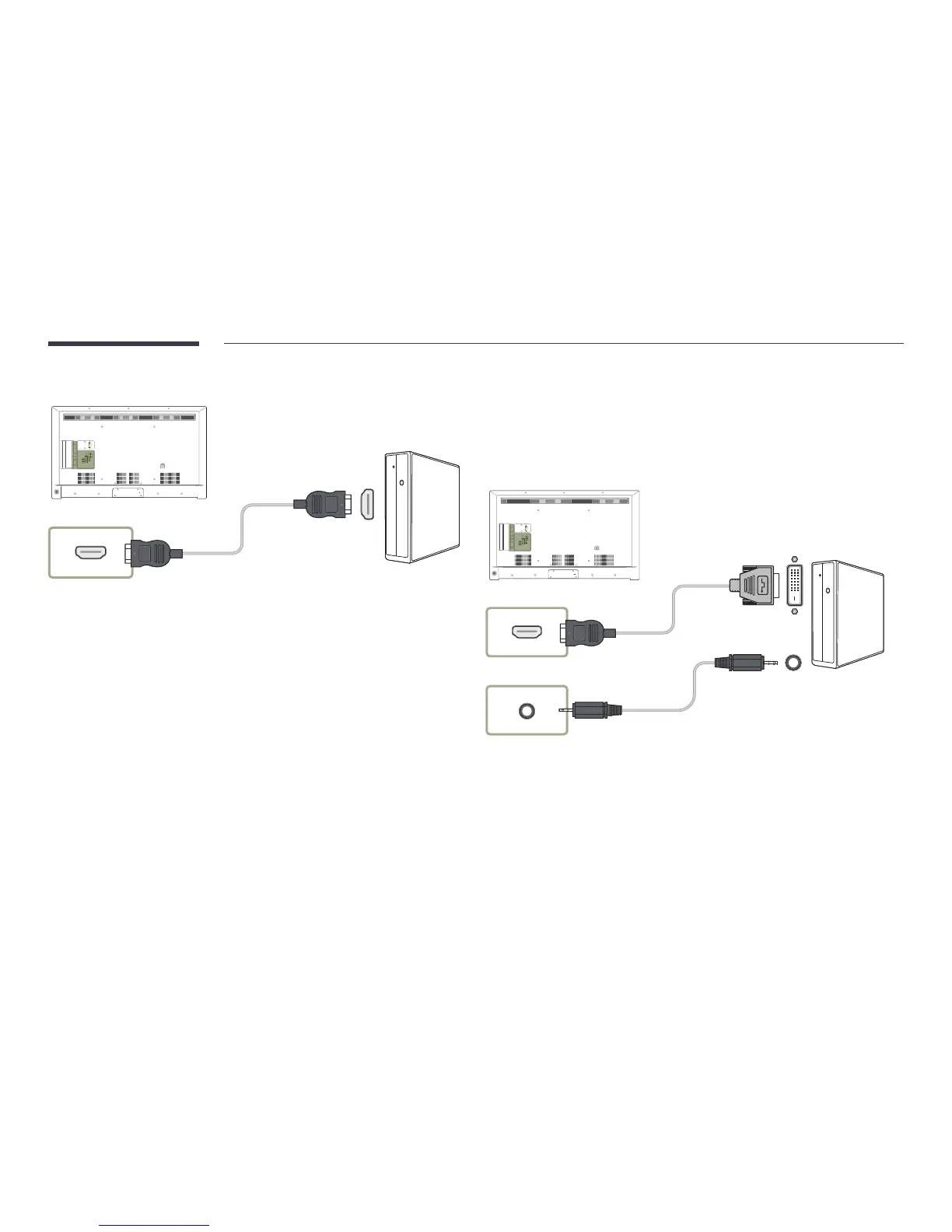
Connection Using an HDMI Cable
HDMI 1, HDMI 2 (ARC), HDMI 3
PC IN
LAN
USB
(0.5A)
USB
(1.0A)
HDMI 1
ANT IN
HDMI 2
(ARC)
HDMI 3
AV IN
PC
AUDIO
IN
AUDIO
OUT
RS232C IN
VIDEO
AUDIO
RL
Connection Using an HDMI-DVI Cable
After connecting a computer to the product with an HDMI-DVI cable, make sure to configure the settings
as shown below to enable the video and audio from the computer.
•
Sound
→
set HDMI Sound to PC(DVI)
•
Picture
→
set each screen mode to Text under Picture Mode
•
System
→
General
→
set HDMI Hot Plug to Off
HDMI 1, HDMI 2 (ARC), HDMI 3
PC AUDIO IN
PC IN
LAN
USB
(0.5A)
USB
(1.0A)
HDMI 1
ANT IN
HDMI 2
(ARC)
HDMI 3
AV IN
PC
AUDIO
IN
AUDIO
OUT
RS232C IN
VIDEO
AUDIO
RL



 To Next Page