EasyManua.ls Logo

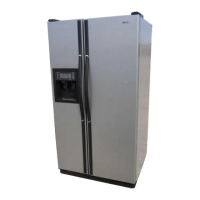
Samsung RS23A500A Series - User Manual

Samsung RS23A500A Series
196 pages
Print Icon
To Next Page IconTo Next Page
Loading...
Refrigerator
User manual
RS28A500A**/RS23A500A**
Free Standing Appliance
Untitled-1 1 2020-12-31  2:29:10

Table of Contents

Questions and Answers

  • D
    Deborah FosterAug 17, 2025
    Why is my Samsung RS23A500A Refrigerator not cold enough?
    • J
      Janet PattonAug 17, 2025
      If your Samsung Refrigerator is not cooling properly, there are several potential causes. First, ensure the power cord is correctly plugged in. Next, check the temperature control and set it to a lower setting if needed. Also, make sure that the refrigerator isn't near a heat source or direct sunlight. Ensure there's enough clearance (more than 2" or 50 mm) between the refrigerator and nearby walls or cabinets. Finally, avoid overloading the refrigerator and ensure that food isn't blocking the vents.
  • J
    Jamie ChavezAug 19, 2025
    Why is my Samsung Refrigerator ice maker not working?
    • B
      Brittany YangAug 19, 2025
      If your Samsung Refrigerator's ice maker isn't producing ice, consider these possibilities: If the refrigerator was just installed, allow 12 hours for ice production to begin. Ensure the freezer temperature is set below 0 °F (-18 °C), or even -4 °F (-20 °C) in warmer environments. Also, verify that the ice maker is turned on.
  • T
    Tiffany ReedAug 23, 2025
    Why won't my Samsung Refrigerator dispense water?
    • K
      Karen PayneAug 23, 2025
      If water isn't dispensing from your Samsung Refrigerator, first check if the water line is properly connected and the water supply is turned on. If you've installed a third-party water filter, replace it with a Samsung-provided or approved filter to prevent leaks and damage. If the water filter indicator is on or blinking, replace the water filter and reset the filter indicator sensor.
  • C
    Carol ShawAug 26, 2025
    What to do if ice won't dispense from my Samsung Refrigerator?
    • S
      Steven WilsonAug 26, 2025
      If ice is not dispensing from your Samsung Refrigerator, the ice may be jammed due to infrequent use; if you won't be using the refrigerator for about three weeks, empty the ice bucket and turn off the ice maker. Check that the ice bucket is correctly inserted. Verify that the water line is properly connected and the water supply is on.
  • M
    michaelmedinaAug 28, 2025
    Why is my Samsung RS23A500A Refrigerator freezing food?
    • S
      sharonperezAug 28, 2025
      If your Samsung Fridge/Freezer is over-cooling, the temperature control may not be set correctly. Try setting the temperature higher.
  • J
    Jennifer GoldenAug 31, 2025
    How to get rid of odors in my Samsung RS23A500A Refrigerator?
    • A
      Ashley SanchezAug 31, 2025
      To eliminate odors in your Samsung Refrigerator, start by cleaning the refrigerator and removing any spoiled food. Additionally, ensure that any strong-smelling food is wrapped airtight.
  • R
    Roy ShieldsSep 2, 2025
    Why is there condensation in my Samsung RS23A500A Refrigerator?
    • M
      melaniealvarezSep 2, 2025
      Condensation on the interior walls of your Samsung Refrigerator can occur if the door is left open, allowing moisture to enter. Remove the moisture and avoid leaving the door open for extended periods. Also, ensure food with high moisture content is wrapped airtight.
  • J
    Jennifer DavisSep 5, 2025
    Why is there frost on the inside of my Samsung RS23A500A Refrigerator?
    • J
      Jason LopezSep 5, 2025
      If you notice frost on the interior walls of your Samsung Refrigerator, it may be caused by the door not closing properly. Make sure food isn't blocking the door and clean the door gasket.
  • D
    deborah24Sep 8, 2025
    Why is the water flow weak in my Samsung RS23A500A Refrigerator?
    • W
      wjoyceSep 8, 2025
      If the water flow from your Samsung Refrigerator is weaker than normal, the water pressure may be too low. Ensure that the water pressure is between 20 and 125 psi (138 and 862 kPa).
  • K
    Kristy MitchellSep 12, 2025
    Why is there frost around the vents in my Samsung RS23A500A?
    • K
      Kimberly LawrenceSep 12, 2025
      If you see frost around the vents in your Samsung Refrigerator, it's likely due to food blocking the vents. Ensure that no food is obstructing the refrigerator vents.

Summary

Safety Information

Important Safety Symbols and Precautions

Covers important safety symbols, general precautions, and the California Proposition 65 warning.

State of California Proposition 65 Warning

Specific warning regarding cancer and reproductive harm as per California law.

Severe Warning Signs for Transportation and Site

Highlights critical warning signs related to the transportation and installation site.

Critical Installation Warnings

Details specific warnings and precautions for the proper installation of the refrigerator.

Critical Usage Warnings

Outlines critical warnings to ensure safe operation and prevent hazards during use.

Usage Cautions

Offers cautions for the proper and safe usage of the refrigerator's features.

Cleaning Cautions

Provides essential cautions to follow when cleaning the refrigerator.

Critical Disposal Warnings

Warns about hazards and procedures for the safe disposal of the refrigerator.

Installation

Refrigerator at a Glance

Overview of the refrigerator's main components and features with labeled parts.

Site Selection and Clearance Requirements

Guidelines for choosing an installation site and required clearances for proper ventilation.

Door Removal for Narrow Entrances

Procedure for removing refrigerator doors to fit through doorways.

Water Line Connection and Door Reattachment

Steps to reconnect water hoses and reattach the refrigerator doors correctly.

Leveling and Door Height Adjustment

Instructions for leveling the refrigerator and adjusting door height for proper function.

Connecting the Water Dispenser Line

Guide for connecting the water supply line to the dispenser and ice maker.

Initial Setup and Final Checks

Steps for initial settings, power-on, and performing final checks after installation.

Operations

Feature Panel and Basic Controls

Explanation of the main control panel, buttons, and temperature settings.

Advanced Cooling and Ice Making Functions

Details Power Cool, Power Freeze, Ice Maker operation, and Filter Reset.

Smart Features and Modes

Covers Door Alarm, Lock, Sabbath Mode, Cooling Off, and Network connection.

SmartThings App Integration

Guide to downloading, installing, and connecting the SmartThings app for remote control.

Energy Management and Smart Grid

Information on SMART GRID (Demand Response) and Energy Management functions.

Auto Ice Maker Operation

Specific instructions for the auto ice maker and troubleshooting common issues.

Maintenance

Auto Ice Maker Care

Instructions for removing ice and resetting the auto ice maker.

Cleaning Shelves, Bins, and Drawers

Procedures for removing and cleaning refrigerator shelves, door bins, and drawers.

Interior, Exterior, and Seal Cleaning

Guidance on cleaning the refrigerator's interior, exterior surfaces, and rubber door seals.

Water Filter Replacement Procedure

Detailed steps for replacing the water filter and resetting the indicator.

Troubleshooting

Temperature and Cooling Issues

Troubleshooting common problems related to refrigerator and freezer temperature.

Odour, Frost, and Condensation Problems

Solutions for issues like bad odors, frost buildup, and condensation on interior walls.

Water and Ice Dispensing Issues

Diagnosing problems with water flow, ice maker sounds, and ice dispensing.

SmartThings App Troubleshooting

Resolving common issues with the SmartThings app connection and functionality.

Smart Grid Function Troubleshooting

Guidance for troubleshooting issues with Energy Management and Smart Grid features.

Limited Warranty (U.S.A.)

Warranty Coverage and Conditions

Details the warranty period, coverage, and terms for original purchasers in the U.S.A.

Warranty Exclusions and Limitations

Lists damages and circumstances not covered by the warranty and limitations of remedies.

Warranty Information (CANADA)

Canadian Warranty Terms

Specifies warranty periods, coverage, and obligations for Canadian purchasers.

Warranty Exclusions for Canada

Details damages and conditions not covered by the warranty in Canada.

Regulatory Notice

FCC Compliance Information

Provides FCC rules, compliance statements, and radiation exposure information.

IC Compliance Information

Details Industry Canada compliance, radio certification, and radiation exposure limits.

Open Source Announcement

Samsung RS23A500A Series Specifications

General IconGeneral
BrandSamsung
ModelRS23A500A Series
CategoryRefrigerator
LanguageEnglish

Related product manuals