EasyManua.ls Logo

Samsung RS265TD series - User Manual

Samsung RS265TD series
68 pages
Print Icon
To Next Page IconTo Next Page
Loading...
Refrigerator
user manual
imagine the possibilities
Thank you for purchasing this Samsung product.
To receive more complete service,
please register your product at
www.samsung.com/register
RS267TD**
RS265TD**
E nglish
Free Standing Appliance

Questions and Answers

  • C
    Carlos McdonaldJul 30, 2025
    How to fix a Samsung RS265TD that is not cooling?
    • A
      Adam HarrisJul 30, 2025
      If your Samsung Refrigerator isn't cooling properly or not working at all, first, ensure the power plug is correctly connected. Then, check the temperature control on the display panel and try setting it to a lower temperature. Also, make sure the refrigerator isn't in direct sunlight or near a heat source, and that the back of the unit has enough space for air to circulate. Finally, verify if the cooling off function is enabled and, if so, disable it.
  • M
    Michael RamirezAug 3, 2025
    What to do if ice is not dispensing from my Samsung Refrigerator?
    • M
      michael37Aug 3, 2025
      If your Samsung Refrigerator's ice dispenser isn't working, first ensure that at least 12 hours have passed after connecting the water supply line. Check that the water line is connected and the shut-off valve is open. Make sure the Ice Type is set to Cubed or Crushed and that you haven't manually stopped the ice making function. Clear any ice blockage within the ice maker bucket and ensure the freezer temperature isn't too warm by setting it lower.
  • B
    Brooke KerrAug 9, 2025
    What to do if food is freezing in my Samsung Refrigerator?
    • A
      Alyssa ByrdAug 9, 2025
      If the food in your Samsung Refrigerator is freezing, try setting the temperature control on the display panel to a warmer setting. Consider whether the room temperature is very low. Also, avoid storing food with high water content in the coldest part of the fridge.
  • D
    Danielle MedinaAug 14, 2025
    Why is the water dispenser not working on my Samsung Refrigerator?
    • M
      Michelle EdwardsAug 14, 2025
      If the water dispenser on your Samsung Refrigerator isn't working, check that the water line is properly connected and the shut-off valve is open. Make sure the water supply line tubing isn't crushed or kinked, ensuring it's free of obstructions. If the water tank is frozen due to a low refrigerator temperature, try selecting a warmer setting on the main display panel.
  • E
    emoraAug 19, 2025
    Why does my Samsung RS265TD make unusual noises?
    • L
      lmillerAug 19, 2025
      Unusual noises from your Samsung Refrigerator can often be resolved by ensuring the refrigerator is level and stable. Also, check that the back of the refrigerator isn't too close to the wall, which can restrict air circulation. Make sure nothing has fallen behind or under the refrigerator. A ticking sound is normal; it occurs as accessories contract or expand due to temperature changes inside the refrigerator.
  • S
    smithsandraAug 25, 2025
    Why are the front corners of my Samsung RS265TD hot?
    • J
      John SloanAug 25, 2025
      Some heat on the front corners of your Samsung Refrigerator is normal because anti-condensates are installed there to prevent condensation. Condensation can also occur if the refrigerator door is left ajar for an extended period.

Summary

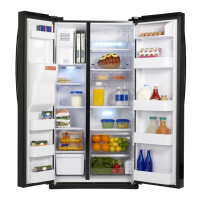
Features of Your Side-by-Side Refrigerator

Twin Cooling Plus

Dual evaporator system for efficient cooling and odor prevention.

Premium Design Ice and Water Dispenser

Easy access to filtered water and ice from the external dispenser.

External Digital Display and Control

User-friendly external display for temperature and dispenser control.

CoolSelect Zone Drawer

Specialized drawer for quick chill, thaw, and cool functions.

Safety Information

Important Safety Symbols and Precautions

Explains warning symbols and safety precautions for appliance use.

Severe Warning Signs for Installation

Details critical warnings related to the refrigerator's installation.

Caution Signs for Installation

Provides cautionary advice for the proper installation of the appliance.

Severe Warning Signs for Using

Outlines critical warnings concerning the safe operation and use of the refrigerator.

Severe Warning Signs for Using (Continued)

Continues to list crucial safety warnings for the refrigerator's operation.

Caution Signs for Using

Offers cautionary advice for the safe usage and maintenance of the refrigerator.

Caution Signs for Cleaning

Provides cautionary notes regarding the cleaning procedures for the refrigerator.

Severe Warning Signs for Disposal

Details critical safety warnings concerning the proper disposal of the refrigerator.

Setting Up Your Side-by-Side Refrigerator

Getting Ready to Install the Refrigerator

Covers essential steps and considerations before installing the refrigerator.

Setting Up the Refrigerator

Details the post-installation steps to get the refrigerator operational.

Installing the Handles

Provides instructions on how to attach the refrigerator handles.

Removing the Freezer Door

Guides on how to safely remove the freezer door for installation or service.

Removing the Fridge Door

Guides on how to safely remove the fridge door for installation or service.

Leveling the Refrigerator

Instructions on how to ensure the refrigerator is level for optimal performance.

Making Minor Adjustments to the Doors

Steps for fine-tuning door alignment and ensuring they close properly.

Checking the Water Dispenser Line

How to inspect the water line for proper connection and function.

Installing the Water Dispenser Line

Step-by-step guide for connecting the water supply line to the refrigerator.

Operating Your Side-by-Side Refrigerator

Checking the Control Panel

Overview of the refrigerator's digital control panel and its functions.

Using the Control Panel

Detailed instructions on operating various control panel functions.

Using the Ice and Cold Water Dispenser

Guide on how to use the ice and water dispenser features.

Storing Food

Recommendations for optimal food storage to maintain freshness.

Cleaning and Maintaining Your Side-by-Side Refrigerator

Removing the Freezer;Fridge Accessories

Instructions for removing internal components for cleaning or maintenance.

Cleaning the Refrigerator

Guidance on cleaning the interior and exterior surfaces of the refrigerator.

Cleaning the Interior

Detailed steps for cleaning the inside walls and accessories.

Cleaning the Exterior

Methods for cleaning the digital panel, doors, handles, and cabinet.

Cleaning the Rubber Door Seals

Advice on cleaning door seals to ensure proper closure and efficiency.

Changing the Water Filter

Step-by-step instructions for replacing the water filter.

Appendix

Troubleshooting

Common problems and their solutions for the refrigerator.

Warranty

Limited Warranty to Original Purchaser

Details the terms and conditions of the product's warranty.

Ambient Room Temperature Limits

Contact SAMSUNG WORLD WIDE

Samsung RS265TD series Specifications

General IconGeneral
BrandSamsung
ModelRS265TD series
CategoryRefrigerator
LanguageEnglish

Related product manuals