SAMSUNG S7390 - Quick Start Guide
Setting Up Your New Smartphone (Page 1 of 2)
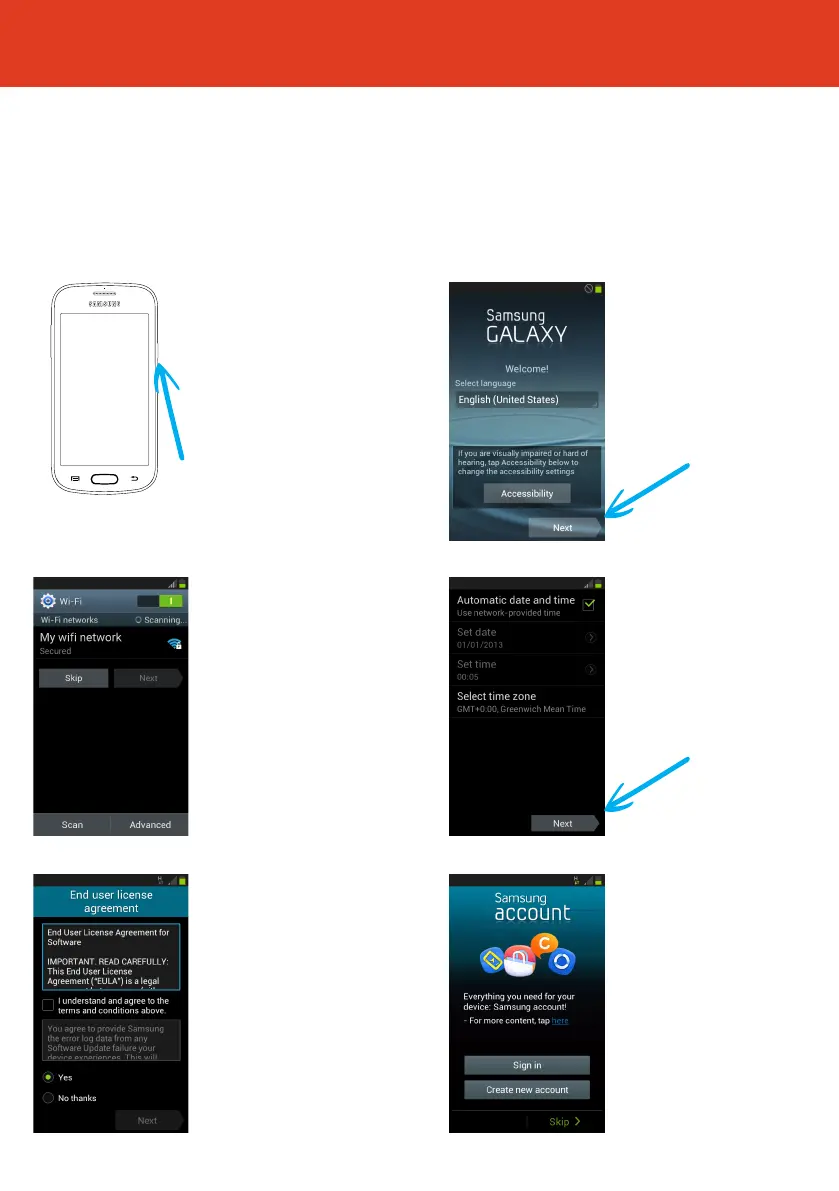
To get started with your smartphone, follow these steps:
2 First, select your
language from the
dropdown box, then tap
“Next”.
4 Choose “Automatic
date and time” or Select
your preferred time zone
and then tap “Next”.
6 Now sign in or set up
a Samsung account. If you
do not want a Samsung
account, tap “Skip”.
(A Samsung account isn’t
essential to operate the
phone).
3 Set up a wi
connection.
(or skip this step and
set up later if wi isn’t
available).
5 Read through the end
user license agreement.
Then tick the box “I
understand and agree to
the terms and conditions
above.”
Then choose whether
or not you want to send
Samsung error log data
click tapping either “Yes”
or “No thanks”. Then tap
“Next”.
QS41 Ver25MAY2015
1 To turn the phone on
press and hold the power
button on the top right
hand side of the phone.



 To Next Page