6
6
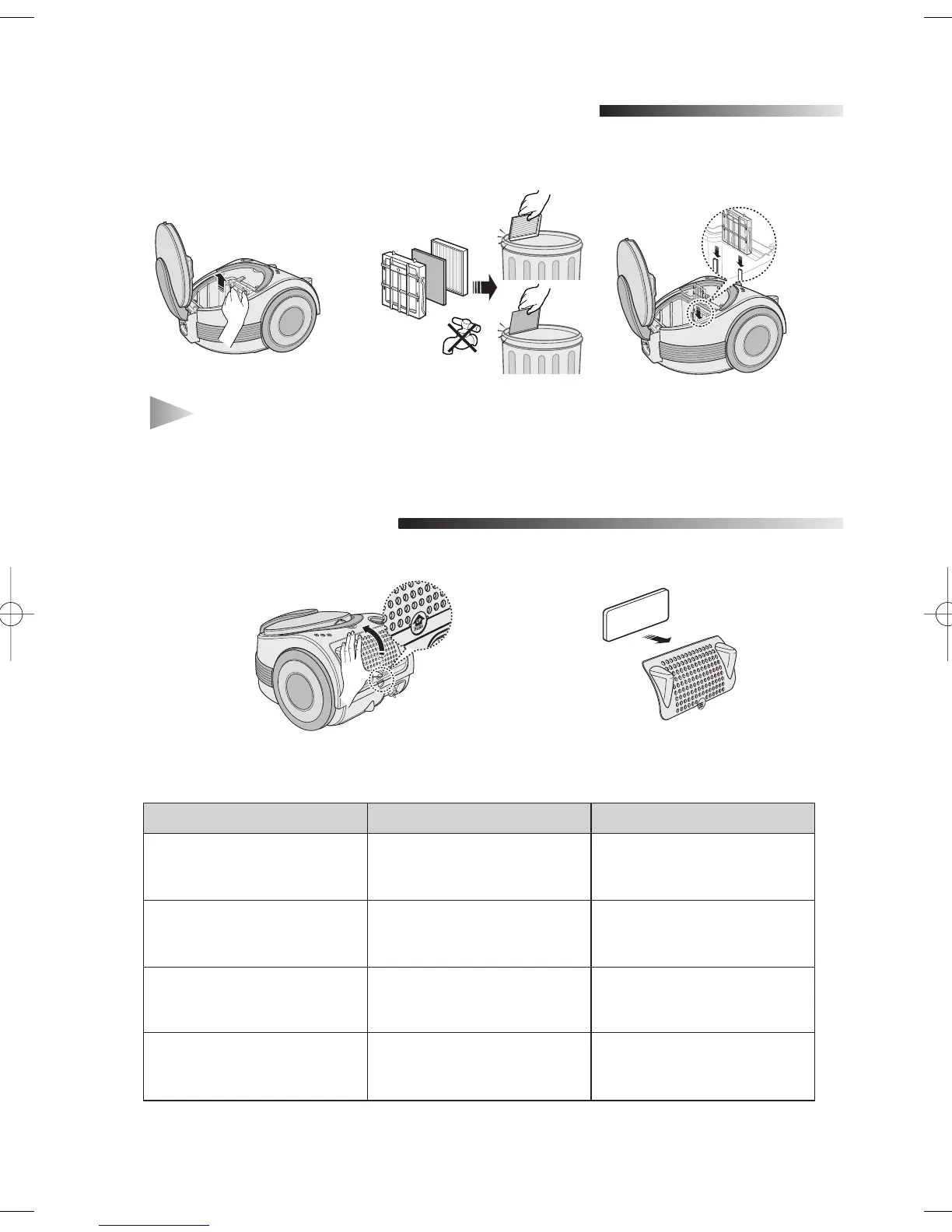
CLEANING THE INLET FILTER
7
OUTLET FILTER
1 2 3
PROBLEM CAUSE REMEDY 0
- IF YOU HAVE A PROBLEM
Motor does not start.
No power supply.
Thermal cut-out.
Check cable, plug and socket.
Leave to cool, check filters
empty/wash as required.
Suction force is gradually
decreasing.
Nozzle, suction hose or tube
is blocked.
Remove the object and
empty/wash cassette filter as
required.
Cord does not rewind fully. Check that the cord is not
twisted or wound unevenly.
Pull the cord out 2-3m and
push down the cord rewind
button.
Vacuum cleaner does not
pick up dirt.
Crack or hole in hose.
Blockage.
Check hose and replace if
required, Check filters and
empty/wash if required.
NOTE
:
Do not allow the filter to become clogged as this may cause power reduc-
tion or may damage the motor.
12
- This filter is not washable. In case of HEPA filter, it is recommended that you replace
it regularly.
DJ68-00178P(EN-2)-0.4 2/21/06 6:54 PM Page 7


 To Next Page